
collection_picker 0.0.2  collection_picker: ^0.0.2 copied to clipboard
A Package contains selectable listview and gridview widgets with support for single, multi, and radio picker types. The data is generic so it can be used using any data. Help you to create a filters, [...]
Overview #
This package contains a set of reusable widget. Provides common widgets that can help to your screen.
Getting Started #
Add dependency to your pubspec.yaml
dependencies:
  collection_picker : "^version"
Usage #
We use sample data with model data and lists as real to make it easier for you to understand
The sample model data given is :
class CityModel {
  String province;
  String city;

  CityModel(this.province, this.city);
}
And the dummy data list is :
List<CityModel> dataCity = [
  CityModel('Jakarta', 'SCBD'),
  CityModel('Jakarta', 'Tebet'),
  CityModel('Jakarta', 'Gambir'),
  CityModel('Lampung', 'Bandar Lampung'),
  CityModel('Lampung', 'Pringsewu'),
  CityModel('Bandung', 'Setrasari'),
  CityModel('Bandung', 'Gedebage'),
  CityModel('Bandung', 'Cihanjuang'),
  CityModel('Yogyakarta', 'Bantul'),
  CityModel('Yogyakarta', 'Sleman'),
];
ListViewPicker #

ListViewPicker<CityModel>(
  type: PickerType.single,
  shrinkWrap: true,
  physics: const NeverScrollableScrollPhysics(),
  separator: const Divider(thickness: 1, height: 16),
  initialValue: dataCity.first,
  data: dataCity,
  unavailableDataIndex: [2, 4],
  itemBuilder: (PickerWrapper<CityModel> item) {
    return SizedBox(
      height: 20,
      child: Row(
        mainAxisAlignment: MainAxisAlignment.spaceBetween,
        children: [
          Text('${item.data?.city}'),
          (item.isSelected)
              ? const Icon(Icons.check)
              : const SizedBox.shrink()
        ],
      ),
    );
  },
  onChanged: (context, index, selectedItem, selectedListItem) {
    // when the type is single/radio, you should use this
    debugPrint('Selected item = ${selectedItem.city}');

    /// when the type is multiple, you should use this
    debugPrint('All selected item = ${selectedListItem.map((e) => e?.city)}');
  },
)
GridViewPicker #
Actually is same as Picker ListView but it is serves as GridView.
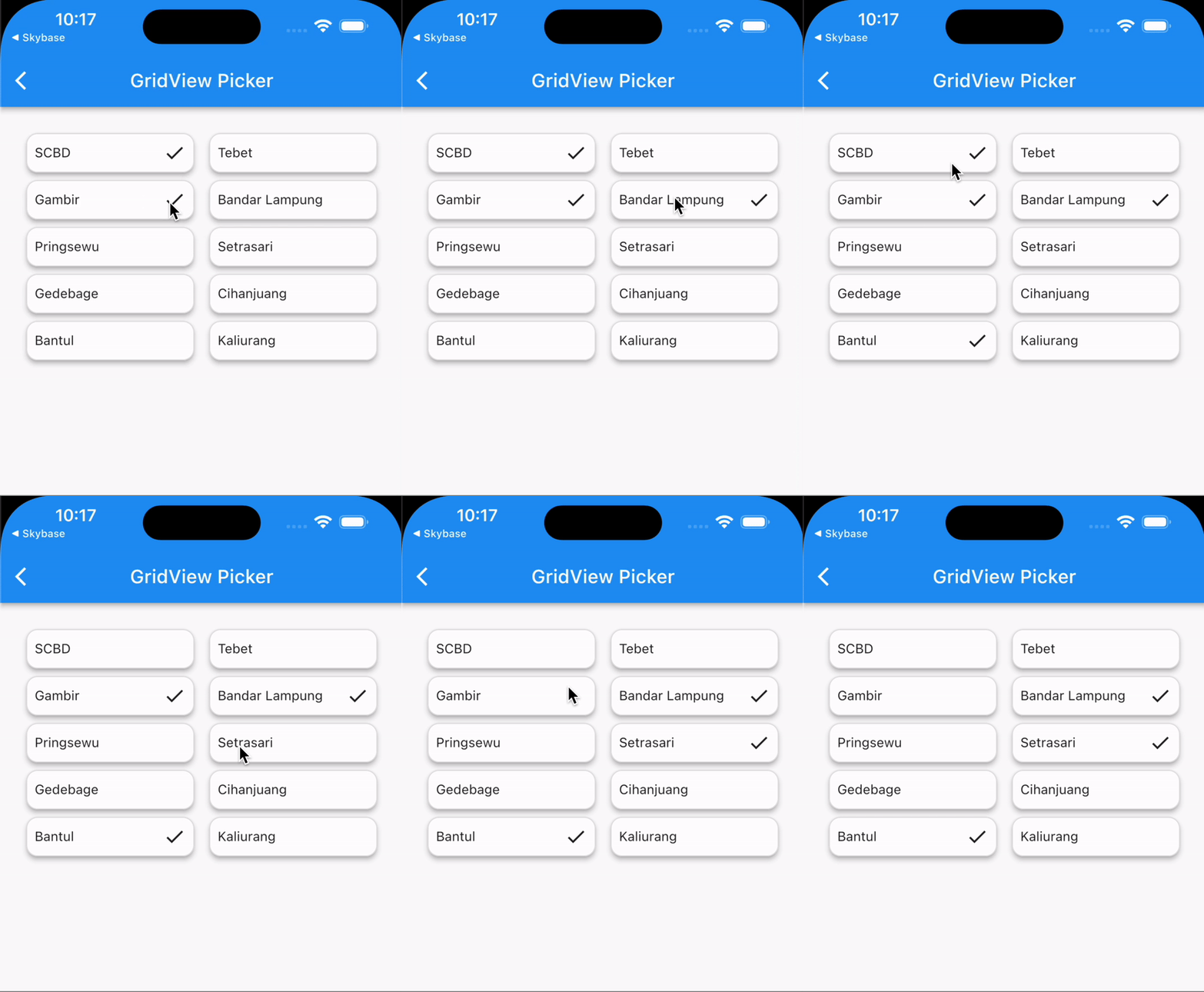
GridViewPicker(
  type: PickerType.multiple,
  shrinkWrap: true,
  initialValue: dataCity.first,
  data: dataCity,
  itemBuilder: (PickerWrapper<CityModel> item) {
    return Container(
      padding: const EdgeInsets.all(8),
      decoration: BoxDecoration(
        borderRadius: BorderRadius.circular(12),
        border: Border.all(color: Colors.grey.shade300),
      ),
      child: Row(
        mainAxisAlignment: MainAxisAlignment.spaceBetween,
        children: [
          Text('${item.data?.city}'),
          (item.isSelected)
              ? const Icon(Icons.check)
              : const SizedBox.shrink()
        ],
      ),
    );
  },
  onChanged: (context, index, selectedItem, selectedListItem) {
    // when the type is single/radio, you should use this
    debugPrint('selected item = ${selectedItem?.city}');

    /// when the type is multiple, you should use this
    debugPrint('All selected item = ${selectedListItem.map((e) => e?.city)}');
  },
)
Additional information #
Thank you. Hope this package can help you. Happy coding..
Metadata
Publisher
unverified uploader
Weekly Downloads
Metadata
A Package contains selectable listview and gridview widgets with support for single, multi, and radio picker types. The data is generic so it can be used using any data. Help you to create a filters, multi choices and etc.
Repository (GitHub)
View/report issues
License
 unknown (license)

