
boldify_icon 1.0.0  boldify_icon: ^1.0.0 copied to clipboard
 mokaily.com
Drop-in Flutter Icon widget with fontWeight support — make any icon bold.
BoldifyIcon #
BoldifyIcon is a drop-in replacement for Flutter’s built-in [Icon] widget,
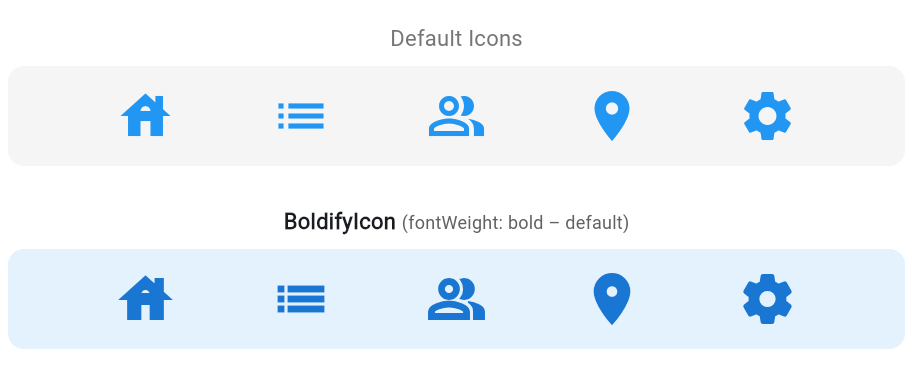
with one key extra feature: fontWeight — allowing you to make any font-based icon bold.
If you’ve ever wanted your icons to match bold text, stand out more in the UI,
or simply have a stronger visual presence, BoldifyIcon makes it easy.
✨ Key Feature #
fontWeight– Set a heavier font weight to make the icon look bold.
Works with any font-based icon, including Flutter’s default Material icons and variable fonts.
Example:FontWeight.normal→ standard stroke thickness.FontWeight.boldorFontWeight.w900→ bold, strong-looking icons.
📦 Installation #
Add to your pubspec.yaml:
dependencies:
  boldify_icon:
🔧 Parameters #
BoldifyIcon accepts all the same parameters as Flutter’s built-in Icon widget,
plus the new 🚀 fontWeight property for controlling icon boldness.
| Parameter | Type | Description |
|---|---|---|
icon |
IconData? |
The icon to display. |
size |
double? |
The size of the icon in logical pixels. |
fontWeight 🔥 |
FontWeight? |
✨ Extra parameter — controls stroke thickness; heavier values make the icon bold. |
fill |
double? |
For variable fonts: 0.0 = outline, 1.0 = filled. |
weight |
double? |
Variable font stroke weight. |
grade |
double? |
Fine-tunes stroke thickness for variable fonts. |
opticalSize |
double? |
Optical size adjustment for variable fonts. |
color |
Color? |
Icon color. |
shadows |
List<Shadow>? |
Shadows behind the icon. |
blendMode |
BlendMode? |
Blend mode for custom rendering effects. |
semanticLabel |
String? |
Screen reader label. |
textDirection |
TextDirection? |
Text direction (LTR or RTL). |
applyTextScaling |
bool? |
Scale icon with text size. |
💡 Why use BoldifyIcon instead of Icon? #
With Flutter’s default [Icon] widget, you can’t change the font weight —
all icons render at the font’s default stroke thickness.
BoldifyIcon unlocks that control, letting you:
- Match icons with bold text for visual harmony in your UI.
- Increase icon visibility for better accessibility and emphasis.
- Create a stronger, bolder look without replacing assets or using custom icon sets.
Donations #
We need your support. Projects like this can not be successful without support from the community. If you find this project useful, and would like to support further development and ongoing maintenance, please consider donating.


Sponsors #
Want to become a sponsor? [Become a Sponsor]

#
#
#
Metadata
Publisher
Weekly Downloads
Metadata
Drop-in Flutter Icon widget with fontWeight support — make any icon bold.
Homepage
Repository (GitHub)
View/report issues
Documentation
License
 MIT (license)

