
better_pattern_lock 1.0.1  better_pattern_lock: ^1.0.1 copied to clipboard
 alt-point.com
A pattern lock for Flutter. Just like in your old Samsung device, but this one is much more customizable.
Better Pattern Lock #
Well, 'better' is a subjective word. This one allows for a lot more customization.
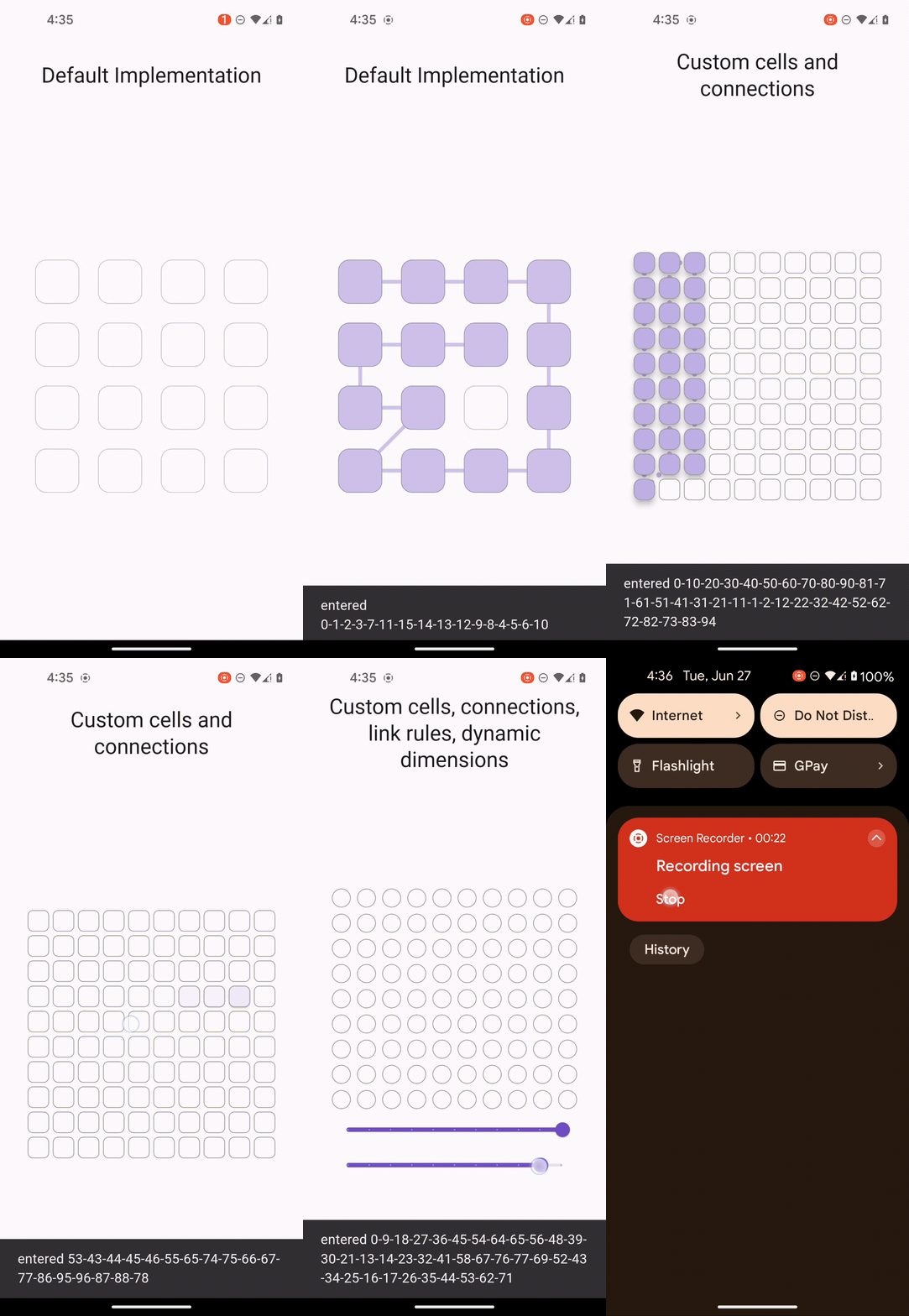
It's a pattern lock #
Just like in your old Samsung device but this one's with Flutter and is much more customizable.
You can hide content behind a visual password. You can use it as a kind of spoiler alert or a content gate. You can use it in a login flow, etc.
Usage #
It's a widget that sizes itself to the smallest
of given constraints (like BoxFit.contain).
This means you can also use it in scroll views.
YourScreen(
  child: PatternLock(
    width: 4,
    height: 4,
    onEntered: (pattern) {},
  ),
);
Customization #
All possible customization parameters are listed below:
PatternLock(
  width: x, //your width
  height: y, // your height
  onEntered: (pattern) {
    ScaffoldMessenger.of(context)
        ..removeCurrentSnackBar()
        ..showSnackBar(
           SnackBar(
             content: Text(
               'entered ${pattern.join('-')}',
             ),
           ),
        );
  },
  onUpdate: (pattern) {},
  enableFeedback: true,
  animationCurve: Curves.bounceInOut,
  linkageConfig: PatternLockLinkageConfig.lengthAndDistance(10, 3),
  linkPainter: const PatternLockLinkGradientPainter(
    width: 10.0,
    gradient: SweepGradient(
      center: FractionalOffset.center,
      colors: <Color>[
        Color(0xFF4285F4),
        Color(0xFF34A853),
        Color(0xFFFBBC05),
        Color(0xFFEA4335),
        Color(0xFF4285F4),
      ],
      stops: <double>[0.0, 0.25, 0.5, 0.75, 1.0],
    ),
    isGlobal: true,
  ),
  drawLineToPointer: true,
  cellBuilder: (ctx, ind, anim) {
    return Material(
      type: MaterialType.circle,
      color: Colors.transparent,
      elevation: 32.0 * anim,
      animationDuration: Duration.zero,
      child: Container(
        decoration: BoxDecoration(
          shape: BoxShape.circle,
          color: Color.lerp(
            Theme.of(ctx).colorScheme.background,
            Color(colors[ind]), // your color to lerp to
            anim,
          )!,
          border: Border.all(
            width: 1.0,
            color: Colors.grey,
            strokeAlign: -1.0,
          ),
        ),
      ),
    );
  },
  cellActiveArea: const PatternLockCellActiveArea(
    shape: PatternLockCellAreaShape.circle,
    units: PatternLockCellAreaUnits.relative,
    dimension: .75,
  ),
  animationDuration: const Duration(milliseconds: 350),
);
Docs within the library provide concrete meanings for all of these.
Metadata
Publisher
Weekly Downloads
Metadata
A pattern lock for Flutter. Just like in your old Samsung device, but this one is much more customizable.
Repository (GitHub)
View/report issues
Documentation
License
 Apache-2.0 (license)

