
background_fetch 1.0.0-nullsafety.2  background_fetch: ^1.0.0-nullsafety.2 copied to clipboard
 transistorsoft.com
Periodic callbacks in the background for both iOS and Android. Includes Android Headless implementation.
CHANGELOG #
1.0.0-nullsafety.2 - 2021-04-01 #
- [Fixed][Android] Flutter 2 broke Android Headless Task with Null-pointer exception.
1.0.0-nullsafety.1 - 2021-02-18 #
- [Fixed][Android] Fix
java.lang.NullPointerException: Attempt to invoke virtual method 'java.lang.String com.transistorsoft.tsbackgroundfetch.BGTask.getTaskId()' on a null object reference
1.0.0-nullsafety.0 - 2021-02-15 #
- [Changed] Implement null-safety (Thanks to @GinoTerlouw).
0.7.0 - 2021-02-11 #
-
[Added][iOS] Implement two new iOS options for
BackgroundFetch.scheduleTask:bool requiresNetworkConnectivitybool requiresCharging(previously Android-only).
-
[Changed][iOS] Migrate
TSBackgroundFetch.frameworkto new.xcframeworkfor MacCatalyst support with new Apple silcon.
⚠️ Breaking Change: Requires cocoapods >= 1.10+. #
iOS' new .xcframework requires cocoapods >= 1.10+:
$ pod --version
// if < 1.10.0
$ sudo gem install cocoapods
- [Added] task-timeout callback.
BackgroundFetch.configurenow accepts a 3rd argumentonTimeoutcallback. This callback will be executed when the operating system has signalled your task has expired before your task has calledBackgroundFetch.finish(taskId). You must stop whatever you're task is doing and executeBackgroundFetch.finish(taskId)immediately.
BackgroundFetch.configure(BackgroundFetchConfig(
  minimumFetchInterval: 15
), (String taskId) {  // <-- task callback.
  print("[BackgroundFetch] taskId: $taskId");
  BackgroundFetch.finish(taskId);
}, (String taskId) {  // <-- NEW:  task-timeout callback.
  // This task has exceeded its allowed running-time.  You must stop what you're doing immediately finish(taskId)
  print("[BackgroundFetch] TIMEOUT taskId: $taskId");
  BackgroundFetch.finish(taskId);
});
⚠️ [Android] Breaking Change For Android Headless-task #
- Since the registered Android headless-task (
BackgroundFetch.registerHeadlessTask) can only receive a single parameter, your headless-task will now receive aHeadlessTask taskinstance rather thanString taskIdin order to differentiate task-timeout events.
OLD
void myBackgroundFetchHeadlessTask(String taskId) async { // <-- OLD:  String taskId
  print("[BackgroundFetch] Headless task: $taskId");
  BackgroundFetch.finish(taskId);
}
BackgroundFetch.registerHeadlessTask(myBackgroundFetchHeadlessTask);
NEW
void myBackgroundFetchHeadlessTask(HeadlessTask task) async { // <-- NEW:  HeadlessTask now provided.
  String taskId = task.taskId;    // <-- NEW:  Get taskId from HeadlessTask
  bool isTimeout = task.timeout;  // <-- NEW:  true if this task has timed-out.
  if (isTimeout) {
    // This task has exceeded its allowed running-time.  You must stop what you're doing immediately finish(taskId)
    print("[BackgroundFetch] Headless TIMEOUT: $taskId");
    BackgroundFetch.finish(taskId);
    return;
  }
  print("[BackgroundFetch] Headless task: $taskId");
  BackgroundFetch.finish(taskId);
}
BackgroundFetch.registerHeadlessTask(myBackgroundFetchHeadlessTask);
0.6.0 - 2020-06-11 #
- [Fixed][Android]
com.android.tools.build:gradle:4.0.0no longer allows "direct local aar dependencies". The Android Setup now requires a custommaven urlto be added to your app's rootandroid/build.gradle:
allprojects {
    repositories {
        google()
        jcenter()
+       maven {
+           // [required] background_fetch
+           url "${project(':background_fetch').projectDir}/libs"
+       }
    }
}
0.5.6 #
- [Fixed][Android] using
forceAlarmManager: truefails to restart fetch events after reboot. - [Fixed] Android check
wakeLock.isHeld()before executingwakeLock.release().
0.5.5 - 2020-03-24 #
- [Fixed] [iOS] bug with
startplugin after executingstop.
0.5.4 - 2020-02-22 #
- [Fixed] [Android] Add
@Keepannotation toHeadlessTask.javato prevent minifying this classs in release builds since the SDK uses reflection to find this class.
0.5.3 - 2020-02-21 #
- [Fixed] [Android]
stopOnTerminatenot cancelling scheduled job / Alarm when fired task fired after terminate.
0.5.2 - 2020-02-20 #
- [Android] Fix Android NPE in
hasTaskIdfor case where plugin is installed first time in had previous version of plugin
0.5.1 - 2020-02-19 #
Minor Breaking Change for iOS Setup #
- [iOS] It's no longer necessary to
registerBGProcessingTaskinAppDelegate.mfor tasks registered for use with#scheduleTask. The SDK now reads the App.plistand automatically registers those tasks found in "Permitted background task scheduler identifiers". Remove all code in yourAppDelegate.mthat referencesTSBackgroundFetch.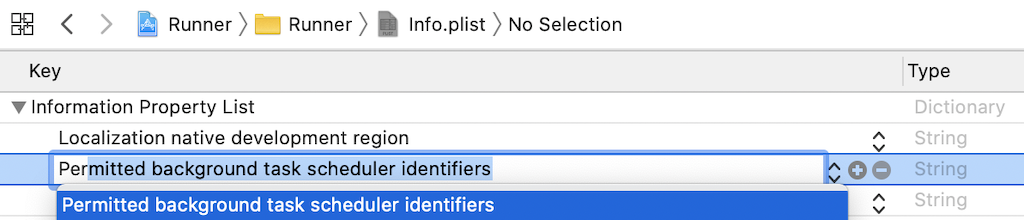
0.5.0 - 2020-02-03 #
- [Added] [Android] New option
forceAlarmManagerfor bypassingJobSchedulermechanism in favour ofAlarmManagerfor more precise scheduling task execution. - [Changed] Migrate iOS deprecated "background-fetch" API to new BGTaskScheduler. See new required steps in iOS Setup.
- [Added] Added new
BackgroundFetch.scheduleTaskmethod for scheduling custom "onehot" and periodic tasks in addition to the default fetch-task.
BackgroundFetch.configure(BackgroundFetchConfig(
  minimumFetchInterval: 15,
  stopOnTerminate: false
), (String taskId) {  // <-- [NEW] taskId provided to Callback
  print("[BackgroundFetch] taskId: $taskId");
  switch(taskId) {
    case 'foo':
      // Handle scheduleTask 'foo'
      break;
    default:
      // Handle default fetch event.
      break;
  }
  BackgroundFetch.finish(taskId);  // <-- [NEW] Provided taskId to #finish method.
});

// This event will end up in Callback provided to #configure above.
BackgroundFetch.scheduleTask(TaskConfig(
  taskId: 'foo',  //<-- required
  delay: 60000,
  periodic: false
));
Breaking Changes #
- With the introduction of ability to execute custom tasks via
#scheduleTask, all tasks are executed in the Callback provided to#configure. As a result, this Callback is now provided an argumentString taskId. ThistaskIdmust now be provided to the#finishmethod, so that the SDK knows which task is being#finished.
BackgroundFetch.configure(BackgroundFetchConfig(
  minimumFetchInterval: 15,
  stopOnTerminate: false
), (String taskId) {  // <-- [NEW] taskId provided to Callback
  print("[BackgroundFetch] taskId: $taskId");
  BackgroundFetch.finish(taskId);  // <-- [NEW] Provided taskId to #finish method.
});
And with the Headless Task, as well:
/// This "Headless Task" is run when app is terminated.
void backgroundFetchHeadlessTask(String taskId) async {  // <-- 1.  Headless task receives String taskId
  print("[BackgroundFetch] Headless event received: $taskId");

  BackgroundFetch.finish(taskId);  // <-- 2.  #finish with taskId here as well.
}

void main() {
  // Enable integration testing with the Flutter Driver extension.
  // See https://flutter.io/testing/ for more info.
  runApp(new MyApp());

  // Register to receive BackgroundFetch events after app is terminated.
  // Requires {stopOnTerminate: false, enableHeadless: true}
  BackgroundFetch.registerHeadlessTask(backgroundFetchHeadlessTask);
}
0.4.0 - 2019-12-17 #
- [Changed] Upgrade to new Flutter Plugin API "V2". Requires flutter sdk version 1.12. See Upgrading pre 1.12 Android Projects
0.3.2 - 2019-10-06 #
- [Fixed] Resolve Android StrictMode violations; typically from accessing SharedPreferences on main-thread.
0.3.1 - 2019-09-20 #
- Fix error
FlutterMain.findBundleAppPath(). The plugin modified a deprecated API for flutter 1.9.1, breaking those on previous flutter versions. Will use deprecated API for now.
0.3.0 - 2019-09-18 #
- Implement Android
JobInfoconstraints. - Fix
NSLogwarnings casting tolong - Default
startOnBoot: truein example
0.2.0 - 2019-03-15 #
- Use AndroidX.
0.1.2 - 2019-02-28 #
- Fixed bug with setting
jobServiceClassusing a reference toHeadlessJobService.class. This crashes devices < api 21, since Android'sJobServicewasn't available until then. Simply provide the class name as aString.
0.1.1 - 2018-11-21 #
- Fixed issue with Android headless config.
0.1.0 #
- First working implementation
0.0.1 #
- First working implementation
Metadata
1.25k
likes
0
points
77.4k
downloads
Publisher
Weekly Downloads
Metadata
Periodic callbacks in the background for both iOS and Android. Includes Android Headless implementation.
Repository (GitHub)
View/report issues
License
 unknown (license)
Dependencies
More
Packages that depend on background_fetch
Packages that implement background_fetch

