
anaglyph 0.0.1-alpha.1  anaglyph: ^0.0.1-alpha.1 copied to clipboard
A Flutter package made to help you create 3D anaglyph apps
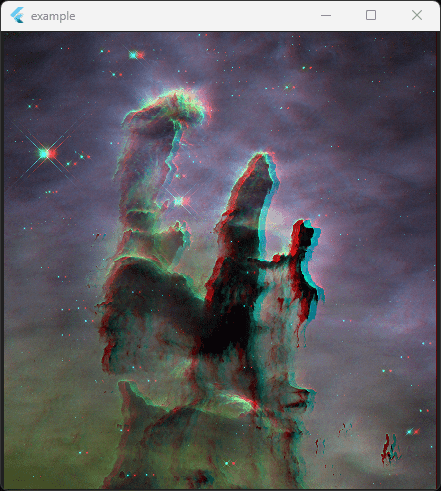
 The nebula image's credit: NASA, ESA, CSA, and STScI
Anaglyph Package #
Create awesome 3D Flutter applications using the Anaglyph package!
It supports all platforms and works on any kind of color display.
You can use this package to convert normal 2D widgets to 3D widgets, the 3D effect can be felt using anaglyph glasses. It's a well-priced glass, but you don't even have to buy an anaglyph glass, you can simply create one!
What is anaglyph? #
Anaglyph 3D is the stereoscopic 3D effect achieved by means of encoding each eye's image using filters of different (usually chromatically opposite) colors, typically red and cyan. Anaglyph 3D images contain two differently filtered colored images, one for each eye. When viewed through the "color-coded" "anaglyph glasses", each of the two images reaches the eye it's intended for, revealing an integrated stereoscopic image. The visual cortex of the brain fuses this into the perception of a three-dimensional scene or composition.
In other words, the anaglyph method is an easy and low-cost way to create 3D images. It doesn't require a special type of display! You can use any kind of color screen to view anaglyph images. This is a perfect option for those looking for a simple, low-cost solution to produce 3D images.
Features #
-
Turn almost any widget into a 3D anaglyph version
-
Ability to change the 3D depth
-
Changes can be applied with a custom animation
Caution #
This package is currently in the alpha channel and it's not ready for production use.
Don't use it in serious projects until the stable version comes out.
I'm hardly trying to make it stable as soon as possible.
This package usually has the best results on images.
Quick Start Guide #
-
Use
AnaglyphViewto create a 3D appearance. -
Use
AnaglyphStyleto set anaglyph style for subtrees. -
Use
AnimatedAnaglyphStyleto apply anaglyph style changes with a custom animation.
Basic Usage #
You can use any other widget instead of Image.network, but those widgets that contain no color but black, can't become 3D!
AnaglyphView(
    depth: -7,
    child: Image.network(
        'https://www.nasa.gov/sites/default/files/thumbnails/image/pillars_of_creation.jpg',
    ),
),
#
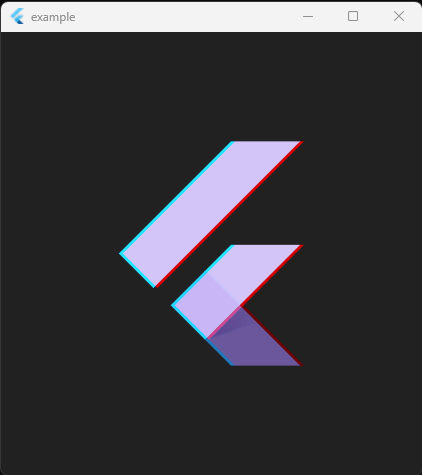
If you want to wrap the widgets that have a transparent background (e.g., Text, Icon, FlutterLogo) in AnaglyphView, make sure clipOuters is false :
AnaglyphView(
    depth: -4,
    clipOuters: false,
    child: FlutterLogo(size: 250),
),
Donation #
If you like this package, I'll be happy to receive your generous donations!😃

Metadata
Publisher
unverified uploader
Weekly Downloads
Metadata
A Flutter package made to help you create 3D anaglyph apps
Repository (GitHub)
View/report issues
Funding
Consider supporting this project:
www.buymeacoffee.com
License
 unknown (license)

