
airplay_button 0.2.1  airplay_button: ^0.2.1 copied to clipboard
A Flutter plugin that displays a native iOS AirPlay route picker button for casting audio to AirPlay devices.
Airplay Button #
A simple Flutter widget that displays a native iOS AirPlay route picker button for casting audio from your app to available AirPlay devices. On iOS, this embeds the system AVRoutePickerView for seamless audio routing.
On non-iOS platforms, the widget renders nothing.
Ideal for apps that use AVPlayer-based audio (e.g., via just_audio) and want to offer users an intuitive way to cast audio via AirPlay.
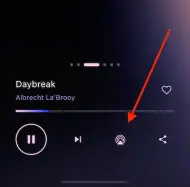
This is how the AirPlay button appears on iOS:

Usage #
Simply use the AirPlayButton widget in your code to display the button.
You can pass it a custom size and colors—parameters are all optional.
import 'package:airplay_button/air_play_button.dart';

AirPlayButton(
  size: 46, // default
  tintColor: const Color(0xFF007AFF), // Apple's standard light blue
  activeTintColor: const Color(0xFF0040DD), // deeper blue to indicate active state
)
Credits #
Inspired by flutter_to_airplay
Metadata

Publisher
unverified uploader
Weekly Downloads
Metadata
A Flutter plugin that displays a native iOS AirPlay route picker button for casting audio to AirPlay devices.
Repository (GitHub)
View/report issues
Topics
Documentation
License
 MIT (license)
Dependencies
More
Packages that depend on airplay_button
Packages that implement airplay_button

