
aatex_board 0.0.4+2  aatex_board: ^0.0.4+2 copied to clipboard
 awaik.pro
AATex kanban board.
AATex Kanban Board #
AATex Kanban Board is a fork of the AppFlowy Kanban Board, an open-source, flexible, and modern kanban board implementation.
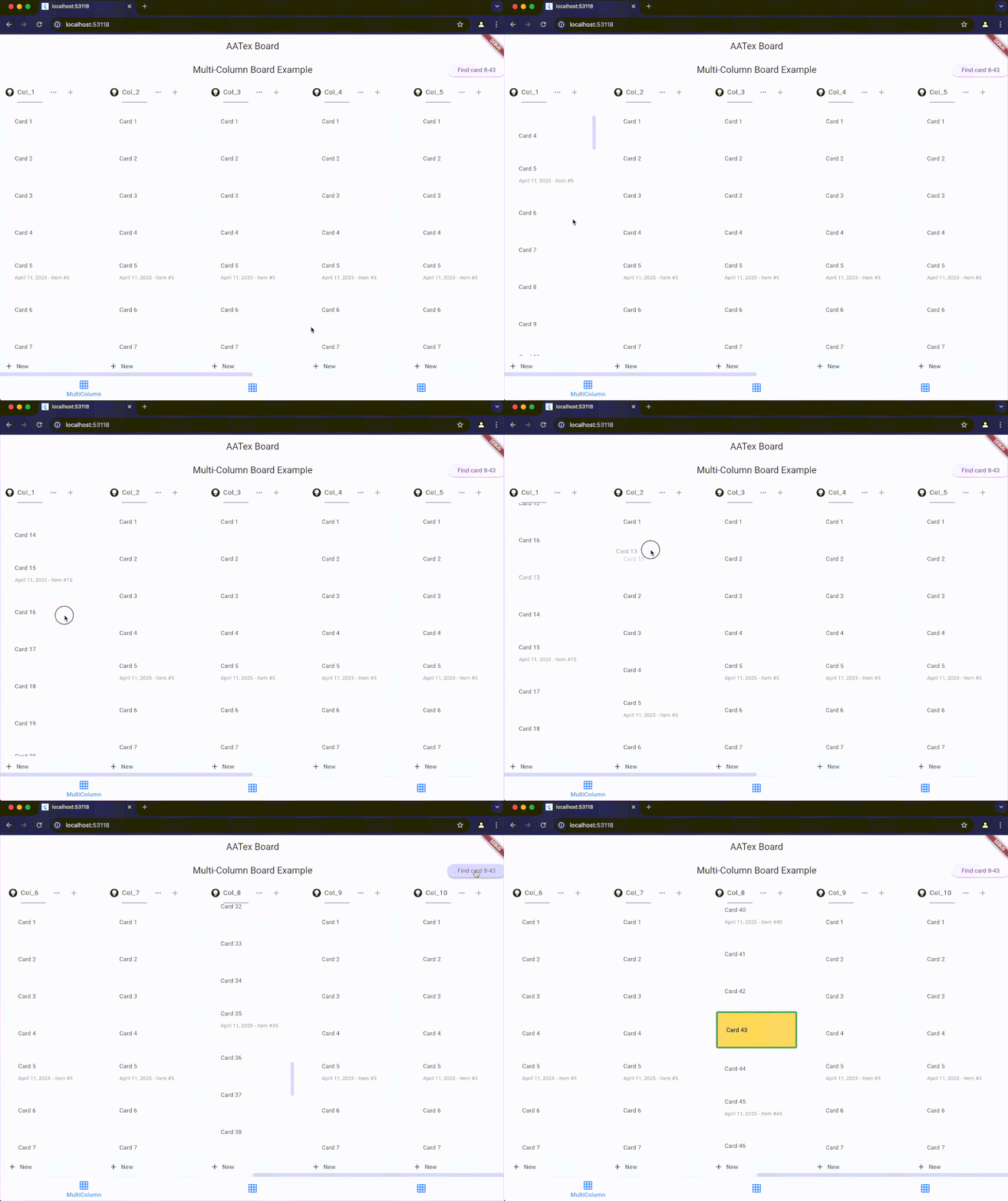
Features #
- Drag and drop cards within and between columns
- Customizable card and column appearance
- Cross-column animations with configurable duration
- Support for both vertical and horizontal layouts
- Active item highlighting
- Programmatic scrolling to specific items
- Support for phantom items during drag operations
- Auto-scrolling during drag operations
Installation #
Add this to your package's pubspec.yaml file:
dependencies:
  aatex_board: ^latest_version
Then run:
flutter pub get
Usage #
Basic Setup #
import 'package:aatex_board/aatex_board.dart';
import 'package:flutter/material.dart';

// Create a controller
final AATexBoardController controller = AATexBoardController(
  onMoveGroup: (fromGroupId, fromIndex, toGroupId, toIndex) {
    print('Column moved from $fromIndex to $toIndex');
  },
  onMoveGroupItem: <T>(groupId, fromIndex, toIndex, item) {
    print('Item moved within column $groupId from $fromIndex to $toIndex');
  },
  onMoveGroupItemToGroup: <T>(fromGroupId, fromIndex, toGroupId, toIndex, T item) {
    print('Item moved from column $fromGroupId to column $toGroupId');
  },
  // Enable cross-column animations with 500ms duration (default)
  crossGroupAnimationDuration: const Duration(milliseconds: 500),
  enableCrossGroupAnimation: true,
);

// Create board scroll controller
final AATexBoardScrollController boardController = AATexBoardScrollController();

// Add columns (groups) and items
final group = AATexGroupData(
  id: "column_1",
  name: "To Do",
  items: [
    YourCustomItem(id: "item_1", text: "Task 1"),
    YourCustomItem(id: "item_2", text: "Task 2"),
  ]
);
controller.addGroup(group);

// Build the board
Widget build(BuildContext context) {
  return AATexBoard(
    controller: controller,
    boardScrollController: boardController,
    cardBuilder: (context, group, groupItem) {
      return AATexGroupCard(
        key: ValueKey(groupItem.id),
        child: YourCustomCardWidget(item: groupItem),
      );
    },
    headerBuilder: (context, columnData) {
      return AATexGroupHeader(
        title: Text(columnData.headerData.groupName),
        height: 50,
      );
    },
    footerBuilder: (context, columnData) {
      return AATexGroupFooter(
        icon: const Icon(Icons.add),
        title: const Text('Add new'),
        height: 50,
      );
    },
    groupConstraints: const BoxConstraints.tightFor(width: 300),
    config: AATexBoardConfig.config(),
  );
}
Custom Items #
Create your own item classes that implement AATexGroupItem:
class YourCustomItem extends AATexGroupItem {
  final String _id;
  final String text;

  YourCustomItem({
    required String id,
    required this.text,
  }) : _id = id;

  @override
  String get id => _id;

  // Enable cross-group animation for this item (optional)
  @override
  bool get animateOnGroupChange => true;

  // Custom animation duration for this specific item (optional)
  @override
  Duration? get crossGroupAnimationDuration => const Duration(milliseconds: 300);
}
For items that can be highlighted/activated, implement the ActiveableGroupItem interface:
class ActiveableItem extends AATexGroupItem implements ActiveableGroupItem {
  final String _id;
  final String text;
  final bool _isActive;
  final Color? _highlightColor;
  final BorderSide? _highlightBorder;

  ActiveableItem({
    required String id,
    required this.text,
    bool isActive = false,
    Color? highlightColor,
    BorderSide? highlightBorder,
  }) : _id = id,
       _isActive = isActive,
       _highlightColor = highlightColor,
       _highlightBorder = highlightBorder;

  @override
  String get id => _id;

  @override
  bool get isActive => _isActive;

  @override
  Color? get highlightColor => _highlightColor;

  @override
  BorderSide? get highlightBorder => _highlightBorder;

  @override
  ActiveableItem copyWith({bool? isActive, Color? highlightColor, BorderSide? highlightBorder}) {
    return ActiveableItem(
      id: _id,
      text: text,
      isActive: isActive ?? _isActive,
      highlightColor: highlightColor ?? _highlightColor,
      highlightBorder: highlightBorder ?? _highlightBorder,
    );
  }
}
Key Components #
AATexBoardController #
Controls the entire board and provides methods to manage columns and items.
Properties:
crossGroupAnimationDuration: Duration for cross-column animations (default: 500ms)enableCrossGroupAnimation: Whether to enable animated transitions (default: true)
Methods:
-
Column Management:
addGroup(AATexGroupData): Add a columninsertGroup(int index, AATexGroupData): Insert a column at specific indexremoveGroup(String groupId): Remove a columnmoveGroup(int fromIndex, int toIndex): Move a columnclear(): Remove all columnsgetGroupController(String groupId): Get controller for specific column
-
Item Management:
addGroupItem(String groupId, AATexGroupItem item): Add item to a columninsertGroupItem(String groupId, int index, AATexGroupItem item): Insert item at specific positionremoveGroupItem(String groupId, String itemId): Remove itemmoveGroupItem(String groupId, int fromIndex, int toIndex, T item): Move item within columnupdateGroupItem(String groupId, AATexGroupItem item): Update or insert item
-
Navigation and Highlighting:
displayCard({required String groupId, required String itemId, ...}): Highlight a card and scroll to it
AATexGroupController #
Controls a specific column, accessed via boardController.getGroupController(groupId).
Methods:
updateGroupName(String newName): Change column nameremoveAt(int index): Remove item at indexmove(int fromIndex, int toIndex): Move item within columninsert(int index, AATexGroupItem item): Insert item at indexadd(AATexGroupItem item): Add item to end of columnreplace(int index, AATexGroupItem newItem): Replace item at indexenableDragging(bool isEnable): Enable/disable dragging for all items in column
AATexBoardScrollController #
Controls scrolling the board to specific positions.
Methods:
scrollToGroup(String groupId, {completed}): Scroll horizontally to show a specific columnscrollToItem(String groupId, int itemIndex, {completed}): Scroll vertically to show a specific itemscrollToBottom(String groupId, {completed}): Scroll to bottom of a column
Configuration #
Customize the board appearance with AATexBoardConfig:
final config = AATexBoardConfig.config(
  groupBackgroundColor: Colors.grey[100],
  stretchGroupHeight: false,
  groupBodyPadding: const EdgeInsets.all(8.0),
  groupHeaderHeight: 50.0,
  groupFooterHeight: 40.0,
);
Events #
Three main callback events are available when creating the controller:
onMoveGroup: Called when column position changesonMoveGroupItem: Called when item moves within a columnonMoveGroupItemToGroup: Called when item moves between columns
Animation Settings #
The Kanban board provides smooth animations for cross-column movements:
// Board-level animation settings
final controller = AATexBoardController(
  crossGroupAnimationDuration: const Duration(milliseconds: 500), // Default
  enableCrossGroupAnimation: true, // Default
);

// Item-level animation settings (override board defaults)
class CustomItem extends AATexGroupItem {
  // ...

  @override
  bool get animateOnGroupChange => true;  // Whether this item should animate

  @override
  Duration? get crossGroupAnimationDuration => const Duration(milliseconds: 300);  // Custom duration
}
Advanced Usage: Working with Callbacks #
A significant advantage of AATeX Kanban Board is the ability to receive the complete item object in callback methods, allowing you to access all object properties directly.
Passing Objects to Callbacks #
When items are moved, you receive the actual item object in callbacks, not just its ID:
final controller = AATexBoardController(
  onMoveGroupItem: <CustomItem>(groupId, fromIndex, toIndex, item) {
    // Access the full item object and its properties
    print('Item ${item.id} with title "${item.title}" moved within column $groupId');

    // Use item properties to update your data model
    updateItemPosition(item.id, groupId, toIndex);

    // Perform conditional logic based on item properties
    if (item.isPriority) {
      notifyPriorityItemMoved(item);
    }
  },

  onMoveGroupItemToGroup: <CustomItem>(fromGroupId, fromIndex, toGroupId, toIndex, item) {
    // The full item object is available with all its properties
    print('Item ${item.id} moved from $fromGroupId to $toGroupId');

    // This simplifies logic for large boards with many items
    updateItemColumn(item.id, toGroupId);

    // You can directly access all custom properties from your item class
    if (item.dueDate != null && item.assignee != null) {
      sendNotification(item.assignee, 'Task moved to ${getColumnName(toGroupId)}');
    }
  }
);
Benefits for Large Boards #
This approach significantly simplifies code for large boards:
- Direct Access to Properties: No need to lookup items by ID after movement
- Type Safety: Generic type parameters ensure you get the correct item type
- Reduced Data Lookups: All item data is immediately available in the callback
- Simplified State Management: Update your state directly with the provided item
Example with Custom Item Class #
class TaskItem extends AATexGroupItem {
  final String _id;
  final String title;
  final String description;
  final DateTime? dueDate;
  final String? assignee;
  final bool isPriority;

  TaskItem({
    required String id,
    required this.title,
    this.description = '',
    this.dueDate,
    this.assignee,
    this.isPriority = false,
  }) : _id = id;

  @override
  String get id => _id;
}

// Later in your controller setup:
final boardController = AATexBoardController(
  onMoveGroupItemToGroup: <TaskItem>(fromGroupId, fromIndex, toGroupId, toIndex, item) {
    // Direct access to all TaskItem properties
    if (toGroupId == 'done_column' && item.isPriority) {
      notifyPriorityTaskCompleted(item.title, item.assignee);
    }
  },
);
Why this fork? #
This fork was created to:
- Rapidly introduce and test new features
- Maintain a faster development and release cycle
- Experiment with custom workflows and UI adjustments
The original project is fantastic and actively maintained — huge thanks to the AppFlowy team for their inspiring work ❤️
License #
This project is dual-licensed under:
You may choose to use the code under the terms of either license.
Credits #
- Original project: AppFlowy Kanban Board
- Fork author: AATex
Contributing #
Feel free to open issues or PRs if you'd like to help improve this version!
Metadata
Publisher
Weekly Downloads
Metadata
AATex kanban board.
Repository (GitHub)
View/report issues
Documentation
License
 unknown (license)

