
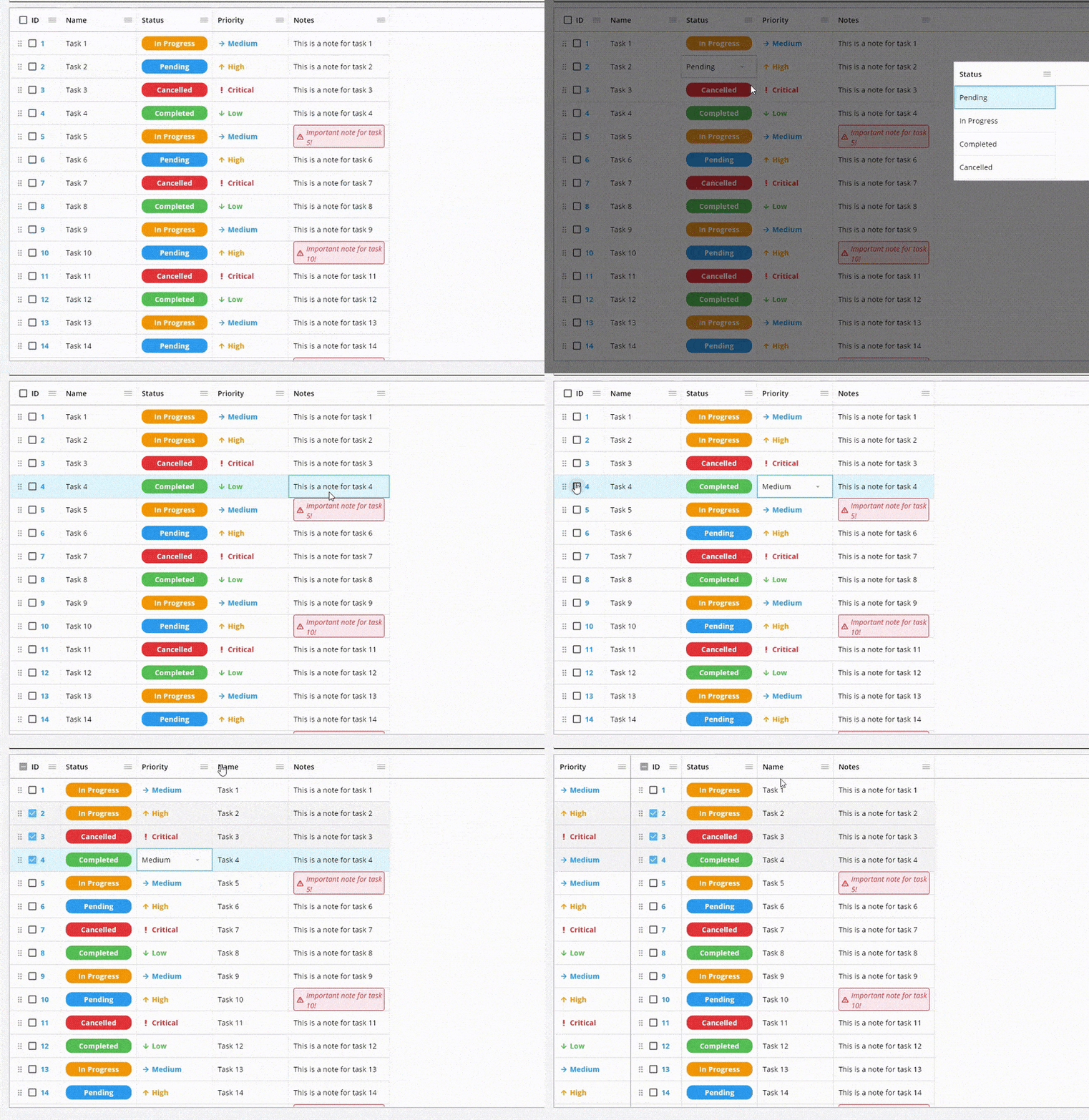
✨ TrinaGrid ✨



🚀 Try the Live Demo 🚀
⭐ Please star this repository to support the project! ⭐
TrinaGrid is a powerful data grid for Flutter that provides a wide range of features for displaying, editing, and managing tabular data. It works seamlessly on all platforms including web, desktop, and mobile.
📑 Table of Contents
- ✨ TrinaGrid
- 💖 Support This Project
- 🚀 Migration from PlutoGrid
- 📦 Installation
- 🏁 Basic Usage
- 🦄 Features
- 🆕 New Feature: Cell-Level Renderers
- 🆕 New Feature: Enhanced Scrollbars
- 📚 Documentation
- 🧑💻 Examples
- 🤝 Contributing
- 📝 License
💖 Support This Project
TrinaGrid is a maintained and enhanced version of the original PlutoGrid package.
I'm Feras, the current maintainer, and I'm actively working on adding new features and keeping this great package rich and up-to-date.
I continued the development after the original package PlutoGrid was no longer being maintained.
If you find TrinaGrid useful, please consider supporting its development:

- Become a GitHub sponsor: Sponsor @doonfrs
- Your support will encourage me to dedicate more time to keeping this useful package updated and well-documented.
🚀 Migration from PlutoGrid
Automatic migration tool included!
If you're migrating from PlutoGrid, we've included a migration tool to help you automatically update your codebase:
# First, add trina_grid to your pubspec.yaml and run flutter pub get

# Run the migration tool (dry run first to see changes)
flutter pub run trina_grid --migrate-from-pluto-grid --dry-run

# Apply the changes
flutter pub run trina_grid --migrate-from-pluto-grid

# To scan all directories (including build and platform-specific directories)
flutter pub run trina_grid --migrate-from-pluto-grid --scan-all
The migration tool will automatically replace all PlutoGrid references with their TrinaGrid equivalents, including:
- Class names (PlutoGrid → TrinaGrid)
- Package imports:
package:pluto_grid/pluto_grid.dart→package:trina_grid/trina_grid.dartpackage:pluto_grid_plus/pluto_grid_plus.dart→package:trina_grid/trina_grid.dart
- All related components, widgets, and enums
See Migration Tool Documentation for more details.
📦 Installation
Add the following dependency to your pubspec.yaml file:
dependencies:
  trina_grid: <latest version>
Then run:
flutter pub get
🏁 Basic Usage
import 'package:flutter/material.dart';
import 'package:trina_grid/trina_grid.dart';

void main() {
  runApp(const MyApp());
}

class MyApp extends StatelessWidget {
  const MyApp({Key? key}) : super(key: key);

  @override
  Widget build(BuildContext context) {
    return MaterialApp(
      title: 'TrinaGrid Example',
      theme: ThemeData(
        primarySwatch: Colors.blue,
      ),
      home: const MyHomePage(),
    );
  }
}

class MyHomePage extends StatefulWidget {
  const MyHomePage({Key? key}) : super(key: key);

  @override
  State<MyHomePage> createState() => _MyHomePageState();
}

class _MyHomePageState extends State<MyHomePage> {
  final List<TrinaColumn> columns = [
    TrinaColumn(
      title: 'ID',
      field: 'id',
      type: TrinaColumnType.text(),
    ),
    TrinaColumn(
      title: 'Name',
      field: 'name',
      type: TrinaColumnType.text(),
    ),
    TrinaColumn(
      title: 'Age',
      field: 'age',
      type: TrinaColumnType.number(),
    ),
    TrinaColumn(
      title: 'Role',
      field: 'role',
      type: TrinaColumnType.select(['Developer', 'Designer', 'Manager']),
    ),
    TrinaColumn(
      title: 'Completion',
      field: 'completion',
      type: TrinaColumnType.percentage(
        decimalDigits: 1,
        showSymbol: true,
      ),
    ),
  ];

  final List<TrinaRow> rows = [
    TrinaRow(
      cells: {
        'id': TrinaCell(value: '1'),
        'name': TrinaCell(value: 'John Doe'),
        'age': TrinaCell(value: 28),
        'role': TrinaCell(value: 'Developer'),
        'completion': TrinaCell(value: 0.75),
      },
    ),
    TrinaRow(
      cells: {
        'id': TrinaCell(value: '2'),
        'name': TrinaCell(value: 'Jane Smith'),
        'age': TrinaCell(value: 32),
        'role': TrinaCell(value: 'Designer'),
        'completion': TrinaCell(value: 0.5),
      },
    ),
    TrinaRow(
      cells: {
        'id': TrinaCell(value: '3'),
        'name': TrinaCell(value: 'Mike Johnson'),
        'age': TrinaCell(value: 45),
        'role': TrinaCell(value: 'Manager'),
        'completion': TrinaCell(value: 0.9),
      },
    ),
  ];

  late TrinaGridStateManager stateManager;

  @override
  Widget build(BuildContext context) {
    return Scaffold(
      appBar: AppBar(
        title: const Text('TrinaGrid Example'),
      ),
      body: Container(
        padding: const EdgeInsets.all(16),
        child: TrinaGrid(
          columns: columns,
          rows: rows,
          onLoaded: (TrinaGridOnLoadedEvent event) {
            stateManager = event.stateManager;
          },
        ),
      ),
    );
  }
}
🦄 Features
TrinaGrid offers a comprehensive set of features for handling tabular data:
🏷️ Column Features
- Column Types: Support for various data types (text, number, select, date, time, currency, percentage)
- Column Freezing: Freeze columns to the left or right
- Column Resizing: Adjust column width by dragging
- Column Moving: Change column order by drag and drop
- Column Hiding: Hide and show columns as needed
- Column Sorting: Sort data by clicking on column headers
- Column Filtering: Filter data with built-in filter widgets
- Column Groups: Group related columns together
- Column Renderers: Customize column appearance with custom widgets
- Column Footer: Display aggregate values at the bottom of columns
🧑🤝🧑 Row Features
- Row Selection: Select single or multiple rows
- Row Moving: Reorder rows by drag and drop
- Row Coloring: Apply custom colors to rows
- Row Checking: Built-in checkbox selection for rows
- Row Groups: Group related rows together
- Frozen Rows: Keep specific rows visible while scrolling
🔲 Cell Features
- Cell Selection: Select individual cells or ranges
- Cell Editing: Edit cell values with appropriate editors
- Cell Renderers: Customize individual cell appearance
- Cell Validation: Validate cell values during editing
📊 Data Management
- Pagination: Built-in pagination support
- Infinite Scrolling: Load data as the user scrolls
- Lazy Loading: Load data on demand
- Copy & Paste: Copy and paste data between cells
🎨 UI Customization
- Themes: Light and dark mode support
- Custom Styling: Customize colors, borders, and text styles
- Enhanced Scrollbars: Draggable scrollbars with hover effects, custom colors, and improved desktop experience
- RTL Support: Right-to-left language support
- Responsive Design: Works on all screen sizes
⚡ Other Features
- Keyboard Navigation: Navigate and edit using keyboard shortcuts
- Context Menus: Right-click menus for columns and cells
- Dual Grid Mode: Display two linked grids side by side
- Popup Mode: Use the grid as a popup selector
🆕 New Feature: Cell-Level Renderers
TrinaGrid now supports cell-level renderers, allowing you to customize the appearance of individual cells:
TrinaCell(
  value: 'Completed',
  renderer: (rendererContext) {
    return Container(
      padding: const EdgeInsets.symmetric(horizontal: 8, vertical: 4),
      decoration: BoxDecoration(
        color: Colors.green,
        borderRadius: BorderRadius.circular(12),
      ),
      child: Text(
        rendererContext.cell.value.toString(),
        style: const TextStyle(
          color: Colors.white,
          fontWeight: FontWeight.bold,
        ),
      ),
    );
  },
)
This powerful feature enables:
- Custom formatting for specific cells
- Visual indicators based on cell values
- Interactive elements within cells
- Conditional styling for individual cells
Cell renderers take precedence over column renderers, giving you fine-grained control over your grid's appearance.
🆕 New Feature: Enhanced Scrollbars
TrinaGrid now includes enhanced scrollbar functionality, particularly useful for desktop applications:
- Draggable Scrollbars: Quickly navigate large datasets by dragging the scrollbar thumb
- Hover Effects: Visual feedback when hovering over scrollbars for better user experience
- Customizable Appearance: Control the colors, thickness, and behavior of scrollbars
- Desktop Optimized: Enhanced interaction model ideal for desktop applications
📚 Documentation
For detailed documentation on each feature, please visit our Wiki or check the /doc folder in the repository.
🧑💻 Examples
Check out the example project for more usage examples.
🤝 Contributing
Contributions are welcome! If you'd like to help improve TrinaGrid, here's how you can contribute:
- Star the repository ⭐ to show your support
- Report bugs by opening issues
- Suggest new features or improvements
- Submit pull requests to fix issues or add functionality
- Improve documentation to help other users
- Share the package with others who might find it useful
- Sponsor the project to support its development Buy me a coffee Buy Me A Coffee
I'm committed to maintaining and improving this package, and your contributions help make it better for everyone. Feel free to reach out if you have any questions or ideas!
📝 License
This project is licensed under the MIT License - see the LICENSE file for details.