

Tracelet


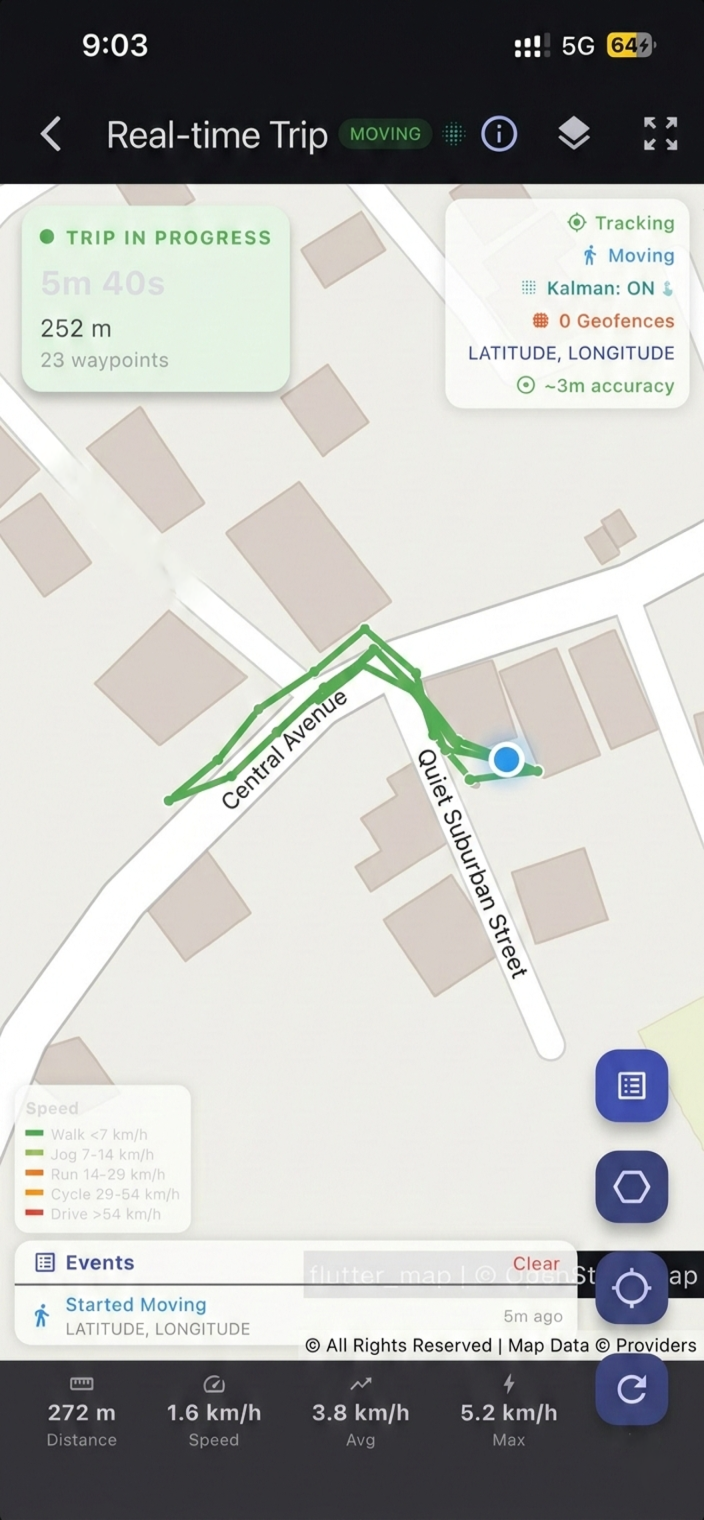

Production-grade background geolocation for Flutter — fully open-source.
Battery-conscious motion-detection intelligence, geofencing, SQLite persistence, HTTP sync, and headless Dart execution for iOS & Android.
Features
- Background location tracking — continuous GPS with configurable
distanceFilteranddesiredAccuracy - Motion-detection intelligence — accelerometer + activity recognition automatically toggle GPS to save battery
- Geofencing — circular and polygon geofences with enter/exit/dwell events
- SQLite persistence — all locations stored locally, queryable, with configurable retention limits
- HTTP auto-sync — batch upload with retry, exponential backoff, offline queue, Wi-Fi-only option
- Headless execution — run Dart code in response to background events
- Scheduling — time-based tracking windows (e.g., "Mon–Fri 9am–5pm") with optional AlarmManager (Android)
- Start on boot — resume after device reboot
- Dart-controlled permissions — no native dialogs, full Dart-side customization
- Foreground service toggle — run with or without a persistent notification (Android)
- Debug sounds — audible feedback during development
- Elasticity control — speed-based distance filter scaling with disable/multiplier overrides
- Location filtering — reject GPS spikes, low-accuracy readings, and speed jumps via
LocationFilter - Kalman filter — optional GPS coordinate smoothing via Extended Kalman Filter (
useKalmanFilter: true) - Trip detection — automatic trip start/stop events with distance, duration, and waypoints
- Polygon geofences — define geofences with arbitrary polygon vertices for non-circular regions
- Auto-stop — automatically stop tracking after N minutes via
stopAfterElapsedMinutes - Activity recognition tuning — confidence thresholds, stop-detection delays, stationary behavior
- Timestamp metadata — optional extra timing fields on each location record
- Geofence high-accuracy mode — full GPS pipeline in geofence-only mode (Android)
- Prevent suspend (iOS) — silent audio keep-alive for continuous background execution
- Shared Dart algorithms — location filtering, geofence proximity, schedule parsing, and persistence logic run in shared Dart for cross-platform consistency
Quick Start
import 'package:tracelet/tracelet.dart' as tl;

// 1. Subscribe to events
tl.Tracelet.onLocation((tl.Location location) {
  print('${location.coords.latitude}, ${location.coords.longitude}');
});

tl.Tracelet.onMotionChange((tl.Location location) {
  print('Moving: ${location.isMoving}');
});

// 2. Initialize
final state = await tl.Tracelet.ready(tl.Config(
  geo: tl.GeoConfig(
    desiredAccuracy: tl.DesiredAccuracy.high,
    distanceFilter: 10.0,
    filter: tl.LocationFilter(
      trackingAccuracyThreshold: 100,
      maxImpliedSpeed: 80,
      useKalmanFilter: true, // smooth GPS coordinates
    ),
  ),
  app: tl.AppConfig(
    stopOnTerminate: false,
    startOnBoot: true,
  ),
  persistence: tl.PersistenceConfig(
    maxDaysToPersist: 7,
    maxRecordsToPersist: 5000,
  ),
  logger: tl.LoggerConfig(
    debug: true,
    logLevel: tl.LogLevel.verbose,
  ),
));

// 3. Start tracking
await tl.Tracelet.start();
Documentation
Kalman Filter GPS Smoothing
Enable the Extended Kalman Filter to smooth GPS coordinates, eliminate jitter, and produce cleaner tracks:
final state = await tl.Tracelet.ready(tl.Config(
  geo: tl.GeoConfig(
    filter: tl.LocationFilter(
      useKalmanFilter: true, // Enable Kalman smoothing
    ),
  ),
));
The filter uses a constant-velocity model with GPS accuracy as measurement noise. It runs natively on both Android and iOS for zero-overhead smoothing. See the Kalman Filter Guide for details.
Trip Detection
Subscribe to trip events that fire automatically when the device transitions from moving to stationary. See the Trip Detection Guide for full details.
tl.Tracelet.onTrip((tl.TripEvent trip) {
  print('Trip ended: ${trip.distance}m in ${trip.duration}s');
  print('From: ${trip.startLocation}');
  print('To: ${trip.stopLocation}');
  print('Avg speed: ${trip.averageSpeed} m/s');
  print('Waypoints: ${trip.waypoints.length}');
});
Polygon Geofences
Define geofences with arbitrary polygon vertices instead of circular regions:
await tl.Tracelet.addGeofence(tl.Geofence(
  identifier: 'campus',
  latitude: 37.422,    // centroid for proximity sorting
  longitude: -122.084,
  radius: 0,           // ignored for polygon geofences
  vertices: [
    [37.423, -122.086],
    [37.424, -122.082],
    [37.421, -122.081],
    [37.420, -122.085],
  ],
));
Polygon containment uses the ray-casting algorithm for efficient point-in-polygon checks. Requires geofenceModeHighAccuracy: true. See the Polygon Geofences Guide for full details.
| Guide | Description |
|---|---|
| Android Setup | Gradle, permissions, and manifest configuration |
| iOS Setup | Info.plist, capabilities, and entitlements |
| Permissions | Permission flow, status codes, Dart dialog examples |
| Background Tracking | Foreground service, silent mode, runtime switching |
| API Reference | All methods, events, and return types |
| Configuration | All config groups with property tables |
| Kalman Filter | GPS smoothing — how it works, when to use it |
| Trip Detection | Automatic trip events — setup, API, edge cases |
| Polygon Geofences | Polygon geofences — vertices, ray-casting, examples |
| Web Support | Web platform capabilities, limitations, and browser APIs |
Architecture
This is the app-facing package in a federated plugin:
| Package | Description |
|---|---|
tracelet (this package) |
Dart API — the only package apps depend on |
tracelet_platform_interface |
Abstract platform interface |
tracelet_android |
Kotlin Android implementation |
tracelet_ios |
Swift iOS implementation |
tracelet_web |
Web implementation (experimental) |
Support
If you find Tracelet useful, consider buying me a coffee:

License
Apache 2.0 — see LICENSE for details.
Libraries
- tracelet
- Tracelet — Production-grade background geolocation for Flutter.