
smart_video_thumbnail



A powerful Flutter plugin for generating video thumbnails using native FFmpeg engine. Fast, reliable, and supports all major video formats.
📸 Screenshot
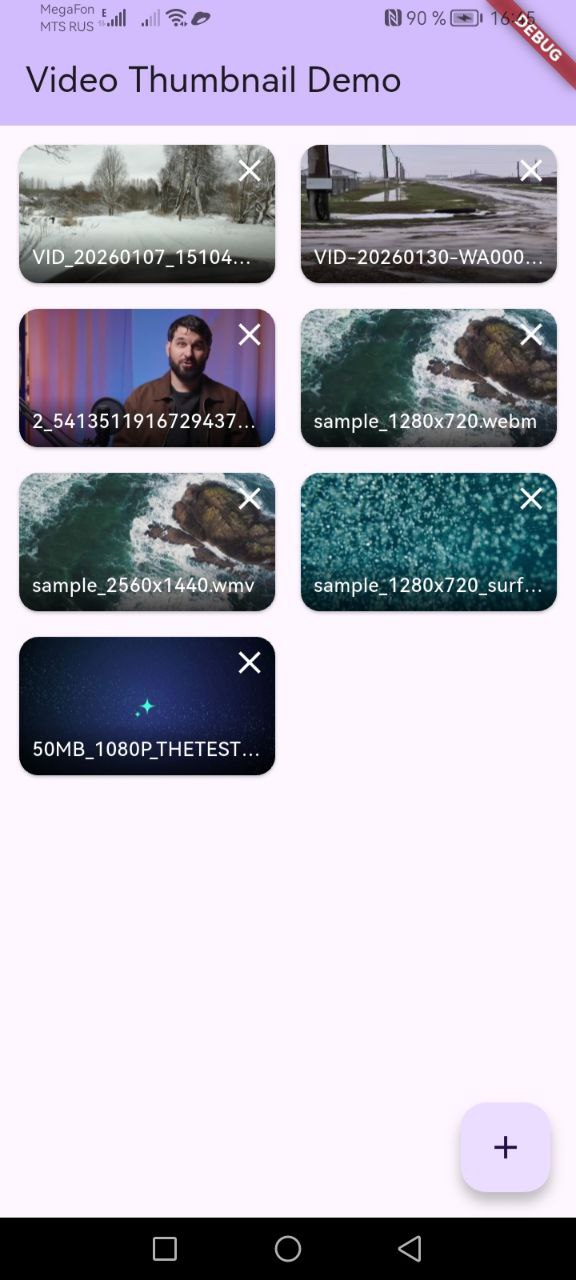
Example app showing video thumbnails in a grid layout
✨ Features
- 🎬 Native FFmpeg - Uses CPU-only decoding for maximum compatibility
- 📦 All Formats - Supports MP4, AVI, MKV, FLV, WMV and other FFmpeg formats
- 🚀 Fast - Optimized frame extraction with minimal overhead
- 💾 Caching - Automatic thumbnail caching for better performance (v0.2.0)
- 📊 Progress - Real-time progress callbacks during generation (v0.2.0)
- 🎯 Flexible - Multiple seek strategies (normal, keyframe, firstFrame)
- 🔧 Independent - No dependency on MediaMetadataRetriever or system APIs
- 💪 Reliable - Works with corrupted or unusual video files
- 📱 Optimized - ARM-only builds for smaller APK size (v0.2.0)
📦 Installation
Add this to your package's pubspec.yaml file:
dependencies:
  smart_video_thumbnail: ^0.2.0
Then run:
flutter pub get
Android Setup
No additional setup required! The plugin automatically downloads the native FFmpeg library from JitPack.
Note: The first build may take a bit longer as Gradle downloads the native library (~8MB).
🚀 Usage
Basic Example
import 'package:smart_video_thumbnail/smart_video_thumbnail.dart';

// Extract thumbnail at 1 second
final thumbnail = await SmartVideoThumbnail.getThumbnail(
  videoPath: '/path/to/video.mp4',
  timeMs: 1000,
  width: 320,
  height: 180,
);

if (thumbnail != null) {
  // thumbnail is Uint8List with RGBA8888 data
  // Size: width * height * 4 bytes
  print('Thumbnail extracted: ${thumbnail.length} bytes');
}
Display with Image Widget
import 'dart:ui' as ui;
import 'dart:async';
import 'package:flutter/material.dart';

Future<ui.Image?> createImageFromRGBA(
  Uint8List rgba,
  int width,
  int height,
) async {
  final completer = Completer<ui.Image>();

  ui.decodeImageFromPixels(
    rgba,
    width,
    height,
    ui.PixelFormat.rgba8888,
    (ui.Image image) {
      completer.complete(image);
    },
  );

  return completer.future;
}

// In your widget
final thumbnail = await SmartVideoThumbnail.getThumbnail(
  videoPath: videoPath,
  width: 320,
  height: 180,
);

if (thumbnail != null) {
  final image = await createImageFromRGBA(thumbnail, 320, 180);
  return RawImage(image: image);
}
Extraction Strategies
// Normal seek (default)
final thumbnail1 = await SmartVideoThumbnail.getThumbnail(
  videoPath: videoPath,
  strategy: ThumbnailStrategy.normal,
);

// Keyframe-focused seek (for AVI/FLV)
final thumbnail2 = await SmartVideoThumbnail.getThumbnail(
  videoPath: videoPath,
  strategy: ThumbnailStrategy.keyframe,
);

// First available frame (fastest)
final thumbnail3 = await SmartVideoThumbnail.getThumbnail(
  videoPath: videoPath,
  strategy: ThumbnailStrategy.firstFrame,
);
📖 API Reference
getThumbnail
Extracts a thumbnail from a video file.
Parameters:
| Parameter | Type | Required | Default | Description |
|---|---|---|---|---|
videoPath |
String |
✅ Yes | - | Path to the video file |
timeMs |
int |
❌ No | 1000 |
Target position in milliseconds |
width |
int |
❌ No | size |
Thumbnail width in pixels |
height |
int |
❌ No | size * 9/16 |
Thumbnail height in pixels |
size |
int |
❌ No | 720 |
Alternative way to set dimensions |
strategy |
ThumbnailStrategy |
❌ No | normal |
Frame extraction strategy |
Returns: Future<Uint8List?> - RGBA8888 pixel data or null on error
Data Format
The plugin returns Uint8List with RGBA8888 format:
- 4 bytes per pixel (Red, Green, Blue, Alpha)
- Data size:
width * height * 4bytes - Pixel order: left to right, top to bottom
📱 Platform Support
| Platform | Status | Architectures |
|---|---|---|
| Android | ✅ Supported | arm64-v8a, armeabi-v7a |
| iOS | ⏳ Coming Soon | - |
📋 Requirements
Android
- minSdk: 26 (Android 8.0+)
- targetSdk: 34
- NDK: r21 or higher
- CMake: 3.18.1 or higher
- FFmpeg: Included in plugin (v4.4.2)
🏗️ Architecture
The plugin consists of three layers:
┌─────────────────────────────────┐
│      Flutter App (Dart)         │
└────────────┬────────────────────┘
             │ MethodChannel
┌────────────▼────────────────────┐
│  SmartVideoThumbnailPlugin (Kt) │
└────────────┬────────────────────┘
             │ JNI
┌────────────▼────────────────────┐
│   SmartFfmpegBridge (C/C++)     │
└────────────┬────────────────────┘
             │
┌────────────▼────────────────────┐
│  FFmpeg Libraries (v4.4.2)      │
│  • libavformat • libavcodec     │
│  • libswscale  • libavutil      │
└─────────────────────────────────┘
Layers:
- Dart API - Flutter interface (
smart_video_thumbnail.dart) - Kotlin Bridge - JNI bridge (
SmartVideoThumbnailPlugin.kt) - Native Library - FFmpeg decoding (smart-ffmpeg-android)
⚡ Performance
Typical frame extraction times:
| Format | Codec | Time |
|---|---|---|
| MP4 | H.264 | 50-150ms |
| AVI | MPEG-4 | 100-200ms |
| MKV | H.265 | 150-300ms |
| FLV | - | 100-250ms |
Performance factors:
- Video format and codec
- Output image size
- Frame position in video
- Device performance
🐛 Debugging
Enable Android logging:
adb logcat | grep -E "SmartVideoThumbnail|SmartFfmpegBridge"
Example logs:
I/SmartVideoThumbnail: 🎬 getThumbnail: path=/path/to/video.mp4, targetMs=1000, size=320x180
I/SmartFfmpegBridge: Extracting thumbnail from: /path/to/video.mp4 at 1000 ms
I/SmartFfmpegBridge: Successfully extracted thumbnail: 230400 bytes
I/SmartVideoThumbnail: ✅ getThumbnail: Thumbnail extracted successfully (230400 bytes)
🤝 Contributing
Contributions are welcome! Please feel free to submit a Pull Request.
📄 License
This project is licensed under the MIT License - see the LICENSE file for details.
🔗 Links
- Native Library: smart-ffmpeg-android
- FFmpeg: ffmpeg.org
- Issues: GitHub Issues
👨💻 Author
PathCreator Team
If you find this plugin helpful, please give it a ⭐ on GitHub!