
📊 nrb (Nexora Report Builder)
A customizable and highly responsive Flutter table widget builder designed for complex, nested headers and dynamic data visualization. Ideal for enterprise dashboards, inventory tracking, financial reports, or structured data-entry UIs.
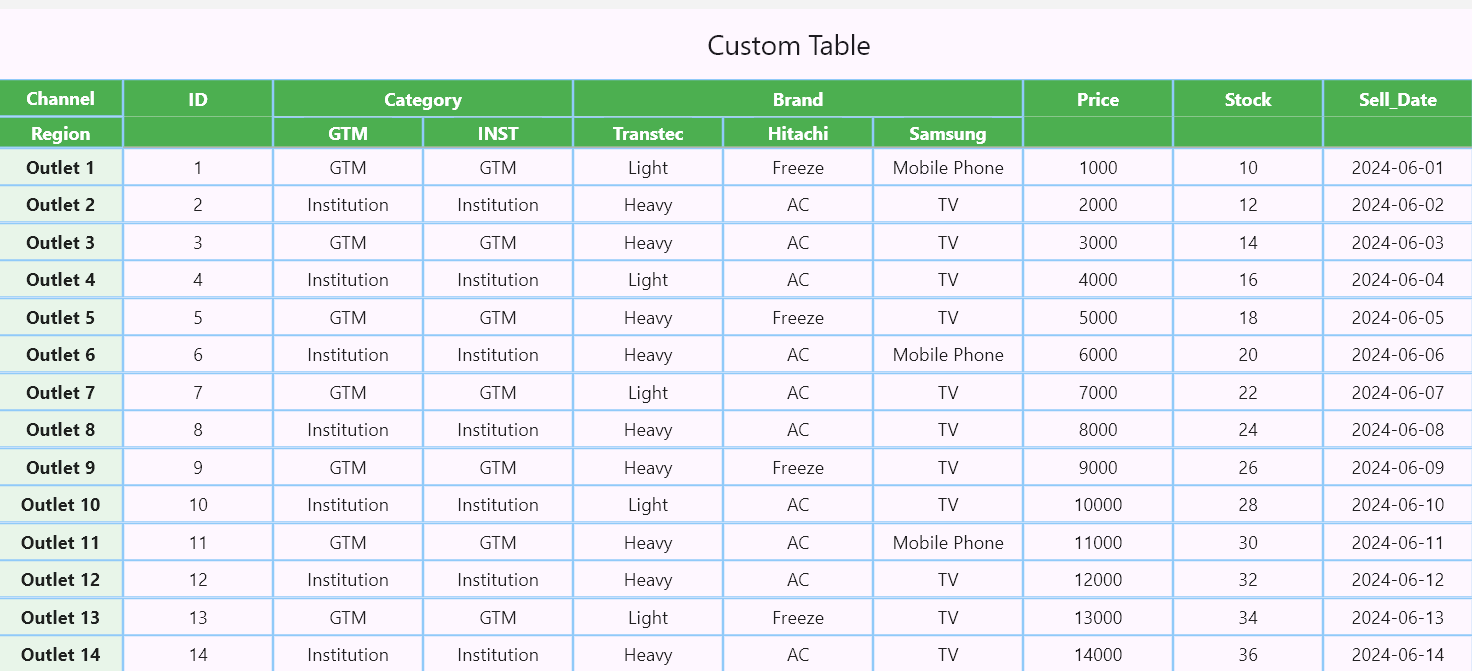
✨ Features
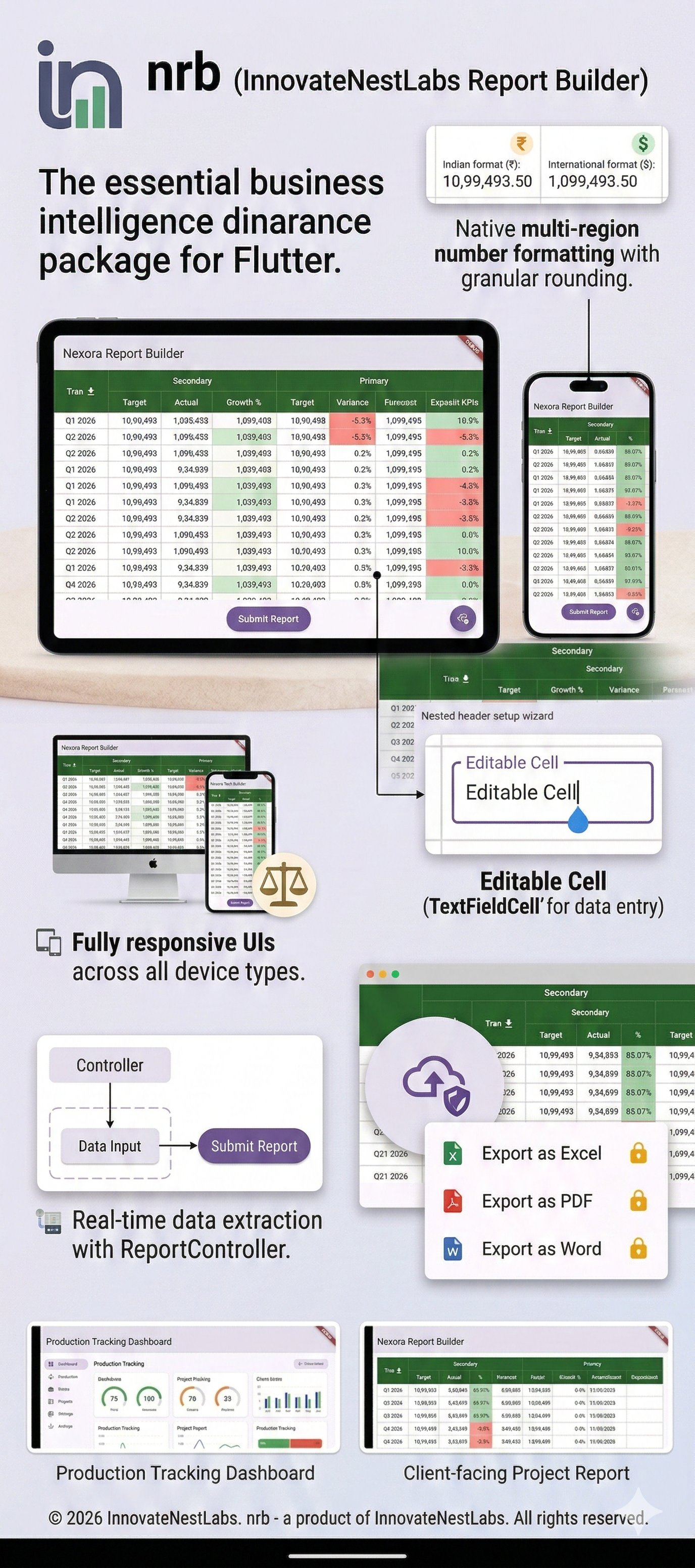
- 📱 Fully Responsive: Columns auto-measure their content (
wrap_content) and expand proportionally to fill available screen space. - 📌 Complex Nested Headers: Build main headers, sub-headers, and sticky left-side columns (like Excel-style freeze panes).
- ✍️ Editable Data Grids: Mix static
TextCells with interactiveTextFieldCells to turn your report into a scrollable data-entry form. - 🔄 Real-time Data Extraction: Use
ReportControllerto extract all grid data instantly via a Submit action. - 💰 Advanced Number Formatting: Built-in
NRBNumberFormatterhandles International and Indian comma separation, along with granular rounding rules. - 📏 Resizable Columns: Double-click column edges to auto-fit, or drag to manually resize.
- 📥 Premium Export Features: Export tables to Excel, PDF, or Word (Requires an active subscription bound to your App's Package Name).
🚀 Getting Started
To integrate nrb into your Flutter project:
1. Add dependency
dependencies:
  nrb: ^[latest_version]
2. Prepare main to include the report layout
import 'dart:io';
import 'package:flutter/foundation.dart';
import 'package:flutter/material.dart';
import 'package:nrb/nrb.dart';

void main() {
  runApp(const MyReportBuilderApp());
}

class MyReportBuilderApp extends StatefulWidget {
  const MyReportBuilderApp({super.key});

  @override
  State<MyReportBuilderApp> createState() => _MyReportBuilderAppState();
}

class _MyReportBuilderAppState extends State<MyReportBuilderApp> {
  // 1. Initialize the controller to extract data later
  final ReportController _reportController = ReportController();

  final List<HeaderCell> headers = [
    HeaderCell(text: "Financial Overview", span: 3, backgroundColor: Colors.green),
  ];

  final List<SubHeaderCell> subHeaders = [
    SubHeaderCell(text: "Target", backgroundColor: Colors.green),
    SubHeaderCell(text: "Actual", backgroundColor: Colors.green),
    SubHeaderCell(text: "Growth %", backgroundColor: Colors.green),
  ];

  final leftColumns = [
    TextCell(itemContent: "Q1 - 2026", backgroundColor: Colors.blue[200], textColor: Colors.black),
    TextCell(itemContent: "Q2 - 2026", backgroundColor: Colors.blue[200], textColor: Colors.black),
  ];

  final tableData = [
    [
      TextCell(
        itemContent: "1500000",
        isAmount: true,
        numberFormatType: CellNumberFormat.indian,
        textAlignment: Alignment.centerRight,
      ),
      TextCell(
        itemContent: "1250000",
        isAmount: true,
        numberFormatType: CellNumberFormat.indian,
        textAlignment: Alignment.centerRight,
      ),
      // Editable Cell for user input
      TextFieldCell(initialValue: "83.33%"),
    ],
    [
      TextCell(
        itemContent: "2000000",
        isAmount: true,
        numberFormatType: CellNumberFormat.international,
        textAlignment: Alignment.centerRight,
      ),
      TextCell(
        itemContent: "1900000",
        isAmount: true,
        numberFormatType: CellNumberFormat.international,
        textAlignment: Alignment.centerRight,
      ),
      // Editable Cell for user input
      TextFieldCell(initialValue: "95.00%"),
    ],
  ];

  @override
  Widget build(BuildContext context) {
    return MaterialApp(
      theme: ThemeData(primarySwatch: Colors.blue),
      home: Scaffold(
        appBar: AppBar(title: const Text('Enterprise Dashboard')),
        body: Column(
          children: [
            Expanded(
              child: ReportMaker(
                headers: headers,
                subHeaders: subHeaders,
                leftColumn: leftColumns,
                tableData: tableData,
                stickyHeaderLabel: "Quarter",
                stickyHeaderBackgroundColor: Colors.green,

                // --- NEW FEATURES OVERVIEW ---
                controller: _reportController, // Attach controller for data extraction
                enableDownload: true,          // Enable premium export
                packageName: "com.yourcompany.yourapp", // Your registered subscription package
                onDownloadCompleted: (bytes, fileName) async {
                  if (!kIsWeb) {
                    final directory = Directory('/storage/emulated/0/Download');
                    if (!await directory.exists()) await directory.create(recursive: true);

                    final file = File('${directory.path}/$fileName');
                    await file.writeAsBytes(bytes);
                    if (kDebugMode) print('File saved to: ${file.path}');
                  }
                },
              ),
            ),
            Padding(
              padding: const EdgeInsets.all(8.0),
              child: ElevatedButton(
                onPressed: () {
                  // 2. Extract all current UI data instantly!
                  List<List<String>> finalData = _reportController.getSubmitData();
                  if (kDebugMode) print("Extracted Data: $finalData");
                },
                child: const Text("Submit Report Data"),
              ),
            )
          ],
        ),
      ),
    );
  }
}
🧮 Number Formatting
nrb comes with a powerful formatter built directly into TextCell. Simply flag the cell as an amount and choose your style:
TextCell(
  itemContent: "1099493.5",
  isAmount: true, // Automatically applies commas
  numberFormatType: CellNumberFormat.indian, // Formats as 10,99,493.5
  roundMode: RoundMode.withRoundUp,
  roundTo: 2, // Formats as 10,99,493.50
  textAlignment: Alignment.centerRight,
)
* Want to Direct use any part?? Just follow below syntax
NRBNumberFormatter.format(newBalance, style: NumberStyle.indian, roundTo: 2)
📥 Premium Download Features (Subscription)
nrb supports backend-driven exporting of your perfectly formatted grids to Excel (.xlsx), PDF, and Word.
To enable the download button in the UI:
- Set
enableDownload: trueinReportMaker. - Provide your app's
packageName. This package name must be registered and hold an active premium subscription. - Handle the incoming bytes using the
onDownloadCompletedcallback to save or share the generated file.
Subscription Notice: Access to the official Nexora API for file generation requires an active premium subscription tied to your application's package name.
📂 Example Output
📄 License
© 2026 Mehedi Hasan & Fahad Mia
This software is licensed under a custom license. Usage is permitted in personal and commercial projects, but:
- ❌ No redistribution or resale
- ❌ No modification of the source
- ✅ Attribution required
See the LICENSE file for full terms and conditions.
📬 Support & Contributions
For issues, feature requests, or contributions, feel free to open a GitHub Issue.
Libraries
- nrb
- nrb/enum/cell_number_format
- nrb/enum/number_style
- nrb/enum/round_mode
- nrb/header_cell
- nrb/report_cell
- nrb/report_controller
- nrb/report_design_builder
- nrb/sub_header_cell
- nrb/text_cell
- nrb/text_field_cell
- nrb/utils/nrb_exporter
- nrb/utils/nrb_number_formatter
- nrb/utils/report_downloader
- nrb/utils/report_downloader_io
- nrb/utils/report_downloader_stub
- nrb/utils/report_downloader_web
- report_maker