
log_overlay



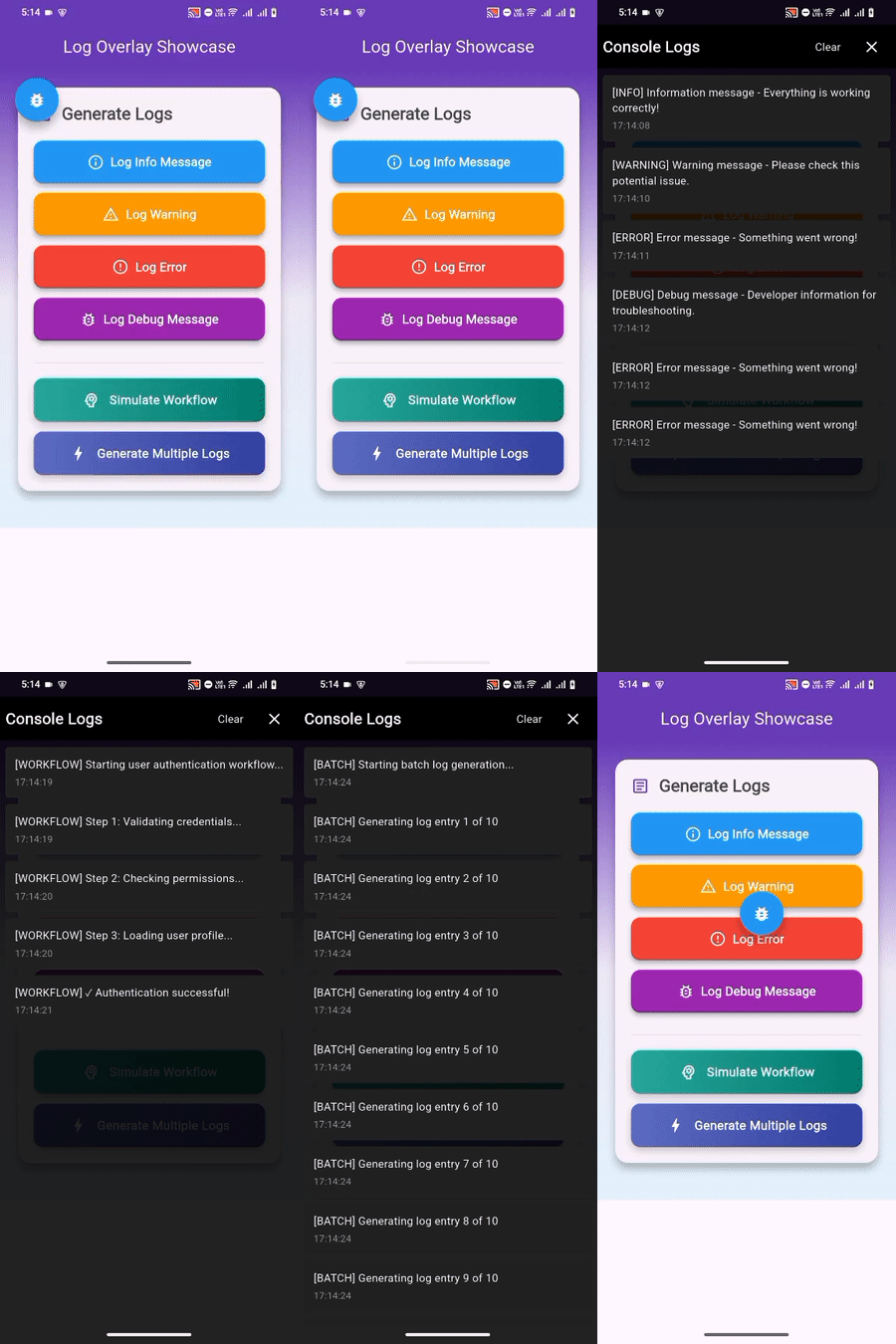
A lightweight, draggable debug console overlay for Flutter apps. View print() logs directly on your device without connecting to an IDE.
Demo
Why log_overlay?
The Problem:
Debugging Flutter apps on physical devices is challenging. When your app runs outside of your IDE—whether on a real phone, in a demo, during beta testing, or in a user's hands—you lose visibility into what's happening. Your print() statements vanish. Exception stack traces disappear. You're debugging blind.
The Solution:
log_overlay provides an in-app debug console that captures all print() statements in real-time. A draggable floating button gives you instant access to logs—anywhere, anytime, no IDE required.
Features
- Automatic log capture - Intercepts all
print()statements - Draggable interface - Floating button that moves anywhere on screen
- Real-time display - See logs as they happen
- Timestamped entries - Track when each log occurred
- Zero dependencies - Pure Flutter implementation
- Cross-platform - Works on all Flutter platforms
- Simple setup - Just 2 lines of code
Installation
Add to your pubspec.yaml:
dependencies:
  log_overlay: ^0.0.1
Run:
flutter pub get
Usage
Basic Setup
Step 1: Initialize in main.dart
import 'package:flutter/material.dart';
import 'package:log_overlay/log_overlay.dart';

void main() {
  LogOverlay.init(const MyApp());
}
Step 2: Add builder to MaterialApp
class MyApp extends StatelessWidget {
  @override
  Widget build(BuildContext context) {
    return MaterialApp(
      title: 'My App',
      builder: LogOverlay.builder(),
      home: HomePage(),
    );
  }
}
That's it. A floating debug button will appear on your screen.
Viewing Logs
All print() statements are automatically captured:
ElevatedButton(
  onPressed: () {
    print('Button pressed');
    print('User action recorded');
  },
  child: Text('Press Me'),
)
Tap the floating button to view logs. Drag it to reposition.
Programmatic Access
Open the console from code:
LogOverlay.open(context);
Configuration
Debug Mode Only
import 'package:flutter/foundation.dart';

void main() {
  if (kDebugMode) {
    LogOverlay.init(const MyApp());
  } else {
    runApp(const MyApp());
  }
}
Custom Build Flavors
void main() {
  if (const String.fromEnvironment('FLAVOR') == 'qa') {
    LogOverlay.init(const MyApp());
  } else {
    runApp(const MyApp());
  }
}
Auto-open on Errors
try {
  // Your code
} catch (e) {
  print('Error: $e');
  LogOverlay.open(context);
}
Comparison
| Feature | log_overlay | Other Packages |
|---|---|---|
| Setup complexity | 2 lines | 5+ lines |
| Print interception | Automatic | Manual logger required |
| UI approach | Draggable FAB | Full-screen only |
| Dependencies | Zero | Multiple |
| Target users | All developers | Advanced users |
Supported Platforms
- Android
- iOS
- Web
- Windows
- macOS
- Linux
Use Cases
On-Device Debugging
- Debug on physical phones and tablets without IDE connection
- Test features that only work on real hardware (camera, sensors, GPS)
- Troubleshoot platform-specific issues
Live Demos & Presentations
- Show logs during presentations or client demos
- Demonstrate app behavior in real-time
- Prove features are working correctly
Beta Testing & User Feedback
- Enable testers to capture and report logs easily
- Get diagnostic information with bug reports
- Verify fixes without re-deploying
Field Testing & Remote Debugging
- Debug issues that only occur in production-like environments
- Monitor app behavior in different network conditions
- Troubleshoot user-reported issues on their devices
Development Without IDE
- Quick debugging when IDE is unavailable
- Lightweight alternative to full remote debugging
- Fast iteration on simple bugs
API Reference
LogOverlay
Static Methods:
LogOverlay.init(Widget app)- Initialize and wrap your appLogOverlay.builder()- Get TransitionBuilder for MaterialAppLogOverlay.open(BuildContext context)- Programmatically open console
LogService
Methods:
LogService().log(String message)- Add log entryLogService().clear()- Clear all logsLogService().logsNotifier- Access ValueNotifier of logs
Contributing
Contributions are welcome! Please feel free to submit a Pull Request.
- Fork the repository
- Create your feature branch (
git checkout -b feature/amazing-feature) - Commit your changes (
git commit -m 'Add amazing feature') - Push to the branch (
git push origin feature/amazing-feature) - Open a Pull Request
License
MIT License - see LICENSE file for details.
Copyright (c) 2025 Harsh Kumar
Author
Harsh Kumar
- GitHub: @HarshKumar009
- Package: log_overlay
Made with ❤️ for developers who value clean code and robust error handling.
If this package helps your workflow, please consider giving it a star on GitHub.