
🛡️ Local Toxicity Guard



A lightweight, privacy-focused AI package that detects toxic content, hate speech, harassment, and offensive language directly on the user's device — without sending any data to the cloud.
✨ Features
- 🔒 100% On-Device Processing – All content moderation happens locally; text never leaves the device
- ⚡ Fast & Lightweight – Optimized ONNX model powered by MiniLM-v2 for real-time performance
- 🎯 Multi-Category Detection – Detects 6 types of toxicity:
- Toxic content
- Severe toxicity
- Obscene language
- Threats
- Insults
- Identity-based hate
- 🔧 Flexible Configuration – Adjustable thresholds for fine-tuned control
- 🌐 Privacy-First – No API keys, no external servers, no data tracking
- 📱 Cross-Platform – Works on both Android and iOS with a unified API
- 🧩 Easy Integration – Simple API with just a few lines of code
🎥 See It In Action
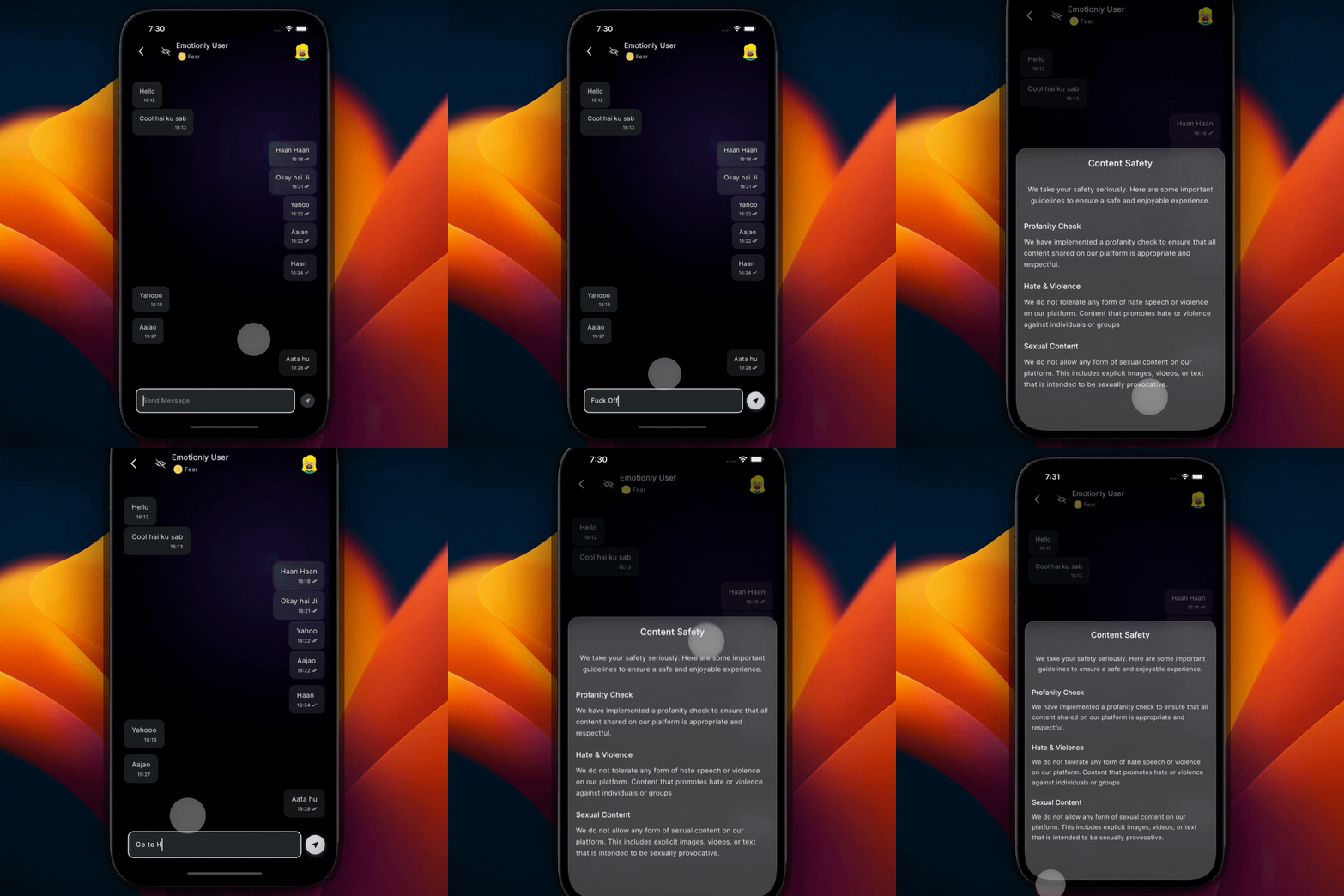
Real-time toxicity detection protecting user-generated content
🚀 Getting Started
Installation
Add local_toxicity_guard to your pubspec.yaml:
dependencies:
  local_toxicity_guard: ^1.0.1
Run:
flutter pub get
Basic Usage
import 'package:local_toxicity_guard/local_toxicity_guard.dart';

// 1. Create an instance
final toxicityGuard = LocalToxicityGuard();

// 2. Detect toxicity in text
String userInput = "Your text to analyze here";
ToxicityResult? result = await toxicityGuard.detectToxicity(userInput);

// 3. Check results
if (result != null && result.isToxic) {
  print('⚠️ Toxic content detected!');
  print('Toxicity score: ${result.toxicProbability.toStringAsFixed(2)}');
  print('Categories: ${result.categoryScores}');
} else {
  print('✅ Content is safe');
}
Using ToxicityService (Recommended)
For better lifecycle management and singleton pattern:
import 'package:local_toxicity_guard/services/toxicity_service.dart';

// Initialize once during app startup
await ToxicityService.instance.initialize();

// Quick check if text is toxic
bool isToxic = await ToxicityService.instance.isToxic(
  "Text to check",
  threshold: 0.5, // Optional: adjust sensitivity
);

if (isToxic) {
  // Handle toxic content
  print('Content blocked due to toxicity');
}

// Get detailed analysis
ToxicityResult? result = await ToxicityService.instance.analyzeText("Text to analyze");
if (result != null) {
  print('Toxic: ${result.toxicScore}');
  print('Insult: ${result.insultScore}');
  print('Threat: ${result.threatScore}');
  print('Obscene: ${result.obsceneScore}');
  print('Severe toxic: ${result.severeToxicScore}');
  print('Identity hate: ${result.identityHateScore}');
}

// Get category breakdown
Map<String, double>? categories = await ToxicityService.instance.getDetailedAnalysis("Text");
print(categories); // e.g., {'toxic': 0.85, 'insult': 0.72, ...}
📖 API Reference
LocalToxicityGuard
The main class for toxicity detection.
Methods
detectToxicity()
Future<ToxicityResult?> detectToxicity(String text)
Analyzes the provided text for toxic content.
Parameters:
text– The text to analyze
Returns: ToxicityResult? containing detection results, or null if an error occurred.
ToxicityService
A singleton service class for managing toxicity detection throughout your app.
Methods
initialize()
Future<bool> initialize()
Initializes the ML model. Call this during app startup for better performance.
Returns: true if initialization succeeded, false otherwise.
analyzeText()
Future<ToxicityResult?> analyzeText(String text)
Performs detailed toxicity analysis on the text.
Returns: ToxicityResult? with detailed scores, or null if unavailable.
isToxic()
Future<bool> isToxic(String text, {double threshold = 0.5})
Quick check if text exceeds toxicity threshold.
Parameters:
text– Text to checkthreshold– Minimum score to consider toxic (0.0–1.0). Default:0.5
Returns: true if any category exceeds the threshold.
getDetailedAnalysis()
Future<Map<String, double>?> getDetailedAnalysis(String text)
Returns a map of category names to their scores.
Returns: Map like {'toxic': 0.85, 'insult': 0.72, 'obscene': 0.23, ...}
ToxicityResult
Represents the output of a toxicity detection operation.
Properties:
double toxicProbability– Overall maximum toxicity score (0.0–1.0)double safeProbability– Inverse of toxicity probabilitybool isToxic– Whether any category exceeded the 0.5 thresholdbool hasError– Whether an error occurred during detectionMap<String, double> categoryScores– Scores for each toxicity category
Category Score Getters:
double toxicScore– General toxic content scoredouble severeToxicScore– Severe toxicity scoredouble obsceneScore– Obscene language scoredouble threatScore– Threatening content scoredouble insultScore– Insulting language scoredouble identityHateScore– Identity-based hate speech score
🎨 Complete Example
Here's a complete example showing how to build a chat input validator:
import 'package:flutter/material.dart';
import 'package:local_toxicity_guard/services/toxicity_service.dart';

class ChatInputField extends StatefulWidget {
  @override
  _ChatInputFieldState createState() => _ChatInputFieldState();
}

class _ChatInputFieldState extends State<ChatInputField> {
  final _controller = TextEditingController();
  final _toxicityService = ToxicityService.instance;
  String? _warningMessage;
  bool _isAnalyzing = false;

  @override
  void initState() {
    super.initState();
    _toxicityService.initialize();
  }

  Future<void> _validateAndSend() async {
    final text = _controller.text.trim();
    if (text.isEmpty) return;

    setState(() => _isAnalyzing = true);

    // Check for toxicity
    final isToxic = await _toxicityService.isToxic(text, threshold: 0.6);

    setState(() => _isAnalyzing = false);

    if (isToxic) {
      // Get detailed breakdown
      final result = await _toxicityService.analyzeText(text);

      setState(() {
        _warningMessage = 'This message may contain offensive content. '
            'Please revise before sending.';
      });

      // Show categories that triggered
      if (result != null) {
        print('Detected:');
        if (result.toxicScore > 0.6) print('- Toxic content');
        if (result.insultScore > 0.6) print('- Insults');
        if (result.threatScore > 0.6) print('- Threats');
        if (result.obsceneScore > 0.6) print('- Obscene language');
      }
    } else {
      // Send message
      _sendMessage(text);
      _controller.clear();
      setState(() => _warningMessage = null);
    }
  }

  void _sendMessage(String text) {
    // Your message sending logic here
    print('Message sent: $text');
  }

  @override
  Widget build(BuildContext context) {
    return Column(
      children: [
        if (_warningMessage != null)
          Container(
            padding: EdgeInsets.all(8),
            color: Colors.red.shade100,
            child: Row(
              children: [
                Icon(Icons.warning, color: Colors.red),
                SizedBox(width: 8),
                Expanded(
                  child: Text(
                    _warningMessage!,
                    style: TextStyle(color: Colors.red.shade900),
                  ),
                ),
              ],
            ),
          ),
        TextField(
          controller: _controller,
          decoration: InputDecoration(
            hintText: 'Type a message...',
            suffixIcon: _isAnalyzing
                ? Padding(
                    padding: EdgeInsets.all(12),
                    child: CircularProgressIndicator(strokeWidth: 2),
                  )
                : IconButton(
                    icon: Icon(Icons.send),
                    onPressed: _validateAndSend,
                  ),
          ),
          onSubmitted: (_) => _validateAndSend(),
        ),
      ],
    );
  }

  @override
  void dispose() {
    _controller.dispose();
    super.dispose();
  }
}
🔧 Advanced Configuration
Adjusting Sensitivity
Control how strict the toxicity detection is:
// Very strict (fewer false negatives, more false positives)
bool isToxic = await ToxicityService.instance.isToxic(text, threshold: 0.3);

// Balanced (recommended for most use cases)
bool isToxic = await ToxicityService.instance.isToxic(text, threshold: 0.5);

// Lenient (fewer false positives, may miss some toxic content)
bool isToxic = await ToxicityService.instance.isToxic(text, threshold: 0.7);
Category-Specific Filtering
Filter based on specific toxicity categories:
ToxicityResult? result = await ToxicityService.instance.analyzeText(userText);

if (result != null) {
  // Block only severe toxicity and threats
  if (result.severeToxicScore > 0.6 || result.threatScore > 0.6) {
    print('Content blocked');
  }

  // Warn on insults but allow
  if (result.insultScore > 0.5) {
    print('Warning: Message may be insulting');
  }
}
🧠 How It Works
- Model Loading – On initialization, the ONNX model (MiniLM-v2 trained on Jigsaw toxic comments) is loaded into memory
- Tokenization – Input text is tokenized using BERT-style WordPiece tokenization with:
- Lowercasing (configurable)
- Punctuation splitting
- Subword handling for out-of-vocabulary words
- Inference – The tokenized input is processed through the neural network to generate logits
- Classification – Sigmoid activation converts logits to probabilities for each of 6 toxicity categories
- Result – Returns structured
ToxicityResultwith category scores and overall toxicity flag
The plugin uses flutter_onnxruntime for efficient cross-platform inference.
📊 Model Information
- Architecture: MiniLM-v2 (lightweight BERT variant)
- Training Data: Jigsaw Toxic Comment Classification Dataset
- Input: Text sequences (max 512 tokens)
- Output: 6 toxicity category probabilities
- Model Size: ~22MB (ONNX format)
- Inference Time: ~100-300ms on modern devices
📋 Requirements
- Flutter SDK:
>=3.3.0 - Dart:
>=3.7.2 - Android: API level 21+ (Android 5.0+)
- iOS: 11.0+
🛠️ Troubleshooting
"Model file not found" error
Ensure the model files are properly bundled in your app:
flutter:
  assets:
    - packages/local_toxicity_guard/assets/toxicity_model/
This should be automatic, but if issues persist, try:
flutter clean
flutter pub get
Slow initialization
The model loads ~22MB on first initialization. To improve perceived performance:
void main() async {
  WidgetsFlutterBinding.ensureInitialized();

  // Initialize in background during splash screen
  ToxicityService.instance.initialize();

  runApp(MyApp());
}
High false positive rate
Try adjusting the threshold:
// More lenient
bool isToxic = await service.isToxic(text, threshold: 0.65);
Or implement category-specific logic to only block the most severe categories.
Memory warnings
The model stays in memory after initialization. If you need to free resources:
// Not typically necessary, but available if needed
await ToxicityGuard.dispose();
🎯 Use Cases
- Chat Applications – Filter toxic messages in real-time
- Social Media Apps – Moderate user-generated content
- Comment Systems – Protect communities from harassment
- Review Platforms – Flag inappropriate reviews
- Educational Apps – Create safe environments for students
- Gaming – Moderate in-game chat and usernames
🔒 Privacy & Security
- ✅ No network requests – Everything runs on-device
- ✅ No data collection – Text is never stored or transmitted
- ✅ No API keys required – Completely self-contained
- ✅ GDPR/CCPA compliant – No personal data leaves the device
- ✅ Offline-first – Works without internet connection
⚠️ Limitations
- Language Support: Currently optimized for English text. May have reduced accuracy for other languages.
- Context Awareness: The model analyzes text in isolation and may miss context-dependent nuances.
- Sarcasm/Irony: May flag sarcastic content that isn't genuinely toxic.
- Performance: Inference takes 100-300ms per text on typical devices. Not suitable for high-frequency real-time analysis of very long texts.
🤝 Contributing
Contributions are welcome! Please feel free to submit a Pull Request. For major changes, please open an issue first to discuss what you would like to change.
📄 License
This project is licensed under the MIT License - see the LICENSE file for details.
🙏 Acknowledgments
- Model training based on Jigsaw Toxic Comment Classification Challenge dataset
- Powered by MiniLM-v2 architecture
- Built with flutter_onnxruntime
📞 Support
- 🐛 Found a bug? Open an issue
- 💡 Have a feature request? Start a discussion
- 📧 Need help? Check out the example app for reference
Made with ❤️ for safer online communities