
🎭 Local Face Detection



A high-performance, privacy-focused Flutter plugin for on-device face detection using ONNX Runtime. Powered by the Qualcomm Lightweight Face Detection model, this plugin detects faces and facial landmarks entirely offline—no cloud API required.
✨ Features
- 🔒 100% On-Device Processing – All detection happens locally; your images never leave the device
- ⚡ Fast & Lightweight – Optimized ONNX model (640×480 input) for real-time performance
- 🎯 Accurate Detection – Returns bounding boxes, confidence scores, and 5-point facial landmarks
- 🛠️ Flexible Configuration – Adjustable score threshold and optional NMS for fine-tuned results
- 📱 Cross-Platform – Works on both Android and iOS with a unified API
- 🧩 Easy Integration – Simple, intuitive API with just a few lines of code
📸 See It In Action
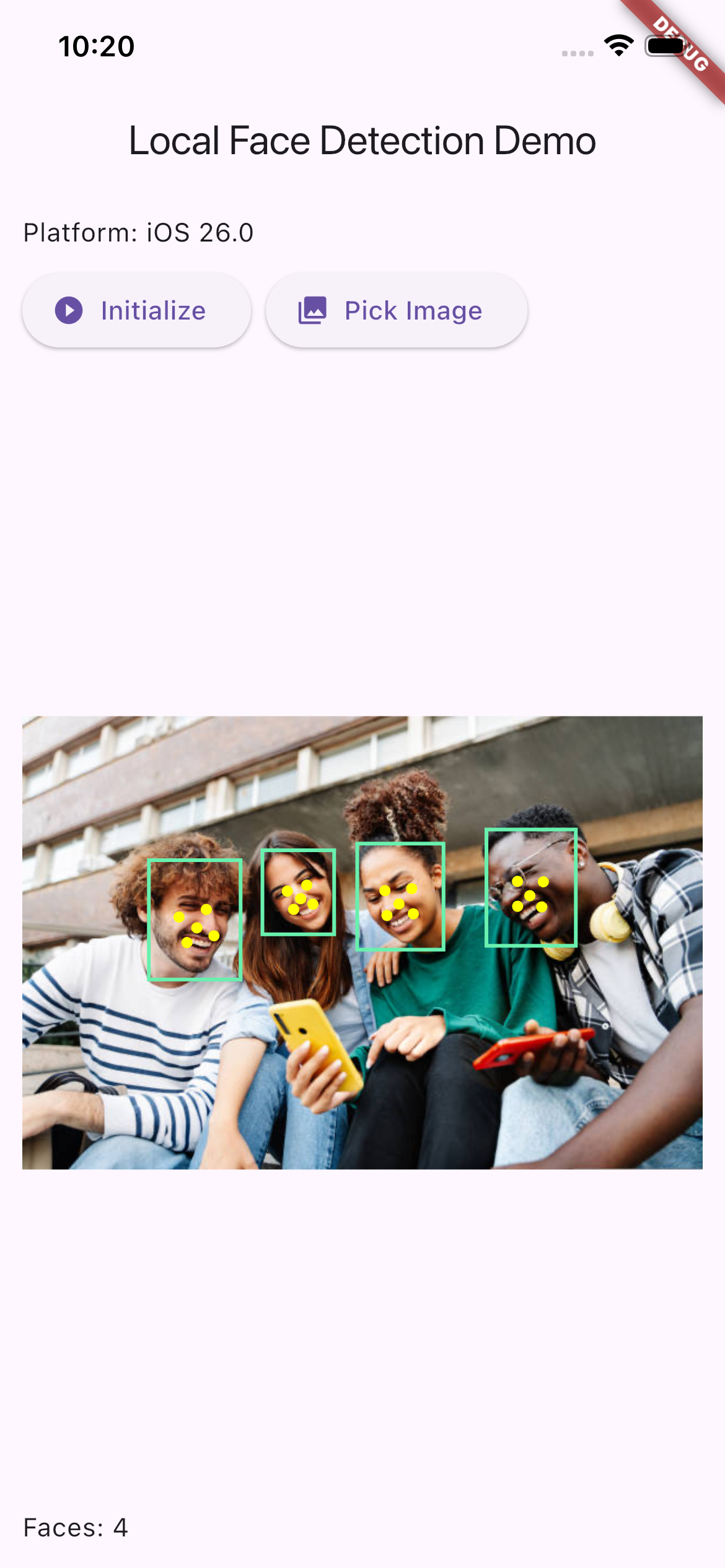 Multiple Face Detection Detects all faces in group photos with bounding boxes and landmarks |
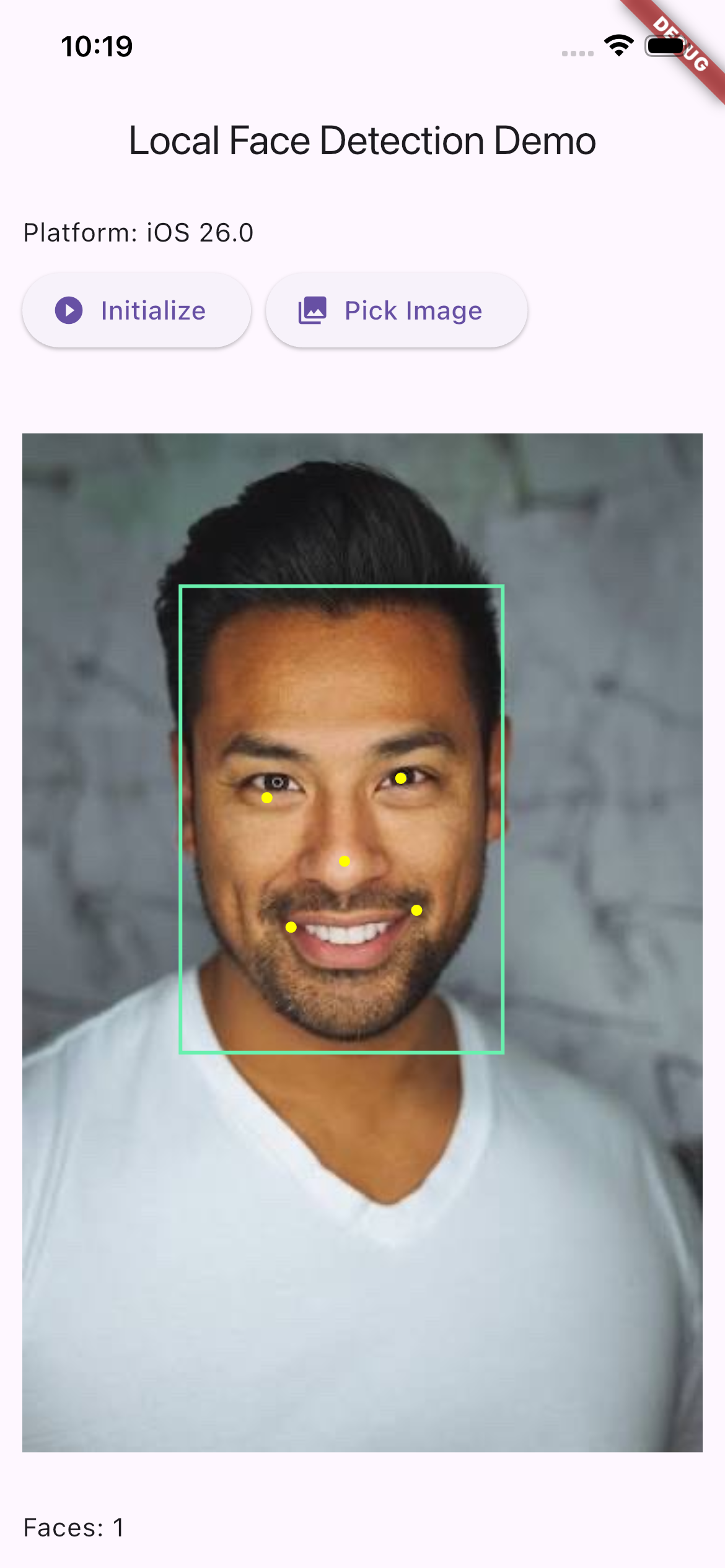 Portrait Detection Accurate single-face detection with 5-point facial landmarks |
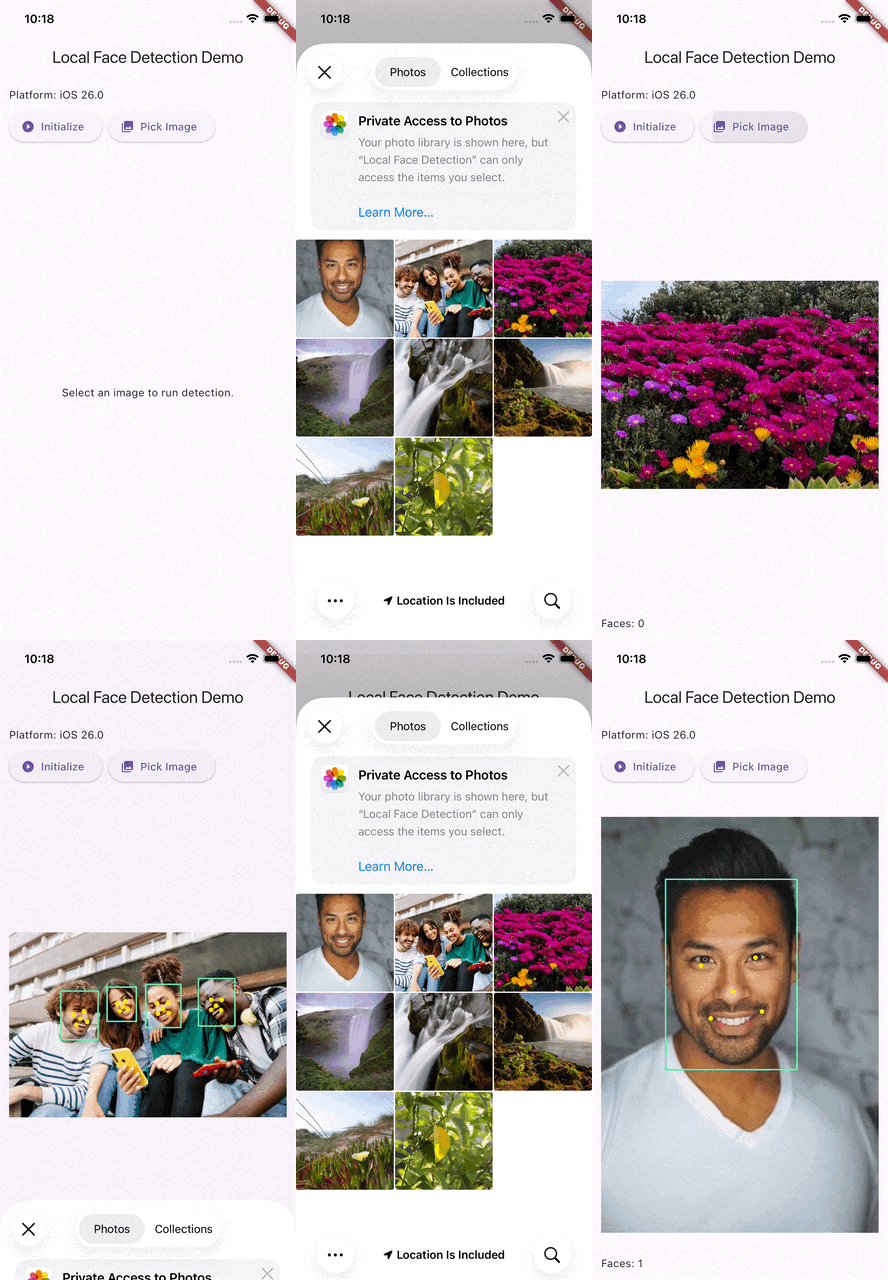 Real-Time Detection Smooth detection on live camera feed or selected images |
🚀 Getting Started
Installation
Add local_face_detection to your pubspec.yaml:
dependencies:
  local_face_detection: ^0.1.0
Run:
flutter pub get
Basic Usage
import 'package:local_face_detection/local_face_detection.dart';
import 'dart:typed_data';

// 1. Create an instance
final faceDetector = LocalFaceDetection();

// 2. Initialize the model (call once, typically during app startup)
await faceDetector.initialize();

// 3. Detect faces in an image
Uint8List imageBytes = ...; // Your image data (PNG, JPEG, etc.)
FaceDetectionResult result = await faceDetector.detectFaces(
  imageBytes,
  scoreThreshold: 0.55,  // Confidence threshold (0.0-1.0)
  nmsThreshold: 0.4,      // Non-Maximum Suppression threshold
);

// 4. Process results
if (result.hasFaces) {
  print('Found ${result.detections.length} face(s)');
  for (var face in result.detections) {
    print('Confidence: ${face.score}');
    print('Bounding box: ${face.boundingBox}');
    print('Landmarks: ${face.landmarks.length} points');
  }
}

// 5. Clean up when done
await faceDetector.dispose();
📖 API Reference
LocalFaceDetection
Methods
initialize()
Future<void> initialize()
Loads the ONNX model into memory. Must be called before detection. Safe to call multiple times (subsequent calls are no-ops).
detectFaces()
Future<FaceDetectionResult> detectFaces(
  Uint8List imageBytes, {
  double scoreThreshold = 0.55,
  double nmsThreshold = -1,
})
Runs face detection on the provided image bytes.
Parameters:
imageBytes– Raw image data (PNG, JPEG, etc.)scoreThreshold– Minimum confidence score (0.0–1.0). Default:0.55nmsThreshold– Non-Maximum Suppression IoU threshold. Use-1to disable NMS. Default:-1
Returns: FaceDetectionResult containing detected faces and metadata.
dispose()
Future<void> dispose()
Releases resources and closes the ONNX session. Call when shutting down.
FaceDetectionResult
Represents the output of a detection operation.
Properties:
List<FaceDetection> detections– List of detected facesint originalWidth– Original image widthint originalHeight– Original image heightbool hasError– Whether an error occurredbool hasFaces– Convenience getter;trueifdetectionsis non-empty
FaceDetection
Represents a single detected face.
Properties:
Rect boundingBox– Face bounding box in original image coordinatesdouble score– Confidence score (0.0–1.0)List<Offset> landmarks– 5 facial landmarks (typically: left eye, right eye, nose, left mouth corner, right mouth corner)bool isValid– Whether this detection is valid (non-zero bounding box, no errors)
🎨 Complete Example
Here's a full example showing image selection and face visualization:
import 'package:flutter/material.dart';
import 'package:local_face_detection/local_face_detection.dart';
import 'package:image_picker/image_picker.dart';
import 'dart:typed_data';

class FaceDetectionDemo extends StatefulWidget {
  @override
  _FaceDetectionDemoState createState() => _FaceDetectionDemoState();
}

class _FaceDetectionDemoState extends State<FaceDetectionDemo> {
  final _detector = LocalFaceDetection();
  Uint8List? _imageBytes;
  FaceDetectionResult? _result;
  bool _isProcessing = false;

  @override
  void initState() {
    super.initState();
    _detector.initialize();
  }

  Future<void> _pickAndDetect() async {
    final picker = ImagePicker();
    final file = await picker.pickImage(source: ImageSource.gallery);
    if (file == null) return;

    setState(() => _isProcessing = true);

    final bytes = await file.readAsBytes();
    final result = await _detector.detectFaces(bytes, scoreThreshold: 0.6);

    setState(() {
      _imageBytes = bytes;
      _result = result;
      _isProcessing = false;
    });
  }

  @override
  Widget build(BuildContext context) {
    return Scaffold(
      appBar: AppBar(title: Text('Face Detection')),
      body: Column(
        children: [
          ElevatedButton(
            onPressed: _isProcessing ? null : _pickAndDetect,
            child: Text('Pick Image'),
          ),
          if (_imageBytes != null)
            Expanded(
              child: Stack(
                children: [
                  Image.memory(_imageBytes!),
                  if (_result?.hasFaces ?? false)
                    CustomPaint(
                      painter: FaceOverlayPainter(_result!),
                    ),
                ],
              ),
            ),
          if (_result != null)
            Text('Detected ${_result!.detections.length} face(s)'),
        ],
      ),
    );
  }

  @override
  void dispose() {
    _detector.dispose();
    super.dispose();
  }
}

class FaceOverlayPainter extends CustomPainter {
  final FaceDetectionResult result;
  FaceOverlayPainter(this.result);

  @override
  void paint(Canvas canvas, Size size) {
    final scaleX = size.width / result.originalWidth;
    final scaleY = size.height / result.originalHeight;

    final boxPaint = Paint()
      ..color = Colors.green
      ..style = PaintingStyle.stroke
      ..strokeWidth = 3;

    final landmarkPaint = Paint()
      ..color = Colors.yellow
      ..style = PaintingStyle.fill;

    for (var face in result.detections) {
      // Draw bounding box
      final rect = Rect.fromLTRB(
        face.boundingBox.left * scaleX,
        face.boundingBox.top * scaleY,
        face.boundingBox.right * scaleX,
        face.boundingBox.bottom * scaleY,
      );
      canvas.drawRect(rect, boxPaint);

      // Draw landmarks
      for (var point in face.landmarks) {
        canvas.drawCircle(
          Offset(point.dx * scaleX, point.dy * scaleY),
          4,
          landmarkPaint,
        );
      }
    }
  }

  @override
  bool shouldRepaint(FaceOverlayPainter old) => old.result != result;
}
🔧 Advanced Configuration
Score Threshold
Controls the minimum confidence level for detections. Higher values reduce false positives but may miss some faces.
// Conservative (fewer false positives, may miss some faces)
await detector.detectFaces(bytes, scoreThreshold: 0.75);

// Balanced (recommended)
await detector.detectFaces(bytes, scoreThreshold: 0.55);

// Aggressive (more detections, more false positives)
await detector.detectFaces(bytes, scoreThreshold: 0.35);
Non-Maximum Suppression (NMS)
Eliminates duplicate detections of the same face. Lower IoU thresholds are more aggressive.
// Disabled (may return multiple boxes per face)
await detector.detectFaces(bytes, nmsThreshold: -1);

// Standard NMS
await detector.detectFaces(bytes, nmsThreshold: 0.4);

// Aggressive NMS (fewer overlapping boxes)
await detector.detectFaces(bytes, nmsThreshold: 0.2);
🧠 How It Works
- Preprocessing – Input images are decoded, resized to 640×480, letterboxed, and normalized
- Inference – The ONNX model processes the image and outputs:
- Heatmap (confidence scores)
- Bounding box predictions
- Facial landmark coordinates
- Postprocessing – Detections are decoded, filtered by score threshold, optionally NMS-filtered, and mapped back to original image coordinates
- Result – Returns structured
FaceDetectionResultwith bounding boxes and landmarks
The plugin uses flutter_onnxruntime for cross-platform ONNX inference.
📋 Requirements
- Flutter SDK:
>=3.0.0 - Dart:
>=2.17.0 - Android: API level 21+ (Android 5.0+)
- iOS: 16.0+
🛠️ Troubleshooting
"Model file not found" error
Ensure the model files are properly bundled:
flutter:
  assets:
    - packages/local_face_detection/assets/face_model/
Poor detection performance
- Try adjusting
scoreThreshold(lower for more detections) - Ensure good lighting and face visibility
- Images should be reasonably sized (very large images may be slower)
Memory issues
- Dispose the detector when no longer needed:
await detector.dispose() - Avoid keeping multiple instances active simultaneously
🤝 Contributing
Contributions are welcome! Please feel free to submit a Pull Request.
📄 License
This project is licensed under the MIT License - see the LICENSE file for details.
🙏 Acknowledgments
- Powered by the Qualcomm Lightweight Face Detection model
- Built with flutter_onnxruntime
📞 Support
- 🐛 Found a bug? Open an issue
- 💡 Have a feature request? Start a discussion
- 📧 Need help? Check out the example app for reference
Made with ❤️ for the Flutter community