
Flutter OCR Kit
A Flutter FFI plugin for OCR (Optical Character Recognition) with Edge AI support. Runs AI inference directly on mobile devices using ONNX Runtime and native OCR engines.
Screenshots


Demo Video
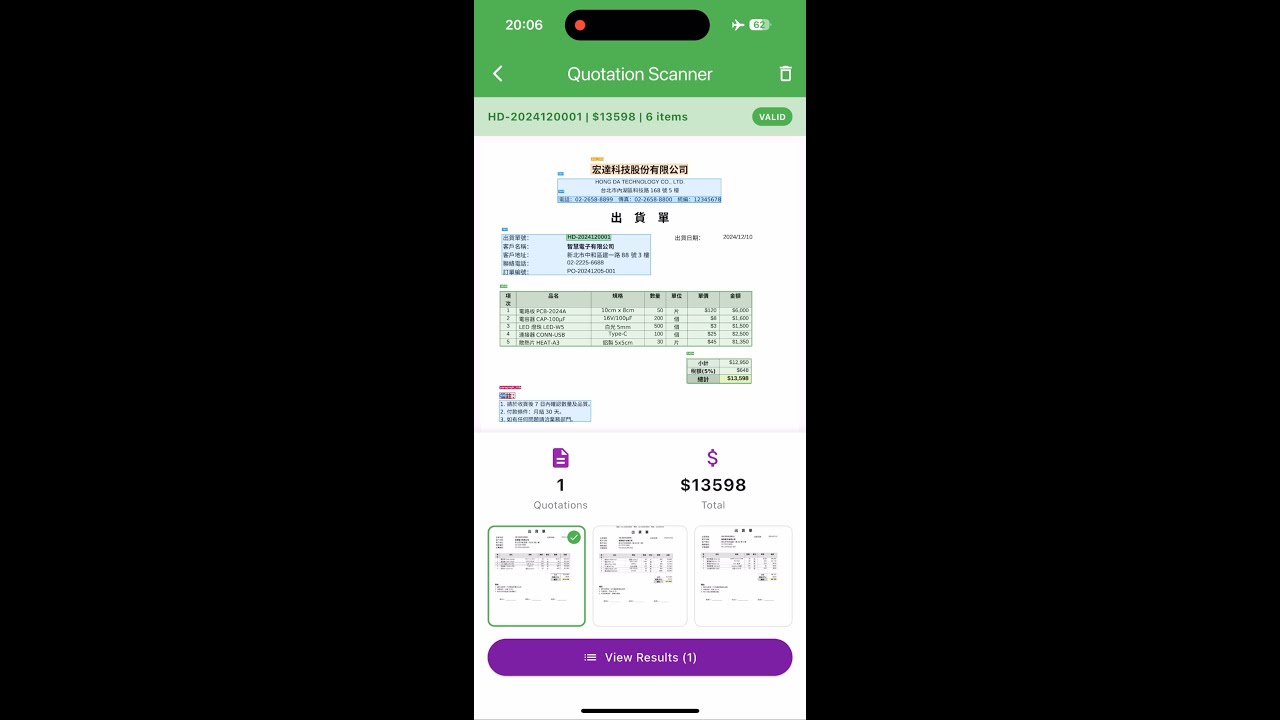
The demo includes 4 examples:
- Real-time text search - Find specific text strings in camera view
- Real-time KIE - Extract specific types (dates, phone numbers, amounts)
- Invoice scanner - Scan Taiwan e-invoices and extract invoice number, date, amount
- Quotation scanner - Scan custom delivery notes with Layout Detection + OCR to extract items, prices, totals
Features
- Native OCR Engine: Uses Apple Vision (iOS) and Google ML Kit (Android) for text recognition
- Layout Detection: ONNX-based document layout analysis (PP-Layout model) to identify tables, text blocks, titles, and figures
- Edge AI: All processing runs locally on device - no internet required
- Cross-platform: Supports both iOS and Android
Supported Platforms
| Platform | OCR Engine | Layout Detection | Native Library |
|---|---|---|---|
| iOS | Apple Vision | ONNX Runtime + OpenCV | Static (.a) |
| Android | Google ML Kit | ONNX Runtime + OpenCV | Dynamic (.so) |
Installation
1. Add Dependency
dependencies:
  flutter_ocr_kit:
    git:
      url: https://github.com/robert008/flutter_ocr_kit.git
2. Download AI Model
Download the ONNX model from GitHub Releases:
| Model | Size | Description |
|---|---|---|
| pp_doclayout_l.onnx | 123 MB | Layout detection model |
Steps:
- Create
assets/folder in your project root - Download the model file and place it in
assets/ - Register in
pubspec.yaml:
flutter:
  assets:
    - assets/pp_doclayout_l.onnx
3. Platform Setup
iOS: Run pod install in your iOS directory. The native libraries will be downloaded automatically.
Android: The native libraries are bundled with the package.
Quick Start
Basic OCR
import 'package:flutter_ocr_kit/flutter_ocr_kit.dart';

// Recognize text from image file
final result = await OcrKit.recognizeNative('/path/to/image.jpg');

print('Full text: ${result.fullText}');
for (final line in result.textLines) {
  print('${line.text} (confidence: ${line.score})');
}
Layout Detection
// Initialize layout model
OcrKit.init('/path/to/pp_doclayout_l.onnx');

// Detect document layout
final layout = OcrKit.detectLayout('/path/to/document.jpg');

for (final region in layout.detections) {
  print('${region.className}: (${region.x1}, ${region.y1}) - (${region.x2}, ${region.y2})');
}

// Release model when done to free memory
OcrKit.releaseLayout();
Note (iOS): Layout detection uses Core ML Execution Provider for faster inference, but consumes more memory (~1.5GB). Always call
OcrKit.releaseLayout()when you no longer need layout detection to free memory. To disable Core ML and use CPU only (lower memory, slower speed), modifysrc/detect/doc_detector.cppand rebuild the static library.
Supported layout classes: Text, Title, Figure, Figure caption, Table, Table caption, Header, Footer, Reference, Equation
Combined: Layout + OCR
// Step 1: Detect layout to find table regions
final layout = OcrKit.detectLayout(imagePath);
final tableRegions = layout.detections.where((d) => d.className == 'Table');

// Step 2: Run OCR on the entire image
final ocrResult = await OcrKit.recognizeNative(imagePath);

// Step 3: Filter OCR results within table regions
for (final table in tableRegions) {
  final tableTexts = ocrResult.textLines.where((line) {
    // Check if text is within table bounding box
    return line.rect.overlaps(Rect.fromLTRB(table.x1, table.y1, table.x2, table.y2));
  });
  print('Table content: ${tableTexts.map((t) => t.text).join(' ')}');
}
Example App
The example app includes 4 tabs demonstrating different use cases:
Tab 1: OCR
Basic OCR demonstration:
- Pick image from gallery or capture with camera
- Display recognized text with bounding boxes
- Show confidence scores for each text line
Tab 2: KIE (Key Information Extraction)
Simple regex-based entity extraction:
- Extract dates, amounts, phone numbers from OCR results
- Demonstrates how to post-process OCR output
Tab 3: Invoice Scanner
Taiwan e-invoice scanner demo:
- Real-time camera scanning
- Extracts invoice number (XX-12345678 format)
- Extracts amount and period
- Auto-deduplication by invoice number
Important: This is a specialized demo for Taiwan e-invoice format. It demonstrates how to combine real-time OCR with custom extraction logic. You will need to modify the extraction rules (
invoice_extractor.dart) for your own document format.
Tab 4: Quotation Scanner
Quotation/delivery note scanner demo:
- Uses Layout Detection to find Table regions
- Runs OCR within detected regions
- Extracts quotation number, date, customer, items, and totals
- Supports both photo mode and real-time camera mode
Important: This is a specialized demo for a specific quotation format. It demonstrates how to combine Layout Detection + OCR for structured document extraction. The extraction logic (
quotation_extractor.dart) is tailored for the demo documents and will need customization for your own document format.
Demo Files
Editable demo files are provided for testing and customization:
example/assets/demo/
  invoices/              # Sample Taiwan e-invoice images
    invoice_1.jpg
    invoice_2.jpg
    invoice_3.jpg
  quotations/            # Sample quotation PDFs (editable)
    宏達科技_出貨單_HD-2024120001.pdf
    宏達科技_出貨單_HD-2024120015.pdf
You can modify the PDF files to test with your own data, then convert to images for scanning.
How to Build Your Own Document Scanner
The Invoice and Quotation demos show the pattern for building custom document scanners:
-
Define your extraction rules - Create an extractor class (see
invoice_extractor.dartorquotation_extractor.dart) -
Use regex patterns - Define patterns for the fields you want to extract:
// Example: Extract order number like "ORD-2024-001234"
final orderPattern = RegExp(r'ORD-\d{4}-\d{6}');
final match = orderPattern.firstMatch(ocrResult.fullText);
- Use Layout Detection (optional) - For structured documents with tables:
// Find table regions first
final tables = layout.detections.where((d) => d.className == 'Table');
// Then extract data from table area only
- Handle confidence scores - Filter low-confidence results:
final reliableText = ocrResult.textLines.where((line) => line.score > 0.8);
Project Structure
lib/
  flutter_ocr_kit.dart              # Main API (OcrKit class)
  src/
    models.dart                     # Data models (TextLine, OcrResult, LayoutResult)
    ocr_service.dart                # Async OCR service with isolate support
    invoice_extractor.dart          # Taiwan e-invoice extraction (demo)
    quotation_extractor.dart        # Quotation extraction (demo)

src/                                # Native C++ code (FFI)
  native_lib.cpp                    # FFI exported functions
  detect/
    doc_detector.cpp                # Layout detection with ONNX
  ocr/
    ocr_engine.cpp                  # OCR engine (backup, not used by default)

ios/
  Classes/
    OcrKitPlugin.m                  # iOS plugin entry
    VisionOcr.m                     # Apple Vision OCR implementation
  static_libs/                      # Pre-built static libraries (.a)
  Frameworks/                       # ONNX Runtime & OpenCV frameworks

android/
  src/main/
    kotlin/.../OcrKitPlugin.kt      # Android plugin (ML Kit OCR)
    jniLibs/                        # Pre-built dynamic libraries (.so)
    cpp/include/                    # ONNX Runtime & OpenCV headers
API Reference
OcrKit
| Method | Description |
|---|---|
init(modelPath) |
Initialize ONNX layout model |
detectLayout(imagePath) |
Detect document layout regions |
recognizeNative(imagePath) |
OCR using native engine (Vision/ML Kit) |
recognizeFromFile(imagePath) |
OCR using ONNX model (backup) |
OcrResult
| Property | Type | Description |
|---|---|---|
fullText |
String | Concatenated text from all lines |
textLines |
List<TextLine> | Individual text lines with positions |
imageWidth |
int | Source image width |
imageHeight |
int | Source image height |
TextLine
| Property | Type | Description |
|---|---|---|
text |
String | Recognized text content |
score |
double | Confidence score (0.0 - 1.0) |
rect |
Rect | Bounding box position |
wordBoxes |
List<Rect> | Word-level bounding boxes |
LayoutResult
| Property | Type | Description |
|---|---|---|
detections |
List<LayoutDetection> | Detected regions |
count |
int | Number of detected regions |
LayoutDetection
| Property | Type | Description |
|---|---|---|
className |
String | Region type (Table, Text, Title, Figure, etc.) |
x1, y1, x2, y2 |
double | Bounding box coordinates |
score |
double | Detection confidence |
Building from Source
Prerequisites
- Flutter SDK 3.7+
- Xcode 14+ (for iOS)
- Android NDK (for Android)
Build Commands
# Run example app
cd example && flutter run

# Analyze code
flutter analyze

# Build Android native library (.so)
./scripts/build_android_so.sh

# Build iOS static library (.a)
./scripts/build_ios_static.sh
License
MIT License
Related Projects
- flutter_doclayout_kit - Document layout detection plugin