
Flutter FastLog
A super lightweight and high-performance logging package for Dart and Flutter.
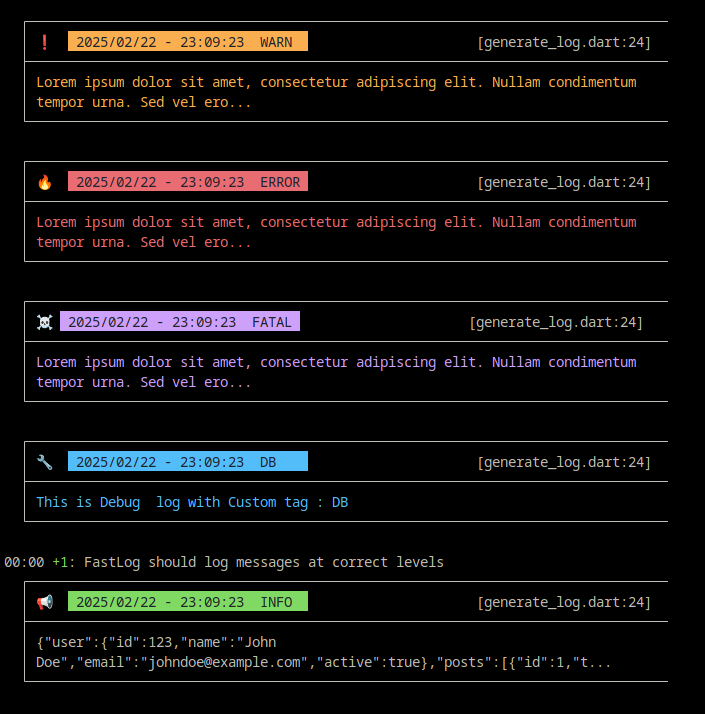
Supports customizable log levels, colors, timestamps, tag, and emojis.





Features
- Lightweight: Optimized for minimal resource usage.
- High Performance: Designed to log messages efficiently.
- Configurable: Customizable log levels, colors, and emojis.
- Easy to Use: Simple API for logging different levels of messages.
Installation
To use flutter_fastlog in your Dart or Flutter project, add the following to your pubspec.yaml file:
dependencies:
flutter_fastlog: ^0.2.0
Then run:
flutter pub get
Usage
Configuration
You can configure the logging behavior using the FastLog.config() method:
FastLog.config(
  showLog: !kReleaseMode, // Show debug logs only in dev mode, auto-disable in production
  isColored: true, // Enable ANSI color codes for better log readability
  useEmoji: true, // Use emojis as visual indicators for different log levels
  outputStyle: OutputStyle.standard, // Choose from: standard, minimal, none, colored
  prettyJson: true, // Automatically format JSON objects with indentation
  messageLimit: 300, // Truncate long messages to prevent console overflow
  showTime: true, // Display timestamp for each log entry
  showCaller: true, // Show file and line number where log was called

  // Log level filtering (in order of severity)
  logLevel: "TRACE", // Options: TRACE, DEBUG, INFO, WARN, ERROR, FATAL
  // TRACE = most verbose (shows everything)
  // DEBUG = development debugging
  // INFO = general information
  // WARN = warnings
  // ERROR = errors
  // FATAL = critical errors only
);
Log Levels
You can log messages at different levels:
FastLog.trace("This is a trace message");
FastLog.debug("This is a debug message");
FastLog.info("This is an info message");
FastLog.warn("This is a warning message");
FastLog.error("This is an error message");
FastLog.fatal("This is a fatal message");
FastLog.debug("This is Debug  log with Custom tag : DB", tag: "DB") // custom tag
Output
Example
Here’s a simple example of logging with flutter_fastlog:
import 'package:flutter_fastlog/flutter_fastlog.dart';

void main() {
// Configure logging
FastLog.config(
    showLog: !kReleaseMode,
    isColored: true,
    useEmoji: true,
    prettyJson: true,
    showTime: true,
    showCaller: true,
    messageLimit: 300,
    logLevel: "DEBUG",
);

// Log messages at different levels
FastLog.debug("This is a debug message");
FastLog.info("This is an info message");
FastLog.error("This is an error message");
FastLog.debug("This is Debug  log with Custom tag : DB", tag: "DB") // custom tag
}
Contribution
Contributions are welcome! If you have suggestions or improvements, feel free to open an issue or pull request on the GitHub repository.
License
This package is open source and available under the MIT License.