
Floaty_chathead
One thing that i always love was the simplicity that messenger had using Chatheads.
And for that reason this plugin was created with all the love that us the developers have :heartbeat:
null-safety version
dependencies:
  floaty_head: ^1.1.0
If you don't wanna use the null-safety, please use the version: 1.1.0
dependencies:
  floaty_head: ^1.1.0
also if you need to add interaction between your code and any button, please add this to your Kotlin/Java class.
override fun configureFlutterEngine(@NonNull flutterEngine: FlutterEngine) {
        GeneratedPluginRegistrant.registerWith(flutterEngine);
        Application().onCreate()
    }
Application.kt
class Application : FlutterApplication(), PluginRegistry.PluginRegistrantCallback {
      override fun onCreate() {
          super.onCreate()
          FloatyHeadPlugin().setPluginRegistrant(this)
          Managment.pluginRegistrantC = this
      }

     override fun registerWith(registry: PluginRegistry) {
        FloatyHeadPlugin().registerWith(registry.registrarFor(this.packageName))
     }
  }
for any doubt please check the example folder.
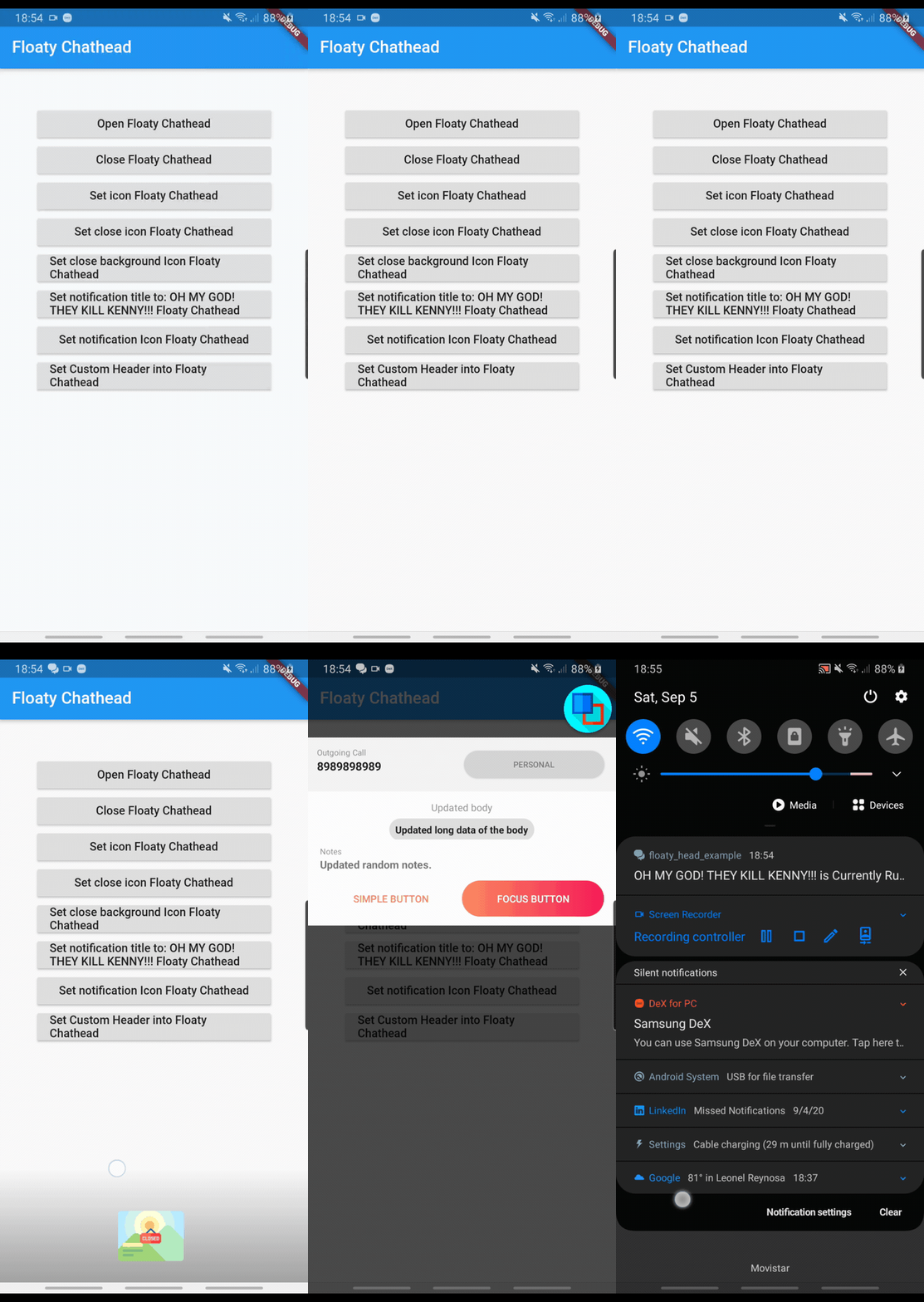
Examples
To set a header with any text or button that you desire the only thing that you need to add is the following code. Like any other CustomWidget!! :D
final header = FloatyHeadHeader(
    title: FloatyHeadText(
        text: "Outgoing Call", fontSize: 10, textColor: Colors.black45),
    padding: FloatyHeadPadding.setSymmetricPadding(12, 12),
    subTitle: FloatyHeadText(
        text: "8989898989",
        fontSize: 14,
        fontWeight: FontWeight.bold,
        textColor: Colors.black87),
    decoration: FloatyHeadDecoration(startColor: Colors.grey[100]),
    button: FloatyHeadButton(
        text: FloatyHeadText(
            text: "Personal", fontSize: 10, textColor: Colors.black45),
        tag: "personal_btn"),
  );
You can also setup your body.
final body = FloatyHeadBody(
    rows: [
      EachRow(
        columns: [
          EachColumn(
            text: FloatyHeadText(
                text: "Updated body", fontSize: 12, textColor: Colors.black45),
          ),
        ],
        gravity: ContentGravity.center,
      ),
      EachRow(columns: [
        EachColumn(
          text: FloatyHeadText(
              text: "Updated long data of the body",
              fontSize: 12,
              textColor: Colors.black87,
              fontWeight: FontWeight.bold),
          padding: FloatyHeadPadding.setSymmetricPadding(6, 8),
          decoration: FloatyHeadDecoration(
              startColor: Colors.black12, borderRadius: 25.0),
          margin: FloatyHeadMargin(top: 4),
        ),
      ], gravity: ContentGravity.center),
      EachRow(
        columns: [
          EachColumn(
            text: FloatyHeadText(
                text: "Notes", fontSize: 10, textColor: Colors.black45),
          ),
        ],
        gravity: ContentGravity.left,
        margin: FloatyHeadMargin(top: 8),
      ),
      EachRow(
        columns: [
          EachColumn(
            text: FloatyHeadText(
                text: "Updated random notes.",
                fontSize: 13,
                textColor: Colors.black54,
                fontWeight: FontWeight.bold),
          ),
        ],
        gravity: ContentGravity.left,
      ),
    ],
    padding: FloatyHeadPadding(left: 16, right: 16, bottom: 12, top: 12),
  );
and even the footer!!!
final footer = FloatyHeadFooter(
    buttons: [
      FloatyHeadButton(
        text: FloatyHeadText(
            text: "Simple button",
            fontSize: 12,
            textColor: Color.fromRGBO(250, 139, 97, 1)),
        tag: "simple_button",
        padding: FloatyHeadPadding(left: 10, right: 10, bottom: 10, top: 10),
        width: 0,
        height: FloatyHeadButton.WRAP_CONTENT,
        decoration: FloatyHeadDecoration(
            startColor: Colors.white,
            endColor: Colors.white,
            borderWidth: 0,
            borderRadius: 0.0),
      ),
      FloatyHeadButton(
        text: FloatyHeadText(
            text: "Focus button", fontSize: 12, textColor: Colors.white),
        tag: "focus_button",
        width: 0,
        padding: FloatyHeadPadding(left: 10, right: 10, bottom: 10, top: 10),
        height: FloatyHeadButton.WRAP_CONTENT,
        decoration: FloatyHeadDecoration(
            startColor: Color.fromRGBO(250, 139, 97, 1),
            endColor: Color.fromRGBO(247, 28, 88, 1),
            borderWidth: 0,
            borderRadius: 30.0),
      )
    ],
    padding: FloatyHeadPadding(left: 16, right: 16, bottom: 12),
    decoration: FloatyHeadDecoration(startColor: Colors.white),
    buttonsPosition: ButtonPosition.center,
  );
DONE:
xPERMISSIONS ON FIRST RUN.xissue with button clicked to retrieve the tag of the button pressed from android into flutter.xCustom Views for Header, Body, Footer.xCustomization of Notification Text.xCustomization of Notification Icon.xCustomization of Bubble Icon.xCustomization of Close Icon.xCustomization of Close Background Icon.xFloatyHead runs even when the app is killed.xAdded documentation to all the classes used in DART and KOTLIN.
Contributing
All contributions are welcome!
If you like this project then please click on the :star2: it'll be appreciated or if you wanna add more epic stuff you can submite your pull request and it'll be gladly accepted :ok_man:
or if you have an idea please let me know to my email: [email protected].