
FFmpegKit Extended for Flutter

Translations
ffmpeg-kit-extended is a comprehensive Flutter plugin for executing FFmpeg, FFprobe, and FFplay 9.0.1 API commands on Android, iOS, macOS, Linux, Windows, and WebAssembly web builds. Native platforms use Dart FFI to interact directly with FFmpeg libraries.
The current minimum requirements are Flutter 3.47.0 and Dart 3.12.0.
If you like the project and are using it in your app give it a ⭐ on ffmpeg-kit-builders and ffmpeg-kit-extended, and a 👍 on pub.dev. It helps a lot 🙏! Happy coding 🚀!
1. Features
- Cross-Platform Support: Works on
Android,iOS,macOS,Linux,Windows, and WebAssembly-enabledWebbuilds.- Android: Full video playback support with native surface rendering.
- Supported native artifact architectures are
arm(armeabi-v7a),arm64(arm64-v8a),ia32(x86), andx64(x86_64).
- Supported native artifact architectures are
- iOS & macOS: High-performance video playback with
CVPixelBufferand Metal integration.- iOS: Supports physical
devicesandsimulators;x86_64is selected only when the requested XCFramework slice exists.
- iOS: Supports physical
- Linux: Full video playback support using Flutter pixel-buffer textures fed by FFplay frame callbacks.
- Supported artifact architectures are
arm64andx86_64. - Windows: Supported artifact architectures are
arm64andx86_64. - Web: Stages the configured base/small/LGPL
wasm32runtime through the Flutter build hook and renders FFplay RGBA frames through the unified Flutter surface API. Build withflutter build web --wasm.
- Android: Full video playback support with native surface rendering.
FFmpeg,FFprobe&FFplay: Latest9.0.1 APIsupport for media manipulation, information retrieval, and audio/video playback.- Video Playback: Complete cross-platform video playback with unified surface API.
- Real-time Streaming: Position and video dimension streams for live playback monitoring.
- Dart FFI: Direct native bindings for optimal performance.
- Asynchronous Execution: Run long-running tasks without blocking the UI thread.
- Parallel Execution: Run multiple tasks in parallel.
- Callback Support: detailed hooks for logs, statistics, and session completion.
- Session Management: Full control over execution lifecycle (start, cancel, list).
- Extensible: Designed to allow custom native library loading and configuration.
- Full package Introspection API: Get detailed information about the package, including version, build date, and available muxers, demuxers, encoders, decoders, filters, etc.
- Deploy Custom Builds: You can deploy custom builds of ffmpeg-kit-extended. See: github.com/akashskypatel/ffmpeg-kit-builders
Platform Support
| Platform | Status | Video Playback | Architecture | Minimum Requirements |
|---|---|---|---|---|
| Android (and Android TV) | ✅ Supported | ✅ Native | armv7, arm64, x86, x86_64 | API 26+ |
| iOS (and Simulator) | ✅ Supported | ✅ Texture | arm64; x86_64 when present | iOS 13+ |
| macOS | ✅ Supported | ✅ Texture | arm64, x86_64 | macOS 13+ |
| Linux | ✅ Supported | ✅ Texture | arm64, x86_64 | glibc 2.28+ |
| Windows | ✅ Supported | ✅ Texture | arm64, x86_64 | Windows 8+ |
| Web (Wasm) | ✅ Supported | ✅ RGBA frames | wasm32 | Flutter Wasm build |
You will have to update your app's minimum requirements on your own to match the requirements above.
Flutter Web uses the same public API and shared session implementation as native platforms. The Web backend invokes the generated Wasm bindings and routes completion, log, and statistics callbacks through the generated callback bridge. FFplay copies RGBA frames from Wasm memory into Flutter images; it does not use a native SDL window or texture.
🎬 Demo

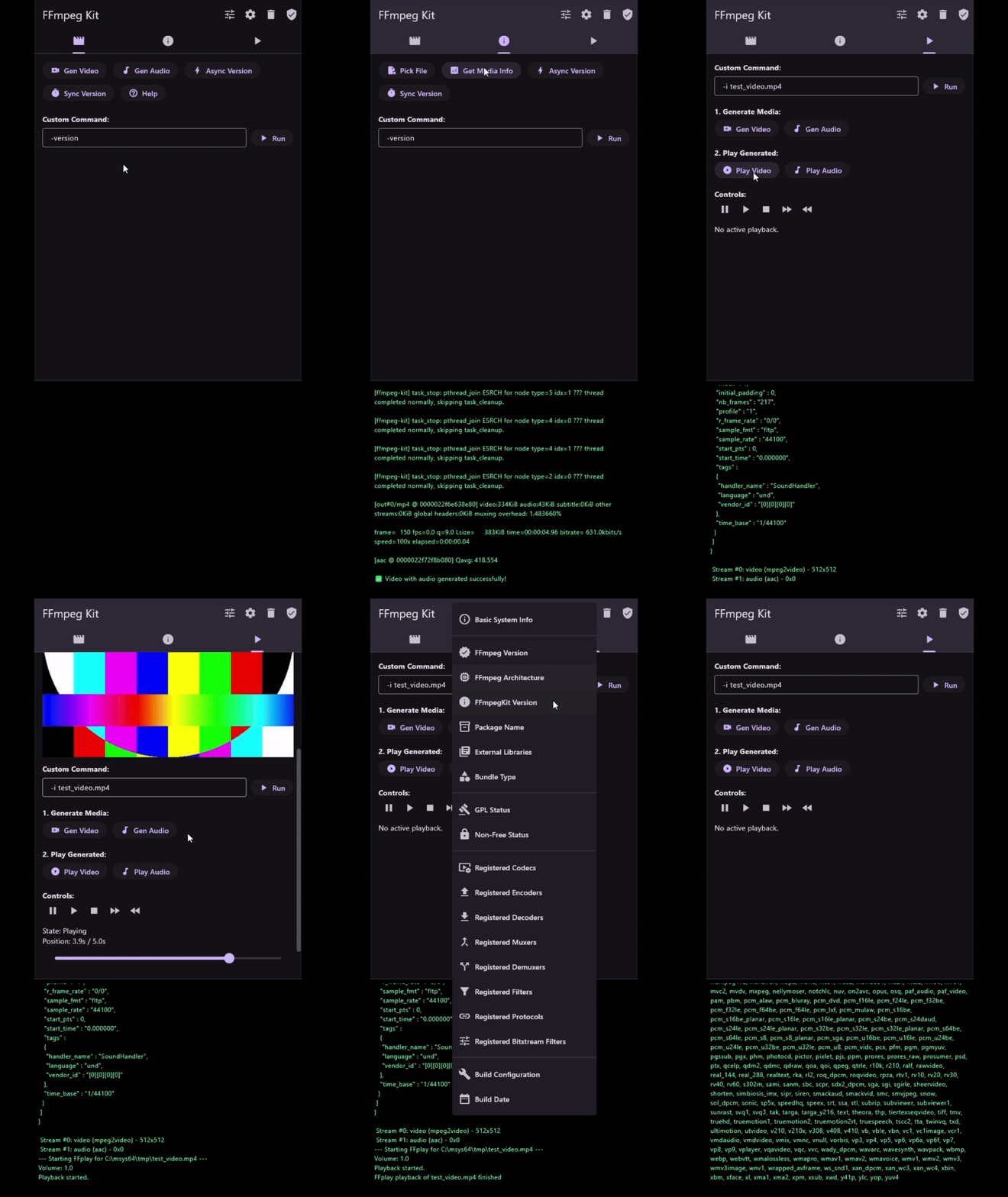
2. Installation
-
Install the package:
flutter pub add ffmpeg_kit_extended_flutter -
Add the official Hooks
user_definessection to the workspace-root (or standalone app-root)pubspec.yaml:hooks: user_defines: ffmpeg_kit_extended_flutter: type: "base" # native pre-bundled builds: debug, base, full, audio, video, video_hw gpl: true # enable to include GPL libraries. WARNING: Make sure you understand what GPL license means before enabling. Check https://www.ffmpeg.org/legal.html for more information. small: true # enable to use smaller builds # Preserve platform override keys under this same map. # windows: "path/to/ffmpeg-kit/libraries" # ios: "https://path/to/bundle.xcframework.zip"hooks.user_definesis the primary configuration path for native and Web builds. Values from the workspace-root pubspec participate in Hooks cache invalidation. Relative local override paths are resolved from that pubspec and registered as hook dependencies. If both configuration sources are present,hooks.user_defineswins and the legacy resolver is not consulted; this precedence is the same for every supported platform.A platform override selects the artifact directly and takes precedence over
type,gpl, andsmall; those selectors apply only when the current target has no override. Web useswebfirst, then itswasmalias. No additional flag or environment variable is required. An invalid override fails the build instead of falling back to a generated release URL.Platform overrides may be local paths or HTTP(S) URLs. Only
http://andhttps://are accepted for remote overrides; URL-like schemes such asftp://fail explicitly instead of being treated as local files. When the hook executes, remote overrides are refreshed and cached by their full URL. Remote URLs are not filesystem dependencies; URL changes invalidate through Hooks inputs, while a server-side change at an unchanged URL is not observed while Hooks skips the cached hook invocation. If the hook runs and the bytes change, the matching extracted artifact is discarded; identical bytes may reuse the existing extraction. Prefer versioned or content-addressed URLs for reproducible builds. Local override files remain filesystem dependencies.Native local or remote archives must preserve the platform layout: Android requires
jni/<abi>/libffmpegkit.so, Linux requires one runtime directory containinglibffmpegkit.so, Windows requires one containinglibffmpegkit.dll, and Apple archives must contain exactly one FFmpegKit.xcframework.For older applications, the legacy
ffmpeg_kit_extended_configsection is still accepted as a bounded migration fallback on every supported platform. It remains compatible with the existing native and Web platform override keys, but it does not override an explicithooks.user_definesvalue:ffmpeg_kit_extended_config: type: "video" gpl: true # == OR == # ------------------------------------------------------------- # You can specify remote or local path to libffmpegkit libraries for each platform # This allows you to deploy custom builds of libffmpegkit. # See: https://github.com/akashskypatel/ffmpeg-kit-builders # Example: # windows: "path/to/ffmpeg-kit/libraries" # ios: "https://path/to/bundle.xcframework.zip"Note: Native libraries and the selected Web/Wasm runtime are resolved during the build process using Dart Hooks. Web builds stage the selected runtime at
assets/packages/ffmpeg_kit_extended_flutter/wasm/in the consuming app. Default bundles, non-default bundle selections, and explicitweb/wasmoverrides all use this stable build-hook staging path; Dart DataAssets are not required. No manual configuration script is required.Dart Pub Workspaces: Put the official
hooks.user_defines.ffmpeg_kit_extended_fluttermap in the workspace-rootpubspec.yaml; do not rely on an app-memberhooks.user_definesmap unless the Flutter integration proves that placement is forwarded to dependency hooks. When no official userDefines are supplied, the legacy resolver considers the package-config root and in-root package entries, accepting configuration only from package-graph roots with a normal dependency path toffmpeg_kit_extended_flutter; arbitrary nested local/path packages and dev-only dependency paths are ignored. If a configured package candidate exists but.dart_tool/package_graph.jsonis unavailable, rerunflutter pub getor define the configuration in the root pubspec. If multiple dependent workspace roots could supply package-specific legacy configuration, the build fails rather than guessing. If no applicable configuration remains, the default base LGPL small bundle is used. Legacy relative local override paths resolve from the pubspec that defines them and are dependency-tracked. Flutter Web keeps the same configuration precedence. App-scoped configuration stages only into that app; shared workspace-root configuration resolves package-graph roots that depend onffmpeg_kit_extended_flutterand stages into those Web apps deterministically.For example, in the workspace root:
hooks:
  user_defines:
    ffmpeg_kit_extended_flutter:
      type: "video"
      gpl: true
Apple slice selection: The build hook reads the XCFramework
AvailableLibrariesmetadata and matches the target platform, simulator/device variant, and requested architecture. iOS device builds usearm64; iOS simulator builds usearm64and usex86_64only when the selected XCFramework actually provides that slice. macOS builds select a compatiblearm64orx86_64entry. The prebuilt iOS bundle supportsarm64; simulatorx86_64is supported only when a custom XCFramework actually provides that slice. An arm64-only simulator artifact is not labeled universal and cannot be copied or relabeled asx86_64. If Flutter requests simulatorx86_64and the artifact has no such slice, the hook fails early with the available-slice diagnostic. PodfileEXCLUDED_ARCHSsettings affect downstream Xcode/CocoaPods targets; they do not choose the architecture requested from the Dart build hook or create native hook assets.Architecture validation: Android accepts
arm,arm64,ia32, andx64; Apple acceptsarm64andx64; Linux and Windows acceptarm64andx64. Any other target architecture fails before artifact download or extraction with the requested architecture and supported set. Custom archives must contain the requested architecture; the hook never substitutes a different architecture or relabels a binary.Build Hook Troubleshooting
Build-hook output is prefixed with
FFmpegKit [Build Hook]and includes the target/SDK, configuration source, selected bundle, artifact/cache path, XCFramework slice, source architectures, and verified output architecture. Use those lines to distinguish a wrong bundle or slice from an Xcode architecture setting.- If the selected bundle or platform override is wrong, check the reported
Configuration source(hooks.user_defines, the legacyffmpeg_kit_extended_config, ordefaults) and theBundle/Artifactlines. Explicithooks.user_definesvalues take precedence. - The
Artifact cacheline identifies the runner-owned shared cache. Change the configuration and rebuild; useflutter cleanwhen a remote artifact or release version must be downloaded again. - For Apple failures, compare the requested target/SDK and architecture with
XCFramework slice,Source architectures, andOutput architecture. Xcode or PodfileEXCLUDED_ARCHSsettings cannot manufacture a missing native slice; the hook must receive a bundle that contains the requested architecture.
Custom Web/Wasm ZIPs or directories must contain exactly one coherent runtime directory containing both
ffmpegkit.mjsandffmpegkit.wasm. The hook rejects split files from different directories and ambiguous layouts with multiple complete pairs. Local Web overrides may be an archive or a directory; remote Web overrides are HTTP(S) archive URLs. Native overrides keep their documented platform-specific archive formats.For offline validation against a locally built native ABI, configure the target platform key with its local artifact path. The hook resolves only that path. To use a hosted custom artifact, set the same key to its direct HTTP(S) download URL; only that configured source is resolved.
Hooks runner lock recovery
Dart Hooks acquires the runner lock before
hook/build.dartexecutes. A.dart_tool/hooks_runner/.../.lockfailure is therefore a runner or filesystem problem, not a package-level lock that this hook can repair. The package deliberately does not delete or acquire that lock, shorten its timeout, or retry runner locking.If no Flutter or Hooks process is still running, recover with
flutter cleanand, when necessary, targeted cleanup of the affected.dart_tool/hooks_runnerentry. Do not remove an active runner directory. If locking remains unreliable on a network or virtualized filesystem, move the checkout and build cache to a local filesystem or report the limitation to the Hooks/Flutter upstream rather than changing package hook code.Important: If you change the selected bundle configuration, rerun the build. Local override files are dependency-tracked, so replacing a local bundle is picked up without
flutter clean. - If the selected bundle or platform override is wrong, check the reported
-
Import the package in your Dart code:
import 'package:ffmpeg_kit_extended_flutter/ffmpeg_kit_extended_flutter.dart'; -
Initialize the plugin at application startup before calling any API:
void main() async { WidgetsFlutterBinding.ensureInitialized(); await FFmpegKitExtended.initialize(); runApp(MyApp()); }Important: Any FFmpeg, FFprobe, or FFplay API call made before
initialize()completes will throw aStateError.Initialization is idempotent after success, and concurrent callers share the same in-flight attempt. If Web initialization fails, the failed attempt is rejected and a later
initialize()call starts a fresh attempt.
Web build and deployment
For local Web Wasm development, use Flutter's cross-origin isolation option so pthread-enabled Wasm can transfer shared memory to its workers:
flutter run -d web-server --cross-origin-isolation
Build Flutter Web with Wasm:
flutter clean
flutter build web --wasm
Note that the WebAssembly bundle has pthread support by default. For a non-pthread build, a custom build of the WebAssembly dependencies and bundle is required using github.com/akashskypatel/ffmpeg-kit-builders.
On every Flutter Web build, the hook resolves the configured wasm32 runtime, verifies official/downloaded artifacts as applicable, requires one coherent ffmpegkit.mjs + ffmpegkit.wasm pair, and stages that pair together with the loader, callback bridge, and callback runtime under assets/packages/ffmpeg_kit_extended_flutter/wasm/. The same path is used for the default runtime, non-default bundle selections, local archive/directory overrides, and HTTP(S) overrides on stable Flutter 3.47; Dart DataAssets are not required. The hook stages into both the consuming app's source web/ tree (for flutter run) and generated build/web/ tree, updating files only when content changes. Threaded Wasm bundles require cross-origin isolation. Serve the application with these HTTP response headers:
Cross-Origin-Opener-Policy: same-origin
Cross-Origin-Embedder-Policy: require-corp
Confirm that window.crossOriginIsolated is true before using the WebAssembly bundle. All Wasm, JavaScript, worker, and other fetched assets must be same-origin or explicitly compatible with the selected COEP policy. See the architecture and maintenance handoff for more details.
Temporary Web/Wasm file access
FFmpegKitWebFiles copies binary data between Dart and the initialized
Emscripten filesystem. It is available only on Web/Wasm; native calls throw
UnsupportedError. Every path must be an absolute flat filename directly
under /tmp/. Files remain in browser memory until deleted or the page/runtime
is reloaded, so account for the browser's available memory when importing large
media. The selected runtime must export FS with writeFile, readFile,
unlink, and stat; otherwise the API throws a StateError explaining the
missing export.
import 'dart:typed_data';

await FFmpegKitExtended.initialize();

const inputPath = '/tmp/input.mp4';
final Uint8List browserFileBytes = await pickedFile.readAsBytes();
FFmpegKitWebFiles.writeFile(inputPath, browserFileBytes);
final probeSession = await FFprobeKit.getMediaInformationAsync(inputPath);

const outputPath = '/tmp/output.mp4';
// Read after the FFmpeg command has successfully created the output.
final outputBytes = FFmpegKitWebFiles.readFile(outputPath);
FFmpegKitWebFiles.deleteFile(inputPath);
Use a browser file picker to obtain the input Uint8List and a user-triggered
browser save action for outputBytes. The pinned streaming Wasm runtime supports
direct HTTP(S) and HLS input through the async APIs, including bounded recording.
See the Web streaming guide
for the exact runtime requirement and browser limits. Direct RTMP/RTMPE and RTSP
remain unsupported.
Flutter test-target limitation
Flutter evaluates the native-assets build hook for the host
TargetPlatform.tester when running tests. Therefore flutter test cannot
make this package's hook select assets for a non-host target. This applies to
all target platforms. Use the platform-specific build or run command, for
example, flutter build web --wasm and a served Web application for Web asset
validation.
Wasm browser behavior is validated by serving the built Web output and running the browser smoke checks locally. The hosted workflow runner does not provide the headful/headless browser environment required by these checks, so a workflow build or compile result is not a browser-runtime result. Do not add a SDK/toolchain workaround for this limitation; record the limitation and keep the goal blocked when the required local tool is unavailable.
When validating an unpublished local ABI, the custom Web fixture points at the local builder archive rather than a hosted or remotely staged binary:
\\wsl.localhost\ManyLinux\home\vscode\ffmpeg-kit-builders\prebuilt\wasm-wasm32\releases\bundle-base-wasm-wasm32-static-lgpl.zip
The fixture staging tests verify archive discovery and coherent asset
selection only. They are synthetic hook tests, not executable-runtime
evidence. Runtime evidence comes from building and serving the example's
lib/web_runtime_smoke.dart target, then running its browser smoke script with
the cross-origin-isolation headers enabled:
flutter build web --wasm --release --target lib/web_runtime_smoke.dart
node web_static_server.mjs build/web 8080
node web_runtime_smoke.mjs http://127.0.0.1:8080 wasm
Use the local archive override for this check whenever the native ABI is not published. Stop the temporary server after the smoke run and remove any temporary package-manager or junction artifacts created to provide Playwright.
The package intentionally keeps ffigen_js: ^0.0.16-pre because no stable
release is available. A publication dry-run warning caused solely by that
direct prerelease dependency is the accepted release exception; do not replace
the dependency or invent a toolchain workaround to silence it.
2.1 Platform specific configuration
-
iOS and iOS Simulator - If a downstream CocoaPods target requests an architecture absent from the selected artifact, add a targeted post-install exclusion. Do not use exclusions to substitute for a missing XCFramework slice or to blanket-disable supported simulator/device architectures:
post_install do |installer|
  installer.pods_project.targets.each do |target|
    flutter_additional_ios_build_settings(target)
    target.build_configurations.each do |config|
       # Example only: exclude i386 when that legacy architecture is the
       # actual unsupported target. Keep x86_64/arm64 when provided.
       config.build_settings['EXCLUDED_ARCHS[sdk=iphonesimulator*]'] = 'i386'
    end
  end

  installer.generated_projects.each do |project|
    project.targets.each do |target|
      target.build_configurations.each do |config|
         config.build_settings['EXCLUDED_ARCHS[sdk=iphonesimulator*]'] = 'i386'
        config.build_settings['ONLY_ACTIVE_ARCH'] = 'YES'
      end
    end
    project.save
  end
end
2.2 Pre-bundled Builds
debug is supported for native prebuilt targets where available. The
automatic prebuilt Flutter Web debug artifact is not supported because the
published artifact is browser-incompatible. For Web debug/custom development,
provide an explicit web/wasm override containing one coherent
ffmpegkit.mjs + ffmpegkit.wasm pair.
- base: Basic build with core FFmpeg libraries, libjsoncpp, SDL2, and platform defaults.
- full: Full build with all platform-compatible FFmpeg libraries. See: github.com/akashskypatel/ffmpeg-kit-builders?tab=readme-ov-file#supported-external-libraries
- audio: Build with audio-only FFmpeg libraries.
- video: Build with video-only FFmpeg libraries.
- video_hw: Build with hardware-accelerated video FFmpeg libraries.
Native bundle types are debug, base, full, audio, video, and video_hw.
The legacy streaming value is accepted as an alias for video.
2.2 Feature Matrix
GPL licensing
⚠️ WARNING ⚠️: Enabling GPL libraries makes your application GPL-licensed as well and may face additional challenges during app store approval. GPL license requires your application to be open-source and distributed under the same license.
It is recommended to use LGPL bundle if you are not familiar with GPL licensing.
- Libraries marked 10 Enabling any GPL library makes the resulting FFmpeg binary GPL-licensed and non-redistributable under a permissive license.
- Audio+: libbs2b, libcdio, librubberband, libjack (Linux)
- Video+: libx264, libx265, libdavs2, libdvdnav, libdvdread, libxavs, libxavs2, libxvid (Linux), frei0r, libvidstab
- Video+HW+: v4l2-m2m (Linux)
- Video+ (Desktop only): avisynth
AI
libopenvinoandlibtensorfloware only available on Desktop builds (MacOS,Linux, andWindows).libtorchis only available onLinuxandMacOsbuilds (Windowsnot supported due ABI mismatch).libonnxruntimeis not available onx86_64MacOS.- Only CPU AI libraries are vendored with pre-built bundles. GPU libraries must be custom deployed.
| Feature | Base | Audio | Video | Video+Hardware | Full |
|---|---|---|---|---|---|
| Video | x | x | x | ||
| Audio | x | x | x | x | |
| Streaming (native bundle support) | x | x | x | x | |
| Hardware | x | x | |||
| AI* | x* | ||||
| HTTPS | * | x | x | x | x |
| Platform* | x | x | x | x | x |
| Other* | x |
- AI features are not supported on all platforms. You must deploy your own custom build of ffmpeg-kit-extended to enable certain AI features.
- See Supported External Libraries for more information.
| Runtime | Network stream input/recording |
|---|---|
| Web (Wasm), pinned streaming runtime | Async HTTP(S)/HLS input and bounded recording; no RTMP/RTMPE or RTSP |
The bundle-level Streaming row covers native protocols. Web input requires the pinned streaming runtime and the browser's CORS and cross-origin isolation setup.
-
Platform features are built-in platform libraries that FFmpeg support like AVFounation, VideoToolbox, etc. on apple platforms or DirectX, MediaFoundation on Windows.
-
HTTPS features are enabled by default for Platforms that have built-in HTTPS support like Windows or Apple. For Linux and Android OpenSSL is enabled by default.
-
Other features are additional features that are not covered by the above categories. See Supported External Libraries for more information.
-
To deploy a custom build see ffmpeg-kit-builders.
Bundle Sizes
Note: Values are uncompressed libffmpegkit binary sizes in decimal MB. Each range shows the measured LGPL minimum and GPL maximum for the v0.11.2 release assets.
See the bundle distribution page for the source release assets: https://github.com/akashskypatel/ffmpeg-kit-builders/releases
Apple table entries measure the uncompressed framework binaries and exclude debug-symbol files.
| Bundle Type | Android (MB) | iOS (MB) | macOS (MB) | Linux (MB) | Windows (MB) |
|---|---|---|---|---|---|
| (Universal) | (Universal) | (Universal) | |||
| debug | 81.2-82.0 | 37.8-38.2 | 41.6-42.0 | 133.5-139.6 | 480.4-490.8 |
| base | 73.4-93.0 | 36.0-48.6 | 39.8-54.3 | 31.6-44.2 | 41.3-55.2 |
| audio | 102.6-179.1 | 74.6-126.0 | 79.8-134.2 | 49.3-86.7 | 82.9-124.1 |
| video | 233.0-353.0 | 160.7-227.4 | 183.5-255.5 | 164.6-232.1 | 215.0-281.1 |
| video_hw | 239.4-359.9 | 163.8-230.7 | 186.8-259.0 | 171.3-239.2 | 219.0-285.4 |
| full | 267.1-387.5 | 182.0-248.8 | 223.3-295.4 | 209.0-276.2 | 248.4-314.8 |
3. Usage
3.1 Basic Command Execution
FFmpegKit.execute(...) is blocking and returns a terminal session after the
command and cleanup finish. Inspect its result immediately; it does not need
SessionQueueManager().waitForAll(). Use executeAsync(...) for long-running
work on the Flutter UI isolate. The asynchronous Future is managed by
SessionQueueManager and honors its concurrency limit.
Execute an FFmpeg command asynchronously:
import 'package:ffmpeg_kit_extended_flutter/ffmpeg_kit_extended_flutter.dart';

FFmpegKit.executeAsync('-i input.mp4 -c:v libx264 output.mp4', onComplete: (session) async {
  final returnCode = session.getReturnCode();

  if (ReturnCode.isSuccess(returnCode)) {
    print("Command success");
  } else if (ReturnCode.isCancel(returnCode)) {
    print("Command cancelled");
  } else {
    print("Command failed with state ${session.getState()}");
    final failStackTrace = session.getFailStackTrace();
    print("Stack trace: $failStackTrace");
  }
});
3.2 Retrieving Media Information
Use FFprobeKit to get detailed metadata about a media file:
import 'package:ffmpeg_kit_extended_flutter/ffmpeg_kit_extended_flutter.dart';

FFprobeKit.getMediaInformationAsync('path/to/video.mp4', onComplete: (session) {
  final info = session.getMediaInformation();
  if (info != null) {
      print("Duration: ${info.duration}");
      print("Format: ${info.format}");
      for (var stream in info.streams) {
          print("Stream type: ${stream.type}, codec: ${stream.codec}");
      }
  }
});
3.3 Handling Logs and Statistics
You can register logs and statistics callbacks for improved monitoring:
FFmpegKit.executeAsync(
  '-i input.mp4 output.mkv',
  onComplete: (session) { /* Complete Callback */ },
  onLog: (log) {
    print("Log: ${log.message}");
  },
  onStatistics: (statistics) {
    print("Progress: ${statistics.time} ms, size: ${statistics.size}");
  },
);
Callback transport and redirection
Live log callbacks use the single structured callback ABI, carrying the session ID, native sequence, level, and copied message. Normal delivery does not poll the complete native log history. Native history getters remain available for public inspection and bounded terminal reconciliation when an event arrives late; there is no legacy callback-ABI fallback.
Callback bridge installation is demand-driven: completion transport is retained
for every asynchronous execution, while log and statistics transport is leased
only while a corresponding consumer exists. Completion is therefore
independent of optional log/statistics consumers. FFmpegKitConfig.disableRedirection()
remains authoritative for native capture and forwarding;
installing a wrapper callback bridge does not implicitly re-enable redirection.
The wrapper copies each accepted native message into its managed value and releases the native payload internally. No borrowed native pointer is exposed to Dart. Custom Web/Wasm runtimes use the same stable build-hook staging path as the default runtime, so stable Flutter 3.47 supports custom selection without Dart DataAssets.
3.4 Session Management
All executions return a Session object which can be used to control the task:
// Cancel a specific session
FFmpegKit.cancel(session);

// Cancel all active sessions
FFmpegKitExtended.cancelAllSessions();

// List all sessions
final sessions = FFmpegKitExtended.getSessions();
// OR list only FFmpeg sessions
final ffmpegSessions = FFmpegKit.getFFmpegSessions();
Queue-wide cancellation attempts every active session even if an individual cancellation fails, then rethrows the first error after the queue has been cleared.
3.5 FFplay Video Playback
The plugin supports complete video playback with a unified cross-platform surface API.
Basic Video Playback
import 'package:ffmpeg_kit_extended_flutter/ffmpeg_kit_extended_flutter.dart';

class VideoPlayerWidget extends StatefulWidget {
  @override
  _VideoPlayerWidgetState createState() => _VideoPlayerWidgetState();
}

class _VideoPlayerWidgetState extends State<VideoPlayerWidget> {
  FFplaySurface? _surface;
  bool _hasVideo = false;
  int _videoWidth = 0;
  int _videoHeight = 0;
  double _playbackPosition = 0.0;

  @override
  void dispose() {
    _surface?.release();
    super.dispose();
  }

  Future<void> _startPlayback(String filePath) async {
    // Release any previous playback surface before replacing it. This keeps
    // native textures and the Web polling timer bounded across replays.
    final previousSurface = _surface;
    _surface = null;
    await previousSurface?.release();

    // Create the replacement surface before starting playback.
    final surface = await FFplaySurface.create();
    if (!mounted) {
      await surface?.release();
      return;
    }
    setState(() => _surface = surface);

    final session = await FFplayKit.executeAsync('-i "$filePath"');

    // Listen for video dimensions
    session.videoSizeStream.listen((size) {
      final (width, height) = size;
      if (mounted && width > 0 && height > 0) {
        setState(() {
          _videoWidth = width;
          _videoHeight = height;
          _hasVideo = true;
        });
      }
    });

    // Listen for position updates
    session.positionStream.listen((position) {
      if (mounted) {
        setState(() => _playbackPosition = position);
      }
    });
  }

  @override
  Widget build(BuildContext context) {
    return Column(
      children: [
        // Video display (only when video frames are available)
        if (_hasVideo && _surface != null)
          SizedBox(
            width: _videoWidth.toDouble(),
            height: _videoHeight.toDouble(),
            child: _surface!.toWidget(),
          ),

        // Playback controls
        Row(
          children: [
            IconButton(
              onPressed: () => FFplayKit.pause(),
              icon: Icon(Icons.pause),
            ),
            IconButton(
              onPressed: () => FFplayKit.resume(),
              icon: Icon(Icons.play_arrow),
            ),
            Expanded(
              child: Slider(
                value: _playbackPosition / (FFplayKit.duration > 0 ? FFplayKit.duration : 1.0),
                onChanged: (value) => FFplayKit.seek(value * FFplayKit.duration),
              ),
            ),
          ],
        ),
      ],
    );
  }
}
Platform-Specific Usage
The FFplaySurface class automatically handles platform differences:
- Android: Uses
SurfaceTexturebackedANativeWindowfor native rendering - iOS/macOS: Uses
CVPixelBuffertextures with Metal optimization - Linux/Windows: Uses pixel buffer textures with frame callbacks
- Web: Pulls generation-tracked RGBA8888 frames from Wasm memory and renders them as Flutter images
- Audio-only: Surface is created but not displayed, preventing crashes
Advanced Features
// Get session-specific properties
final session = await FFplayKit.executeAsync('-i video.mp4');

// Video dimensions (available when first frame is decoded)
final width = session.getVideoWidth();
final height = session.getVideoHeight();

// Real-time streams; listeners may be attached before or after startup.
session.positionStream.listen((pos) => print('Position: ${pos}s'));
session.videoSizeStream.listen((size) => print('Size: ${size}'));

// Volume control
session.setVolume(0.8); // 0.0 to 1.0
print('Volume: ${session.getVolume()}');

// Session state
print('Playing: ${session.isPlaying()}');
print('Paused: ${session.isPaused()}');
4. Supported External Libraries
Platform availability follows the CONFIG_* and CONFIG_*_UNSUPPORTED definitions in variable.sh. A grouped row contains only libraries with identical platform availability and bundle keys.
| Bundle Key | Description |
|---|---|
b+ |
Base bundle and above. |
a+ |
Audio bundle and above. |
v+ |
Video bundle and above. |
h+ |
Video+Hardware bundle and above. |
f |
Full bundle only. |
c |
Custom selection; not enabled by the standard bundle categories. |
|
Explicitly disabled for this platform. |
| Library | Android | Linux | Windows | tvOS | iOS | macOS | Web (Wasm) |
|---|---|---|---|---|---|---|---|
| Base dependencies | |||||||
| libjsoncpp, sdl2 | b+ | b+ | b+ | b+ | b+ | b+ | b+ |
| System | |||||||
| bzlib, iconv, lzma, zlib | a+ | a+ | a+ | a+ | a+ | a+ | a+ |
| TLS / HTTPS (one selected per build) | |||||||
| gnutls, libtls, mbedtls | a+ | a+ | a+ | a+ | a+ | a+ | a+ |
| openssl | b+ | b+ | a+ | a+ | a+ | a+ | b+ |
| Streaming | |||||||
| libsrt, librist, librtmp | a+ | a+ | a+ | a+ | a+ | a+ | |
| Audio Codecs | |||||||
| alsa | b+ | ||||||
| libbs2b10 | a+ | a+ | a+ | a+ | a+ | a+ | a+ |
| libcodec2, libgsm, libilbc, liblc3, libmodplug | a+ | a+ | a+ | a+ | a+ | a+ | a+ |
| libmp3lame, libopencore-amrnb, libopencore-amrwb, libopenmpt, libopus | a+ | a+ | a+ | a+ | a+ | a+ | a+ |
| libsoxr, libspeex, libtwolame, libvo-amrwbenc, libvorbis | a+ | a+ | a+ | a+ | a+ | a+ | a+ |
| openal | a+ | a+ | a+ | a+ | a+ | a+ | a+ |
Audio Extras (not in small builds) |
|||||||
| chromaprint | a+ | a+ | a+ | a+ | a+ | a+ | a+ |
| ladspa | a+ | ||||||
| libcdio10 | a+ | a+ | a+ | ||||
| libflite, libgme | a+ | a+ | a+ | a+ | a+ | a+ | a+ |
| libjack10 | a+ | ||||||
| libmysofa | a+ | a+ | a+ | a+ | a+ | a+ | a+ |
| libpulse | a+ | ||||||
| librubberband10 | a+ | a+ | a+ | a+ | a+ | a+ | a+ |
| libshine | a+ | a+ | a+ | a+ | a+ | a+ | a+ |
| lv2 | a+ | a+ | a+ | a+ | a+ | a+ | |
| sndio | a+ | ||||||
| Audio Nonfree (custom deployment only) | |||||||
| libfdk-aac, libmpeghdec9 (custom deployment only) | a+ | a+ | a+ | a+ | a+ | a+ | a+ |
| Video Libraries | |||||||
| lcms2, libaom | v+ | v+ | v+ | v+ | v+ | v+ | v+ |
| libaribb2410 | v+ | v+ | v+ | v+ | v+ | v+ | v+ |
| libaribcaption, libass | v+ | v+ | v+ | v+ | v+ | v+ | v+ |
| libbluray | v+ | v+ | v+ | v+ | |||
| libcaca, libdav1d | v+ | v+ | v+ | v+ | v+ | v+ | v+ |
| libdavs210 | v+ | v+ | v+ | v+ | v+ | v+ | v+ |
| libdc1394 | v+ | ||||||
| libdvdnav, libdvdread10 | v+ | v+ | v+ | v+ | |||
| libfontconfig, libfreetype, libfribidi, libharfbuzz | v+ | v+ | v+ | v+ | v+ | v+ | v+ |
| libiec61883 | v+ | ||||||
| libjxl, libkvazaar, liblcevc-dec, liboapv, libopenh264 | v+ | v+ | v+ | v+ | v+ | v+ | v+ |
| libopenjpeg | v+ | v+ | v+ | v+ | v+ | v+ | v+ |
| libsvtjpegxs15 | v+ | v+ | v+ | v+ | |||
| libopencolorio15 | v+ | v+ | v+ | v+ | v+ | v+ | v+ |
| librav1e | v+ | v+ | v+ | v+ | v+ | v+ | v+ |
| librsvg | v+ | v+ | v+ | v+ | v+ | v+ | |
| libsnappy | v+ | v+ | v+ | v+ | v+ | v+ | v+ |
| libsvtav1 | v+ | v+ | v+ | v+ | v+ | v+ | |
| libtheora, libuavs3d, libvpx, libvvenc, libwebp | v+ | v+ | v+ | v+ | v+ | v+ | v+ |
| libx264, libx265, libxavs, libxavs210 | v+ | v+ | v+ | v+ | v+ | v+ | v+ |
| libxevd, libxeve | v+ | v+ | v+ | v+ | v+ | v+ | v+ |
| libxvid10 | v+ | ||||||
| libzimg, libzvbi, libxml2 | v+ | v+ | v+ | v+ | v+ | v+ | v+ |
Video Extras (not in small builds) |
|||||||
| avisynth10 | v+ | v+ | v+ | ||||
| frei0r10 | v+ | v+ | v+ | v+ | v+ | ||
| libklvanc | v+ | v+ | v+ | v+ | v+ | v+ | v+ |
| liblensfun | v+ | v+ | v+ | v+ | v+ | v+ | |
| libqrencode | v+ | v+ | v+ | v+ | v+ | v+ | v+ |
| libv4l2 | v+ | ||||||
| libvidstab10 | v+ | v+ | v+ | v+ | v+ | v+ | v+ |
| libvmaf | v+ | v+ | v+ | v+ | v+ | v+ | v+ |
| libxcb, libxcb-shape, libxcb-shm, libxcb-xfixes | v+ | ||||||
| vapoursynth | v+ | v+ | v+ | v+ | v+ | v+ | |
| xlib | v+ | ||||||
| Video Nonfree (custom deployment only) | |||||||
| decklink9 (custom deployment only) | v+ | v+ | v+ | v+ | v+ | v+ | |
| Hardware Acceleration | |||||||
| amf, libmfx, libplacebo | h+ | h+ | h+ | h+ | h+ | h+ | |
| libvpl | h+ | h+ | h+ | ||||
| opencl, opengl, vulkan | h+ | h+ | h+ | h+ | h+ | h+ | |
| vdpau | h+ | ||||||
| ffnvcodec12 (custom deployment only) | h+ | h+ | |||||
| cuda-llvm12 (custom deployment only) | h+ | ||||||
| cuvid, nvdec, nvenc12 (custom deployment only) | h+ | h+ | |||||
| libdrm, vaapi, rkmpp | h+ | ||||||
| v4l2-m2m10 | h+ | ||||||
| vulkan-static | h+ | h+ | h+ | h+ | h+ | h+ | |
| Hardware Nonfree (custom deployment only) | |||||||
| mmal9 (custom deployment only) | |||||||
| cuda-nvcc12 (custom deployment only) | h+ | ||||||
| AI (Full bundle only) | |||||||
| pocketsphinx | f | f | f | f | f | f | |
| whisper | f | f | f | f | f | f | f |
| AI Video (Full bundle only) | |||||||
| libopencv | f | f | f | f | f | f | f |
| libopenvino11 | f | f | f | ||||
| libquirc | f | f | f | f | f | f | f |
| libtensorflow11 | f | f | f | ||||
| libtesseract | f | f | f | f | f | f | f |
| libonnxruntime11 | f | f | f | ||||
| libtorch11 | f | f | |||||
| Crypto (custom selection) | |||||||
| gcrypt, gmp | c | c | c | c | c | c | c |
| MQ (custom deployment only) | |||||||
| librabbitmq, libzmq | c | c | c | c | c | c | |
| SMB (custom deployment only) | |||||||
| libsmbclient10 | c | c | |||||
| SSH (custom deployment only) | |||||||
| libssh | c | c | c | c | c | c | |
| Platform-specific (all bundles) | |||||||
| appkit | b+ | ||||||
| audiotoolbox, avfoundation, coreimage | b+ | b+ | b+ | ||||
| d3d11va, d3d12va, dxva2 | b+ | ||||||
| jni, mediacodec | b+ | ||||||
| mediafoundation | b+ | ||||||
| metal | b+ | b+ | b+ | ||||
| schannel | b+ | ||||||
| securetransport, videotoolbox | b+ | b+ | b+ |
These entries describe build configuration support, not the contents of a particular release binary or runtime hardware availability. GPL, nonfree, small, architecture, and conflicting-library restrictions still apply; TLS alternatives require selection. OpenSSL is a platform default on Android, Linux, and Web/Wasm. Apple Secure Transport and Windows SChannel are platform defaults. ohcodec is specific to OpenHarmony, which is not a column in this matrix; mmal is disabled on every platform shown.
The Web column describes external library configuration only. Browser protocol support depends on the selected runtime; disabling librtmp does not establish whether HTTP(S)/HLS is supported.
You can also get the full list of supported external libraries by running --list-libraries
| Library | Description | Platform1 | Extra2 | Base | Audio | Video | Video+Hardware | Full |
|---|---|---|---|---|---|---|---|---|
| jni8 | Enables Java Native Interface interactions on Android | Android | x | x | x | x | x | |
| appkit8 | Accesses AppKit for screen and window capture | macOS | x | x | x | x | x | |
| avfoundation8 | Captures input from AVFoundation devices (cameras/mics) | tvOS, iOS, macOS | x | x | x | x | x | |
| pocketsphinx | Performs offline speech-to-text conversion | Android, Linux, Windows, iOS, macOS, Web (Wasm) | x | |||||
| whisper | Integrates OpenAI Whisper for speech recognition | x | ||||||
| audiotoolbox8 | Accesses AudioToolbox for native codec support | tvOS, iOS, macOS | x | x | x | x | x | |
| alsa | Accesses ALSA for audio input and output | Linux | x | x | x | x | x | |
| chromaprint | Calculates audio fingerprints for identification | x | x | x | x | x | ||
| ladspa | Loads LADSPA plugins for audio filtering | Linux | x | x | x | x | x | |
| libbs2b | Simulates binaural audio via DSP | 10 | 10 | 10 | 10 | |||
| libcdio | Reads and extracts audio from CDs | Linux, Windows, macOS | 10 | 10 | 10 | 10 | 10 | |
| libcodec2 | Encodes and decodes Codec2 speech format | x | x | x | x | |||
| libfdk-aac | Encodes and decodes high-quality AAC audio | 9 | 9 | 9 | 9 | |||
| libflite | Synthesizes speech from text (TTS) filter | x | x | x | x | x | ||
| libgme | Emulates and plays video game music formats | x | x | x | x | x | ||
| libgsm | Encodes and decodes GSM audio | x | x | x | x | |||
| libilbc | Encodes and decodes iLBC audio | x | x | x | x | |||
| libjack8 | Connects to the JACK audio connection kit | Linux | 10 | 10 | 10 | 10 | 10 | |
| liblc3 | Encodes and decodes LC3 (Bluetooth LE) audio | x | x | x | x | |||
| libmodplug | Decodes module music formats (MOD, etc.) | x | x | x | x | |||
| libmp3lame | Encodes MP3 audio | x | x | x | x | |||
| libmysofa | Reads HRTF files for the sofalizer filter | x | x | x | x | x | ||
| libopencore-amrnb | Encodes and decodes AMR-NB audio | x | x | x | x | |||
| libopencore-amrwb | Decodes AMR-WB audio | x | x | x | x | |||
| libopenmpt | Decodes tracked music files (OpenMPT based) | x | x | x | x | |||
| libopus | Encodes and decodes Opus audio | x | x | x | x | |||
| libpulse8 | Captures audio via PulseAudio server | Linux | x | x | x | x | x | |
| librubberband | Performs high-quality time stretching/pitch shifting | 10 | 10 | 10 | 10 | 10 | ||
| libshine | Encodes MP3 using fixed-point math | x | x | x | x | x | ||
| libsoxr | Resamples audio using the SoX library | x | x | x | x | |||
| libspeex | Encodes and decodes Speex audio | x | x | x | x | |||
| libtwolame | Encodes MP2 audio | x | x | x | x | |||
| libvo-amrwbenc | Encodes AMR-WB audio | x | x | x | x | |||
| libvorbis | Encodes and decodes Vorbis audio | x | x | x | x | |||
| lv2 | Loads LV2 plugins for audio filtering | Android, Linux, Windows, tvOS, iOS, macOS | x | x | x | x | x | |
| openal | Captures audio via OpenAL 1.1 | x | x | x | x | |||
| sndio | Accesses sndio for audio I/O on OpenBSD | Linux | x | x | x | x | x | |
| gcrypt | Provides crypto functions for RTMP/RTMPE | 3 | ||||||
| gmp | Provides math functions for crypto contexts | 3 | ||||||
| bzlib | Compresses and decompresses bzip2 streams | x | x | x | x | |||
| iconv | Converts character encodings for text/subtitles | x | x | x | x | |||
| libxml2 | Parses XML for DASH, IMF, and other formats | x | x | x | ||||
| lzma | Provides LZMA lossless data compression | x | x | x | x | |||
| zlib | Provides Deflate/zlib lossless data compression | x | x | x | x | |||
| amf | Accesses AMD Advanced Media Framework (GPU encoding) | Android, Linux, Windows, tvOS, iOS, macOS | x | x | ||||
| mediacodec8 | Accesses Android MediaCodec hardware acceleration | Android | x | x | x | x | x | |
| coreimage8 | Applies video filters via Apple CoreImage | tvOS, iOS, macOS | x | x | x | x | x | |
| metal8 | Utilizes Apple Metal for GPU acceleration | tvOS, iOS, macOS | x | x | x | x | x | |
| videotoolbox8 | Accesses VideoToolbox for hardware encoding/decoding | tvOS, iOS, macOS | x | x | x | x | x | |
| cuda-llvm8 | Compiles CUDA kernels at runtime using Clang | Windows | 12 | 12 | ||||
| cuda-nvcc8 | Compiles CUDA kernels using NVCC | Linux | 12 | 12 | ||||
| cuvid8 | Accesses Nvidia CUVID for decoding (Legacy) | Linux, Windows | 12 | 12 | ||||
| ffnvcodec | Provides headers for Nvidia codec API integration | Linux, Windows | 12 | 12 | ||||
| libdrm | Accesses Direct Rendering Manager for Linux GPU buffer | Linux | x | x | ||||
| libglslang14 | Compiles GLSL shaders to SPIR-V for Vulkan filters | x | x | |||||
| libmfx14 | Accesses Intel Quick Sync Video (QSV) via MediaSDK | Android, Linux, Windows, tvOS, iOS, macOS | x | x | ||||
| libnpp13 | Uses Nvidia Performance Primitives for image processing | Nvidia | ||||||
| libplacebo | Applies high-quality GPU video processing filters | Android, Linux, Windows, tvOS, iOS, macOS | x | x | ||||
| libshaderc14 | Compiles GLSL shaders to SPIR-V (Google implementation) | x | x | |||||
| libvpl14 | Accesses Intel oneVPL video processing library | Android, Linux, Windows | x | x | ||||
| nvdec8 | Accesses Nvidia NVDEC for hardware decoding | Linux, Windows | 12 | 12 | ||||
| nvenc8 | Accesses Nvidia NVENC for hardware encoding | Linux, Windows | 12 | 12 | ||||
| opencl | Enables OpenCL-based video filtering | Android, Linux, Windows, tvOS, iOS, macOS | x | x | ||||
| rkmpp | Accesses Rockchip Media Process Platform for HW codecs | Linux | x | x | ||||
| v4l2-m2m | Accesses V4L2 Memory-to-Memory hardware codecs | Linux | 10 | 10 | ||||
| vaapi | Accesses Video Acceleration API for HW codecs | Linux | x | x | ||||
| vdpau8 | Accesses VDPAU for hardware decoding on Unix | Linux | x | x | ||||
| vulkan | Enables Vulkan-based filtering and rendering | Android, Linux, Windows, tvOS, iOS, macOS | x | x | ||||
| vulkan-static | Links libvulkan statically | Android, Linux, Windows, tvOS, iOS, macOS | x | x | ||||
| opengl | Enables OpenGL-based rendering and filtering | Android, Linux, Windows, tvOS, iOS, macOS | x | x | ||||
| d3d11va8 | Accesses Direct3D 11 for video acceleration | Windows | x | x | x | x | x | |
| d3d12va8 | Accesses Direct3D 12 for video acceleration | Windows | x | x | x | x | x | |
| dxva28 | Accesses DirectX 9 for video acceleration | Windows | x | x | x | x | x | |
| mediafoundation8 | Accesses Windows Media Foundation for encoding | Windows | x | x | x | x | x | |
| ohcodec8 | Accesses OpenHarmony multimedia codec capabilities | OpenHarmony (not shown above) | x | x | x | x | x | |
| mmal | Accesses Broadcom MMAL for Raspberry Pi multimedia | Disabled on all platforms shown | 9 | 9 | ||||
| securetransport8 | Provides TLS/SSL support via Apple Secure Transport | tvOS, iOS, macOS | x | x | x | x | x | |
| gnutls | Provides TLS/SSL support via GnuTLS | 4 | 4 | 4 | 4 | |||
| libtls | Provides TLS/SSL support via LibreSSL | 4 | 4 | 4 | 4 | |||
| mbedtls | Provides TLS/SSL support via mbedTLS | 4 | 4 | 4 | 4 | |||
| openssl | Provides TLS/SSL support via OpenSSL | Android, Linux, Web/Wasm | 4 | 4 | 4 | 4 | ||
| schannel8 | Provides TLS/SSL support via Windows SChannel | Windows | x | x | x | x | x | |
| librabbitmq | Enables AMQP protocol support (RabbitMQ) | Android, Linux, Windows, tvOS, iOS, macOS | 5 | |||||
| libzmq | Enables ZeroMQ message passing protocol | Android, Linux, Windows, tvOS, iOS, macOS | 5 | |||||
| libsmbclient | Enables SMB/CIFS protocol support | Linux, macOS | 6 & 10 | |||||
| libssh | Enables SFTP protocol support | Android, Linux, Windows, tvOS, iOS, macOS | 7 | |||||
| librist | Enables Reliable Internet Stream Transport (RIST) | Android, Linux, Windows, tvOS, iOS, macOS | x | x | x | x | ||
| librtmp | Enables RTMP and RTMPE stream support | Android, Linux, Windows, tvOS, iOS, macOS | x | x | x | x | ||
| libsrt | Enables Secure Reliable Transport (SRT) protocol | Android, Linux, Windows, tvOS, iOS, macOS | x | x | x | x | ||
| libopencv | Applies computer vision filters via OpenCV | x | ||||||
| libopenvino8 | Runs DNN-based filters using Intel OpenVINO backend | Linux, Windows, macOS | 11 | |||||
| libtensorflow8 | Runs DNN-based filters using TensorFlow backend | Linux, Windows, macOS | 11 | |||||
| libtorch8 | Runs DNN-based filters using PyTorch backend | Linux, macOS | 11 | |||||
| libonnxruntime8 | Runs DNN-based filters using ONNX Runtime backend | Linux, Windows, macOS | 11 | |||||
| libquirc | Decodes QR codes from video streams | x | ||||||
| libtesseract | Performs Optical Character Recognition (OCR) | x | ||||||
| sdl2 | Outputs audio/video to window using SDL2 | x | x | x | x | x | ||
| libjsoncpp | Provides JSON support for FFmpegKit | x | x | x | x | x | ||
| avisynth | Reads and demuxes AviSynth script files | Linux, Windows, macOS | 10 | 10 | 10 | 10 | ||
| decklink | Captures/Outputs via Blackmagic DeckLink devices | Android, Linux, Windows, tvOS, iOS, macOS | 9 | 9 | 9 | |||
| frei0r | Loads Frei0r plugins for video filtering | Android, Linux, Windows, iOS, macOS | 10 | 10 | 10 | 10 | ||
| lcms2 | Applies ICC color profiles using LittleCMS 2 | x | x | x | ||||
| libaom | Encodes and decodes AV1 video | x | x | x | ||||
| libaribb24 | Decodes ARIB STD-B24 captions | 10 | 10 | 10 | ||||
| libaribcaption | Decodes ARIB captions (alternative library) | x | x | x | ||||
| libass | Renders ASS/SSA subtitles | x | x | x | ||||
| libbluray | Reads Blu-ray playlists and protocols | Linux, Windows, macOS, Web (Wasm) | x | x | x | |||
| libcaca | Renders video as ASCII characters | x | x | x | ||||
| libdav1d | Decodes AV1 video (high performance) | x | x | x | ||||
| libdavs2 | Decodes AVS2 video | 10 | 10 | 10 | ||||
| libdc1394 | Captures video from FireWire cameras | Linux | x | x | x | |||
| libdvdnav | Navigates and demuxes DVD menus/content | Linux, Windows, macOS, Web (Wasm) | 10 | 10 | 10 | |||
| libdvdread | Reads DVD filesystem structures | Linux, Windows, macOS, Web (Wasm) | 10 | 10 | 10 | |||
| libfontconfig | Configures and locates fonts for text rendering | x | x | x | ||||
| libfreetype | Renders fonts for text overlays | x | x | x | ||||
| libfribidi | Handles bi-directional text logic | x | x | x | ||||
| libharfbuzz | Shapes complex text for subtitles | x | x | x | ||||
| libiec61883 | Captures DV/HDV via FireWire | Linux | x | x | x | |||
| libjxl | Encodes and decodes JPEG XL images | x | x | x | ||||
| libklvanc | Processes Vertical Ancillary Data (VANC) | x | x | x | x | |||
| libkvazaar | Encodes HEVC video | x | x | x | ||||
| liblcevc-dec | Decodes LCEVC video enhancement layers | x | x | x | ||||
| liblensfun | Corrects lens distortion using Lensfun | Android, Linux, Windows, iOS, macOS, Web (Wasm) | x | x | x | x | ||
| liboapv | Encodes OAPV (Open Advanced Photos/Video) | x | x | x | ||||
| libopenh264 | Encodes H.264 video (Cisco implementation) | x | x | x | ||||
| libopenjpeg | Encodes and decodes JPEG 2000 images | x | x | x | ||||
| libqrencode | Generates QR codes as video sources | x | x | x | x | |||
| librav1e | Encodes AV1 video (Rust implementation) | x | x | x | ||||
| librsvg | Renders SVG files for overlays | Android, Linux, Windows, iOS, macOS, Web (Wasm) | x | x | x | |||
| libsnappy | Compresses data for the Hap codec | x | x | x | ||||
| libsvtav1 | Encodes AV1 video (SVT implementation) | Android, Linux, Windows, tvOS, iOS, macOS | x | x | x | |||
| libtheora | Encodes Theora video | x | x | x | ||||
| libuavs3d | Decodes AVS3 video | x | x | x | ||||
| libv4l2 | Accesses V4L2 devices and utilities | Linux | x | x | x | x | ||
| libvidstab | Stabilizes video using motion analysis | 10 | 10 | 10 | 10 | |||
| libvmaf | Calculates VMAF video quality scores | x | x | x | x | |||
| libvpx | Encodes and decodes VP8 and VP9 video | x | x | x | ||||
| libvvenc | Encodes H.266/VVC video | x | x | x | ||||
| libwebp | Encodes WebP images | x | x | x | ||||
| libx264 | Encodes H.264/AVC video | 10 | 10 | 10 | ||||
| libx265 | Encodes HEVC/H.265 video | 10 | 10 | 10 | ||||
| libxavs | Encodes AVS video | 10 | 10 | 10 | ||||
| libxavs2 | Encodes AVS2 video | 10 | 10 | 10 | ||||
| libxcb | Captures screen content via XCB | Linux | x | x | x | x | ||
| libxcb-shape | Handles X11 shapes during capture | Linux | x | x | x | x | ||
| libxcb-shm | Uses shared memory for X11 capture | Linux | x | x | x | x | ||
| libxcb-xfixes | Fixes cursor rendering in X11 capture | Linux | x | x | x | x | ||
| libxevd | Decodes EVC video | x | x | x | ||||
| libxeve | Encodes EVC video | x | x | x | ||||
| libxvid | Encodes MPEG-4 video (Xvid) | Linux | 10 | 10 | 10 | |||
| libzimg | Performs scaling and color conversion (zscale) | x | x | x | ||||
| libzvbi | Decodes VBI teletext data | x | x | x | ||||
| vapoursynth | Demuxes VapourSynth script frames | Android, Linux, Windows, tvOS, iOS, macOS | x | x | x | x | ||
| xlib | Captures screen content via Xlib | Linux | x | x | x | x | ||
| libsvtjpegxs | Encodes JPEG XS video | Android, Linux, Windows, macOS | x | x | x | |||
| libopencolorio15 | Color space conversion | 15 | 15 | 15 | ||||
| libmpeghdec | Decodes MPEG-H 3D Audio | 9 | 9 | 9 | 9 |
1 The detailed table is subject to the platform matrix above. A blank Platform cell adds no restriction; listed platforms limit availability. Platform-specific defaults are enabled in all bundles on their target platform.
2 Extra libraries are enabled on non-small bundles.
3 RTMP(T)E support requires either gcrypt or gmp if the requires SSL library is not selected in the bundle.
4 HTTPS support requires a selected TLS backend. Platform defaults and available alternatives are listed in the platform matrix above; a custom build can select another supported backend.
5 MQ libraries are not enabled by default in any bundle. A custom build must be deployed to enable them using --enable-mq OR --enable-librabbitmq and --enable-libzmq.
6 SAMBA (SMB protocol) library is not enabled by default in any bundle (except on Windows, which supports SMB by default). A custom build must be deployed to enable them using --enable-smb OR --enable-libsmbclient.
7 SSH library is not enabled by default in any bundle. A custom build must be deployed to enable them using --enable-ssh OR --enable-libssh.
8 These libraries cannot be built statically. If you deploy a static build with these libraries they will not be bundled with FFmpegKit wrapper bundle. The target system will need these libraries installed or running the wrapper may crash immediately.
9 These libraries have restrictive licenses that may make the binaries non-redistributable, are not compatible with GPL and only included with --enable-nonfree.
10 These libraries are GPL and only included with --enable-gpl.
11 These libraries can either be selected with GPU support or CPU only. Note that some of them do not support AMD ROCm framework. The platform matrix above specifies availability for each AI library; mobile exclusions apply to libopenvino, libtensorflow, libtorch, and libonnxruntime.
12 while these libraries are not compatible with GPL and have a more restrictive license, they are redistributable and will be bundled with non-gpl ffmpeg-kit bundle.
13 These libraries have been deprecated and will be auto-disabled and repalced by modern library if available.
14 These libraries conflict with other libraries with overlapping functionality. If both conflicting libraries are enabled, the preferred library, indicated by an * will be enabled and the other library will be disabled:
- libmfx -> libvpl*
- libglslang -> libshaderc*
15 These libraries are only supported on specific CPU architectures.
- libsvtjpegxs -> x86_64 only
5. License
This project is licensed under the LGPL v3.0 by default. However, depending on the underlying FFmpeg build configuration and external libraries used, the effective license may be GPL v3.0. Please review the licenses of the included libraries.
Understand the difference between LGPL and GPL licenses before using this plugin in your project.
Using GPL licensed components in your application may require your application to also be licensed under GPL.
Session lifecycle
Session objects are one-shot execution objects. A session may be submitted
once, and history wrappers for running or terminal sessions are read-only
observations; create a new session for another execution. Cancellation before
submission or while queued removes it before native execution. Cancellation
requested during native startup is retained until it can be forwarded to a
Running session; isCancelled records the request, not a guaranteed winning
result. Running cancellation attempts native delivery; repeating cancel() may
retry a failed delivery, while natural completion may still win the race.
FFmpegKitExtended.cancelSession(0) is the compatibility spelling for
cancelAllSessions() and applies to sessions active or queued in the Flutter
session queue. Nonzero IDs use the current Dart/history lookup.
dispose() commits ownership only after the native handle release succeeds.
If native release fails, the handle and finalizer remain available for a later
retry; cleanup failures after a successful release do not cause a second
native release. The post-release cleanup order is finalizer detach, execution
error-handler clear, then the concrete session's onDispose() hook.
FFplayKit.executeAsync returns a live session after native startup has been
handed off; it does not wait for full playback. currentSession remains the
newest tracked session until its execution Future settles, including startup
and transport failures. FFplayKit.start starts a Created global session or
resumes a paused session; it does not re-execute an already submitted session.
Calling FFplaySession.cancel() records cancellation before its playback stop
operation. A stop failure therefore cannot erase the cancellation request, and
queued or pre-start sessions do not invoke the playback stop control.
FFplayKit.cancel() and FFplayKit.close() clear the global current session
only after their operation succeeds and only when no tracked execution is
pending; tracked sessions remain current until their execution Future settles.
On Web, abandoned session wrappers also have a garbage-collection finalizer
safety net that releases their Wasm handle. Call dispose() explicitly when
deterministic release timing is required.
Libraries
- build_hook/apple
- build_hook/config
- build_hook/native_artifact
- ffmpeg_kit_extended_flutter
- Flutter plugin for FFmpeg, FFprobe, and FFplay commands.
- ffmpeg_kit_extended_flutter_method_channel
- ffmpeg_kit_extended_flutter_platform_interface
- ffmpeg_kit_extended_flutter_web