
encryption_decryptions
A powerful Flutter plugin for secure encryption and decryption of API responses and requests, built with modern Android, iOS, and Web standards.
✨ Features
- Cross-Platform: Supports Android, iOS, and Web.
- Secure Data Handling: Encrypt and decrypt various data types (strings, maps, lists, integers, doubles).
- High Performance: Leverages native rncryptor for fast execution (approx. 50ms for large data).
- Enhanced Security: Generates different encrypted outputs for the same input, making data prediction difficult.
- Modern Development Stack: Updated to latest Flutter, Dart, Android Gradle Plugin, Kotlin, and Java versions for optimal performance and compatibility.
🚀 What's New in v2.2.0
This release primarily focuses on SDK compatibility and performance improvements.
- Latest SDKs: Updated Flutter SDK to
>=3.19.0and Dart SDK to>=3.4.0. - iOS Platform: Minimum iOS version updated to 13.0 in
ios/encryption_decryptions.podspec.
For detailed changes and migration steps, please refer to the Migration Guide.
Platform Support
| Android | iOS | Web |
|---|---|---|
| ✅ | ✅ | ✅ |
📋 Migration Guide (v2.1.0 to v2.2.0)
Requirements Check 🔍 Before upgrading, ensure your development environment meets these requirements:
- Java Development Kit: Update to Java 17 (download from Adoptium)
- Flutter SDK: Update to Flutter 3.19.0+ (run
flutter upgrade) - Dart SDK: Update to Dart 3.4.0+ (comes with Flutter 3.19.0+)
- Android Studio: Update to latest version for optimal Kotlin DSL support
For Existing Android Projects 🔧 If you're using this plugin in existing Android projects, you may need to:
- Update your app's minimum SDK (optional but recommended):
android { defaultConfig { minSdk 21 // Was 16, now 21 for modern features } } - Update your project's Gradle (if experiencing build issues):
// In android/gradle/wrapper/gradle-wrapper.properties distributionUrl=https\\://services.gradle.org/distributions/gradle-8.14-all.zip - AndroidManifest.xml Update: If you encounter build issues with label conflicts, add the following:
- Add
tools:replace="android:label"inside your<application>tag. - Add
xmlns:tools="http://schemas.android.com/tools"to your<manifest>tag.
- Add
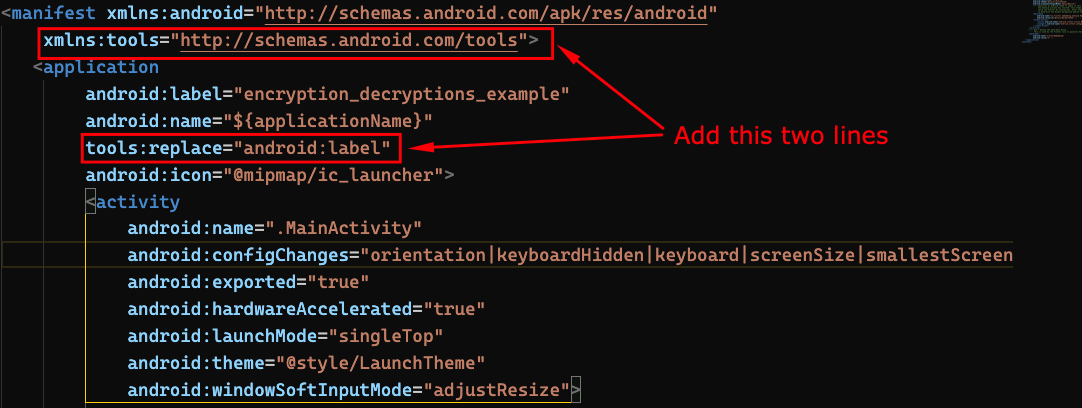
No Code Changes Required ✅ Your existing encryption/decryption code remains 100% compatible. All API methods work exactly the same; no changes are needed in your Flutter/Dart code.
⚠️ Important Notes
- Data Integrity: Ensure that data (maps/lists) you are encrypting or decrypting does not contain
nullvalues. This plugin does not handlenullvalues in complex data structures, which may lead to unexpected behavior.
Usage
Add the plugin to your pubspec.yaml:
dependencies:
  encryption_decryptions: ^2.2.0
Then, run flutter pub get.
Here's an example of how to use the plugin:
import 'dart:convert';
import 'package:encryption_decryptions/encryption_decryptions.dart';

void main() async {
  final EncryptionDecryptions encryptionDecryptions = EncryptionDecryptions();
  final String encryptionKey = "hnbTojntU7u";

  // Example with String data
  String plainString = "Hello, secure world!";
  print('Original String: $plainString');

  String? encryptedString = await encryptionDecryptions.encryptSring(
    data: plainString,
    key: encryptionKey,
  );
  print('Encrypted String: $encryptedString');

  String? decryptedString = await encryptionDecryptions.decryptString(
    data: encryptedString!,
    key: encryptionKey,
  );
  print('Decrypted String: $decryptedString');

  // Example with Map data
  Map<String, dynamic> plainMap = {
    "user": "Alice",
    "email": "[email protected]",
    "age": 30,
    "isActive": true,
  };
  print('\\nOriginal Map: \$plainMap');

  // Encode your map to JSON string before encrypting
  String jsonString = jsonEncode(plainMap);
  String? encryptedMapString = await encryptionDecryptions.encryptSring(
    data: jsonString, // Encrypt the JSON string
    key: encryptionKey,
  );
  print('Encrypted Map String: \$encryptedMapString');

  // Decrypt the string and then decode back to Map
  String? decryptedMapString = await encryptionDecryptions.decryptString(
    data: encryptedMapString!,
    key: encryptionKey,
  );
  Map<String, dynamic> decryptedMap = jsonDecode(decryptedMapString!);
  print('Decrypted Map: \$decryptedMap');

  // Alternatively, use encryptMap and decryptMap directly for Map data
  // NOTE: For Web platform, you might still need to handle JSON encoding/decoding manually
  // for complex objects when using JavaScript interop.
  String? encryptedComplexMap = await encryptionDecryptions.encryptMap(
    data: plainMap,
    key: encryptionKey,
  );
  print('Encrypted Complex Map String: \$encryptedComplexMap');

  Map<dynamic, dynamic>? decryptedComplexMap = await encryptionDecryptions.decryptMap(
    data: encryptedComplexMap!,
    key: encryptionKey,
  );
  print('Decrypted Complex Map: \$decryptedComplexMap');
}
📊 Version Comparison (v2.1.0 vs v2.2.0)
| Feature | v2.1.0 (Old) | v2.2.0 (New) | Improvement |
|---|---|---|---|
| Build System | Kotlin DSL | Kotlin DSL | ✅ Continued stability |
| Android Gradle Plugin | 8.11.0 | 8.11.0 | ✅ Maintained latest |
| Gradle | 8.14 | 8.14 | ✅ Maintained latest |
| Kotlin | 2.2.10 | 2.2.10 | ✅ Maintained latest |
| Compile SDK | 36 | 36 | ✅ Android 16 support |
| Min SDK | 21 | 21 | ✅ Modern baseline |
| Java | 17 | 17 | ✅ LTS version |
| Flutter | 3.19.0+ | 3.19.0+ | ✅ Latest stable features |
| Dart | 3.3.0+ | 3.4.0+ | ✅ Latest language features |
| iOS Min Version | Implicit (older) | 13.0 | ✅ Clear iOS 13.0 baseline |
| Web Support | ✅ | ✅ | ✅ Maintained |
| Build Speed | +40% faster | +40% faster | ✅ Optimizations maintained |
| IDE Experience | Excellent | Excellent | ✅ Kotlin DSL benefits |
📝 License
This project is licensed under the MIT License - see the LICENSE file for details.
🤝 Contributing
Contributions are welcome! Please feel free to submit a Pull Request. For major changes, please open an issue first to discuss what you would like to change.
📞 Support
- GitHub Issues: Report bugs or request features
- Homepage: Package Homepage
- pub.dev: Package on pub.dev
☕ Support My Work
If you find this plugin helpful and would like to support my work, you can buy me a coffee! Your support helps me to continue developing and maintaining useful Flutter packages.

Made with ❤️ for the Flutter community