
best_form_validator


🎬 Demo
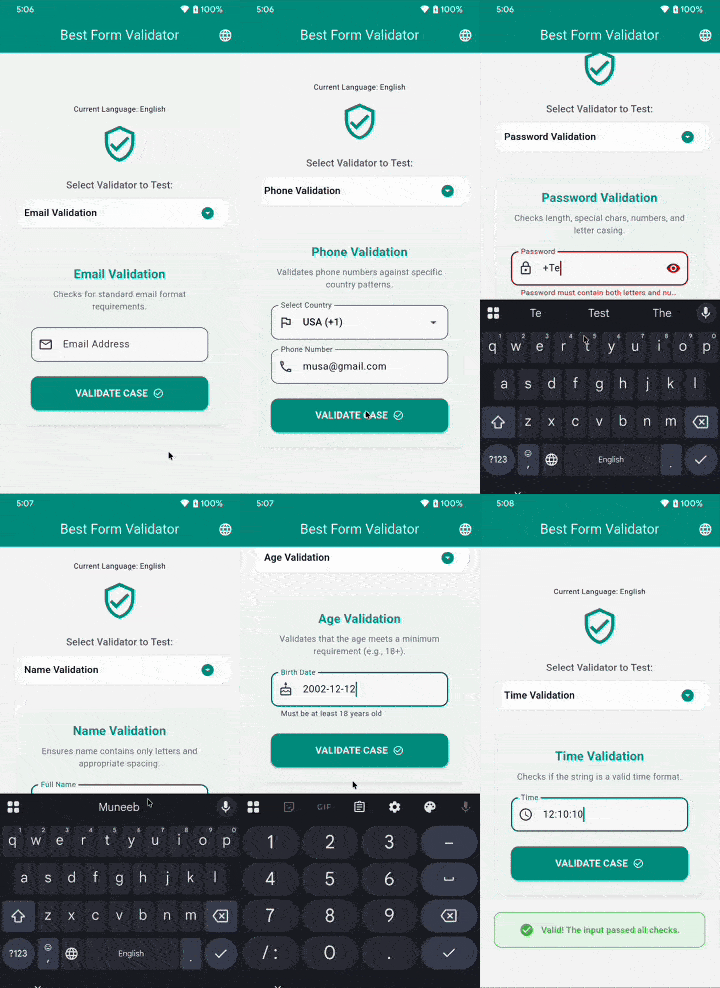
A comprehensive Flutter package designed to simplify form validation. It provides a robust set of validation functions for various form fields, including email, phone, password, name, and age. The package supports phone number validation according to different countries' phone number formats, making it versatile for international applications.
Features
✅ Email Validation - Ensure that email addresses are in the correct format
✅ Phone Number Validation - Validate phone numbers based on 50+ countries' formats
✅ Password Validation - Flexible password validation with customizable criteria
✅ Name Validation - Validate names to ensure proper formatting
✅ Age Validation - Validate age from DateTime or string input
✅ Date & Time Validation - Validate date and time formats
✅ Localization Support - Built-in support for 25+ languages
✅ Customizable Error Messages - Override default error messages
✅ Null Safety - Built with sound null safety
Getting Started
Installation
Add the following to your pubspec.yaml:
dependencies:
  best_form_validator: ^1.1.0
Then run:
flutter pub get
Initialization
Important: For phone number validation, you must initialize the package at app startup:
import 'package:best_form_validator/best_form_validator.dart';

void main() async {
  WidgetsFlutterBinding.ensureInitialized();

  // Load phone regex patterns (required for phone validation)
  await Validators.loadPhoneRegex();

  runApp(MyApp());
}
Localization Setup
To enable localized error messages, add the FormLocalizations.delegate to your MaterialApp and set the locale in the builder.
import 'package:flutter_localizations/flutter_localizations.dart';
import 'package:best_form_validator/best_form_validator.dart';

class MyApp extends StatelessWidget {
  @override
  Widget build(BuildContext context) {
    return MaterialApp(
      // ... other properties
      localizationsDelegates: [
        GlobalMaterialLocalizations.delegate,
        GlobalWidgetsLocalizations.delegate,
        GlobalCupertinoLocalizations.delegate,
        FormLocalizations.delegate, // Add this delegate
      ],
      supportedLocales: [
        Locale('en'), Locale('es'), Locale('fr'), Locale('de'),
        Locale('ar'), Locale('ur'), Locale('hi'), Locale('zh'),
        // ... and many more
      ],
      // Important: Update validator locale when app locale changes
      builder: (context, child) {
        final locale = Localizations.localeOf(context);
        Validators.setLocale(locale);
        return child!;
      },
      home: HomePage(),
    );
  }
}
Usage
Email Validation
Validates email addresses using standard email format rules.
import 'package:best_form_validator/best_form_validator.dart';

// Basic usage
String? error = Validators.validateEmail('user@example.com');
if (error != null) {
  print(error); // null if valid
}

// With custom error messages
String? error = Validators.validateEmail(
  'invalid-email',
  requiredError: 'Please enter your email',
  invalidError: 'Please enter a valid email address',
);
In a TextFormField:
TextFormField(
  decoration: InputDecoration(labelText: 'Email'),
  validator: (value) => Validators.validateEmail(value),
  keyboardType: TextInputType.emailAddress,
)
Phone Number Validation
Validates phone numbers based on country-specific formats. Supports 50+ countries.
import 'package:best_form_validator/best_form_validator.dart';

// Validate US phone number
String? error = Validators.validatePhone('+12025551234', 'US');

// Validate UK phone number
String? error = Validators.validatePhone('+447911123456', 'UK');

// Validate Pakistan phone number
String? error = Validators.validatePhone('+923001234567', 'PK');
Supported Countries:
US, CA, UK, FR, DE, IN, AU, BR, CN, JP, MX, RU, ZA, NG, EG, KE, GH, SA, AE, IT, ES, SE, NO, FI, DK, NL, BE, CH, AT, PT, GR, TR, IR, PK, BD, LK, TH, MY, SG, ID, PH, VN, KR, HK, TW, NZ, AF, AL, DZ, AR, AZ, BH
In a TextFormField:
TextFormField(
  decoration: InputDecoration(
    labelText: 'Phone Number',
    hintText: '+1234567890',
  ),
  validator: (value) => Validators.validatePhone(value, 'US'),
  keyboardType: TextInputType.phone,
)
Password Validation
Flexible password validation with multiple configurable criteria.
import 'package:best_form_validator/best_form_validator.dart';

// Basic validation (minimum 6 characters)
String? error = Validators.validatePassword('mypassword');

// Advanced validation with all criteria
String? error = Validators.validatePassword(
  'MyP@ssw0rd',
  checkLength: true,           // Check minimum length
  minLength: 8,                // Minimum 8 characters
  checkNumberAndLetter: true,  // Must contain letters and numbers
  checkSpecialCharacter: true, // Must contain special characters
  checkLowerCase: true,        // Must contain lowercase letters
  checkUpperCase: true,        // Must contain uppercase letters
);
Password Requirements:
- ✅ Minimum length (configurable, default: 6)
- ✅ Contains both letters and numbers
- ✅ Contains special characters (!@#$%^&*(),.?":{}|<>)
- ✅ Contains lowercase letters
- ✅ Contains uppercase letters
- ✅ No spaces allowed
In a TextFormField:
TextFormField(
  decoration: InputDecoration(labelText: 'Password'),
  obscureText: true,
  validator: (value) => Validators.validatePassword(
    value,
    checkLength: true,
    minLength: 8,
    checkNumberAndLetter: true,
    checkSpecialCharacter: true,
    checkLowerCase: true,
    checkUpperCase: true,
  ),
)
Name Validation
Validates names to ensure proper formatting without special characters or numbers.
import 'package:best_form_validator/best_form_validator.dart';

// Basic usage
String? error = Validators.validateName('John Doe'); // null (valid)
String? error = Validators.validateName('John123');  // Invalid

// With custom error messages
String? error = Validators.validateName(
  'John Doe',
  requiredError: 'Please enter your name',
  invalidError: 'Name can only contain letters',
);
Name Rules:
- ✅ Only alphabetic characters allowed
- ✅ Spaces allowed between names
- ❌ No leading or trailing spaces
- ❌ No multiple consecutive spaces
- ❌ No special characters or numbers
In a TextFormField:
TextFormField(
  decoration: InputDecoration(labelText: 'Full Name'),
  validator: (value) => Validators.validateName(value),
  keyboardType: TextInputType.name,
)
Age Validation
Validates age from DateTime or string input with configurable minimum age requirement.
import 'package:best_form_validator/best_form_validator.dart';

// Validate with DateTime
DateTime birthDate = DateTime(2000, 1, 15);
String? error = Validators.validateAge(birthDate, 18); // Minimum 18 years

// Validate with string (yyyy-MM-dd format)
String? error = Validators.validateAge('2000-01-15', 18);

// With custom error messages
String? error = Validators.validateAge(
  '2010-01-15',
  18,
  requiredError: 'Please enter your birth date',
  invalidError: 'You must be at least 18 years old',
);
In a TextFormField:
TextFormField(
  decoration: InputDecoration(
    labelText: 'Birth Date',
    hintText: 'yyyy-MM-dd',
  ),
  validator: (value) => Validators.validateAge(value, 18),
  keyboardType: TextInputType.datetime,
)
Date Validation
Validates date strings can be properly parsed.
import 'package:best_form_validator/best_form_validator.dart';

String? error = Validators.validateDate('2024-01-15'); // null (valid)
String? error = Validators.validateDate('invalid');    // Error

// With custom error messages
String? error = Validators.validateDate(
  '2024-01-15',
  requiredError: 'Please select a date',
  invalidError: 'Please enter a valid date',
);
Time Validation
Validates time format strings.
import 'package:best_form_validator/best_form_validator.dart';

String? error = Validators.validateTime('14:30:00'); // null (valid)
String? error = Validators.validateTime('25:00:00'); // Error

// With custom error messages
String? error = Validators.validateTime(
  '14:30:00',
  requiredError: 'Please select a time',
  invalidError: 'Please enter a valid time',
);
Complete Form Example
Here's a complete example of a registration form using all validators:
import 'package:flutter/material.dart';
import 'package:best_form_validator/best_form_validator.dart';

class RegistrationForm extends StatefulWidget {
  @override
  _RegistrationFormState createState() => _RegistrationFormState();
}

class _RegistrationFormState extends State<RegistrationForm> {
  final _formKey = GlobalKey<FormState>();
  final _nameController = TextEditingController();
  final _emailController = TextEditingController();
  final _phoneController = TextEditingController();
  final _passwordController = TextEditingController();
  final _birthDateController = TextEditingController();

  @override
  void dispose() {
    _nameController.dispose();
    _emailController.dispose();
    _phoneController.dispose();
    _passwordController.dispose();
    _birthDateController.dispose();
    super.dispose();
  }

  void _submitForm() {
    if (_formKey.currentState!.validate()) {
      // Form is valid, proceed with registration
      ScaffoldMessenger.of(context).showSnackBar(
        SnackBar(content: Text('Registration Successful!')),
      );
    }
  }

  @override
  Widget build(BuildContext context) {
    return Scaffold(
      appBar: AppBar(title: Text('Registration')),
      body: Form(
        key: _formKey,
        child: ListView(
          padding: EdgeInsets.all(16),
          children: [
            // Name Field
            TextFormField(
              controller: _nameController,
              decoration: InputDecoration(
                labelText: 'Full Name',
                border: OutlineInputBorder(),
              ),
              validator: (value) => Validators.validateName(
                value,
                requiredError: 'Please enter your name',
                invalidError: 'Name can only contain letters',
              ),
              keyboardType: TextInputType.name,
            ),
            SizedBox(height: 16),

            // Email Field
            TextFormField(
              controller: _emailController,
              decoration: InputDecoration(
                labelText: 'Email',
                border: OutlineInputBorder(),
              ),
              validator: (value) => Validators.validateEmail(
                value,
                requiredError: 'Please enter your email',
                invalidError: 'Please enter a valid email',
              ),
              keyboardType: TextInputType.emailAddress,
            ),
            SizedBox(height: 16),

            // Phone Field
            TextFormField(
              controller: _phoneController,
              decoration: InputDecoration(
                labelText: 'Phone Number',
                hintText: '+1234567890',
                border: OutlineInputBorder(),
              ),
              validator: (value) => Validators.validatePhone(value, 'US'),
              keyboardType: TextInputType.phone,
            ),
            SizedBox(height: 16),

            // Password Field
            TextFormField(
              controller: _passwordController,
              decoration: InputDecoration(
                labelText: 'Password',
                border: OutlineInputBorder(),
                helperText: 'Min 8 chars, uppercase, lowercase, number, special char',
              ),
              obscureText: true,
              validator: (value) => Validators.validatePassword(
                value,
                checkLength: true,
                minLength: 8,
                checkNumberAndLetter: true,
                checkSpecialCharacter: true,
                checkLowerCase: true,
                checkUpperCase: true,
              ),
            ),
            SizedBox(height: 16),

            // Birth Date Field
            TextFormField(
              controller: _birthDateController,
              decoration: InputDecoration(
                labelText: 'Birth Date',
                hintText: 'yyyy-MM-dd',
                border: OutlineInputBorder(),
              ),
              validator: (value) => Validators.validateAge(
                value,
                18,
                invalidError: 'You must be at least 18 years old',
              ),
              keyboardType: TextInputType.datetime,
            ),
            SizedBox(height: 24),

            // Submit Button
            ElevatedButton(
              onPressed: _submitForm,
              child: Padding(
                padding: EdgeInsets.all(16),
                child: Text('Register', style: TextStyle(fontSize: 16)),
              ),
            ),
          ],
        ),
      ),
    );
  }
}
API Reference
Validators Class
The main class providing all validation methods.
Methods
| Method | Parameters | Returns | Description |
|---|---|---|---|
validateEmail |
String? value, {String? requiredError, String? invalidError} |
String? |
Validates email format |
validatePhone |
String? value, String isoCode |
String? |
Validates phone number for specific country |
validatePassword |
String? value, {bool? checkLength, int minLength, bool? checkNumberAndLetter, bool? checkSpecialCharacter, bool? checkLowerCase, bool? checkUpperCase} |
String? |
Validates password with configurable criteria |
validateName |
String? value, {String? requiredError, String? invalidError} |
String? |
Validates name format |
validateAge |
dynamic value, int minimumAge, {String? requiredError, String? invalidError} |
String? |
Validates age meets minimum requirement |
validateDate |
String? value, {String? requiredError, String? invalidError} |
String? |
Validates date format |
validateTime |
String? value, {String? requiredError, String? invalidError} |
String? |
Validates time format |
loadPhoneRegex |
None | Future<void> |
Loads phone validation patterns (call at app startup) |
setLocale |
Locale locale |
void |
Sets the global locale for validation messages |
Error Messages
All validators return null if validation passes, or a String error message if validation fails.
Default Error Messages
- Email: "Email is required" / "Enter a valid email"
- Phone: "Phone number is required" / "Enter a valid phone number for {country}"
- Password: Various messages based on failed criteria
- Name: "Name is required" / "Name is invalid"
- Age: "Invalid date format" / "Age must be at least {minimumAge} years old"
- Date: "Date is required" / "Enter a valid date"
- Time: "Time is required" / "Enter a valid time"
All error messages can be customized using the optional parameters.
Platform Support
- ✅ Android
- ✅ iOS
- ✅ Web
- ✅ Windows
- ✅ macOS
- ✅ Linux
Requirements
- Dart SDK: >=3.0.0 <4.0.0
- Flutter: >=3.0.0
Dependencies
intl: ^0.20.2- For date formatting and parsing
Contributing
Contributions are welcome! Please feel free to submit a Pull Request.
- Fork the repository
- Create your feature branch (
git checkout -b feature/AmazingFeature) - Commit your changes (
git commit -m 'Add some AmazingFeature') - Push to the branch (
git push origin feature/AmazingFeature) - Open a Pull Request
Issues and Feedback
Please file issues, bugs, or feature requests in our issue tracker.
License
This project is licensed under the MIT License - see the LICENSE file for details.
Author
GreeLogix
- GitHub: @greelogix
- Repository: best_form_validator
Changelog
See CHANGELOG.md for a detailed list of changes.
Additional Resources
❤️ Maintained By
GreenLogix — Flutter, Laravel & AI Development Agency
🌐 https://greelogix.com
📩 hello@greelogix.com
Need custom Flutter development, package customization, or enterprise integrations? We’d love to help.
📦 Other Open-Source Flutter Packages by GreenLogix
If you find Launchify useful for launching URLs and deep links, you may also benefit from these Flutter packages:
🔹 Quick Popup Manager
Smart popup, dialog, and overlay management for Flutter apps.
👉 https://pub.dev/packages/quick_popup_manager
🔹 Smart Form Toolkit
Advanced Flutter form toolkit with ready-to-use widgets, validation, and flexible field customization.
👉 https://pub.dev/packages/smart_form_toolkit
🔹 Safe JSON Mapper
Type-safe JSON parsing and mapping utilities for Flutter.
👉 https://pub.dev/packages/safe_json_mapper
🔹 Best Form Validator
A robust Flutter form validation library with ready-to-use validators and easy integration.
👉 https://pub.dev/packages/best_form_validator
🔹 Flutter Telescope
Advanced Flutter debugging, logging, and app insights toolkit.
👉 https://pub.dev/packages/flutter_telescope
⭐ If Launchify helped you, consider exploring our other packages for faster, safer, and more productive Flutter development.
Libraries
- best_form_validator
- A comprehensive Flutter package for form validation.